Curious which partitions you changed and by how much ?
I have it on my agenda to post a more detailed outline of our upgrade experience. The main one we had to expand for the CDR restores was the /tmp partition. By default, it was only about 2 GB. I had to expand it to about 15-20 GB, due to our CDR being about 13-15 GB uncompressed. Once I did that, it would restore.
And the others (off the top of my head) was the / (root), as the tftpboot was only about 2 GB, and once you download firmware images for phones, it runs out of space (ie, I could never finish downloading firmware, until I noticed that the root partion would fill up, the download would fail, space freed up and then it would retry)
The last is where the MariaDB resides, which I believe is the /var partition. It is also very small, so I had to add space to it, as our database was 14 GB, and believe it defaulted to 20 GB of space for the /var partition.
Seems like the default ISO gives all the extra space to the /var/spool partition. Which for us, isn’t that big. Some time, I’m going to have to stop everything and see if I can resize that partition and take space from the /var/spool, so I can allocated it to the /var partition, as the SQL DB will keep growing, until I clear out old CDR records (usually like to keep about 6-12 months of CDR logs).
Chris
Thank you for the feedback @christrati!
There’s an issue to address this pending in the queue: [bug]: Backup module needs arbitrary temporary directory selection for Restore function · Issue #879 · FreePBX/issue-tracker · GitHub
Still a tussle between /tftpboot to /srv/tftp that needs resolving – opened a new issue on it: [improvement]: Move /tftpboot to /srv/tftp · Issue #974 · FreePBX/issue-tracker · GitHub
How large was the total disk size that you allocated ?
That sounds like a reasonable approach – but  that shrinking partitions with data on them is generally, well, dangerous. Good backups advised in advance!
Shrinking does seem a lot riskier. I still need to build a spare, as we usually have a prod and then spare, in case of a failure.
As I said, I’ll see about making a separate post based on my experience. Overall, the ISO works, and totally understand the partitioning. Just wish there was a way that you could check a box that would allow you to resize the partitions before it allocates everything. Based off my experience, the sizes it allocates to the following would need to be bigger:
- /tmp (backups and restores)
- / (lvroot - where tftpboot resides)
- /var (lvvar), which is where the MariaDB resides, so if you have a large CDR, it will fill up fast.
Chris
Piggy backing on this, we had issues with this with a restore we did using the ISO. /tmp and /tftpboot were too small which caused issues during the restore. We ended up plugging a flash drive in due to issues with adjusting the partition size with a redirect to /tmp being on the flash drive. This was a bit of a mess but it ended up working. Seems like the restore puts everything in tmp and it was only 4gb in size. Had issues with /tftpboot after as well causing issues because it’s size was too small. Had to redirect to /var/spool since there was space there.
Regarding the restores on too small of /tmp … please try:
$ sudo -u asterisk TMPDIR=/var/spool/asterisk/tmp fwconsole backup --restore=/path/to/restore-xxxxxx.tar.gz
…as this will temporarily change the return value of the PHP sys_get_temp_dir() function during script execution.
Or in case that conflicts with the existing backups, use TMPDIR=/var/tmp or similar. You may need to manually clean it out when done.
After the split - regarding /tftpboot - this is where Endpoint Manager places phone firmware (as discussed recently e.g. EPM (comercial) create no File and the ISO was using standard Debian /srv/tftp so this is being marked as an issue for improvement soon.
Decided to move to bindmount on this TFTP issue ^^^.
Also, if you apply the last two PRs #44 and #45 (or wait until next week when they get merged), then run the script on either Debian 12 or 13 (or wherever with a modern version of xorriso), using a command like:
./abuild-fpbx-installer-iso -i /path/to/debian-12.13.0-amd64-netinst.iso -p /path/to/debian-bookworm-mini-20260105.iso -k 6.1.0-35-amd64 -d /path/to/download-debs/ -o /path/to/debian-12.11.0-amd64-netinst.iso -w -x -b 2602.2
…then provided that you have the necessary input ISOs from upstream, you should get an appx. 1.7GB output ISO SNGDEB-PBX17-amd64-12-13-0-2602-2.iso with sha1sum hash 25986851053ea3e1b33cb380e496b46bb6cacba1 along with a few other output files (that are only relevant for PXE booting.) Note that if you wait until another day, then the downloaded DEBs may be different versions from upstream, and, thus, your output ISO will be different, too (along with its sha1sum hash.) But such is the challenge of rolling distributions.
Do you want me to post some of the other issues regarding the transition in this thread? Or do you want me to start a new post?
Chris
If they are specifically related to the ISO, then it would be great to share in this thread; otherwise, probably better to handle in a new thread (can always merge/split/etc. later on if necessary.)
Ok, here’s some issues that I had with the ISO specifially:
Issue 1: DHCP issues with MAC address
This was specifically with Hyper-V on Windows Server 2025. When it would get a DHCP address, it would use the MAC associated with the VM; however, after the reboot, it kepts adding additional information to the MAC address, so it was never unique, and hence, never get an IP address.
Issue 1 Workaround:
-
Edit the following files (using “sudo nano ”:
-
/etc/dhcp/dhclient.conf
-
send dhcp-client-identifier = hardware;
-
Find the line above and unrem it (remove the #) and then remove the random MAC and put " = hardware;"
-
-
/etc/network/interfaces
-
Rem out the “allow-hotplug”
-
Add the line: auto pbxeth0
-
-
Issue 2: Never found a root password, so couldn’t log into the console.
Workaround 2: Made sure and set the root password when setting the Sangoma password, as shown in the display.
My other issues were all with FreePBX and the restore. Not everything came back from the backup, so that would be a different thread on what was missing.
Chris
Was it unique each reboot ? But not the same, single ID used across reboots ?
Added some cloudy things in the FOG install recently at Streamline kernel installation by chrsmj · Pull Request #47 · FreePBX/sngfd12 · GitHub but probably not anything specific in there that helps with your above identified issues 
Aforementioned patches are all merged up in to the sngfd12 main branch now, and you can rebuild your own ISO to QA yourself (while we are internally QA’ing it across our latest Sangoma hardware.) Because it is reproducible, hashes should match (assuming you run it soon because it relies on embedded debs from the FreePBX package mirrors (not module mirrors)):
./abuild-fpbx-installer-iso -i /path/to/debian-12.13.0-amd64-netinst.iso -p /path/to/mini.iso -k 6.1.0-35-amd64 -d ~/test-iso/debs/ -o /path/to/debian-12.11.0-amd64-netinst.iso -b 2603.2
sha1sum of the resulting output SNGDEB-PBX17-amd64-12-13-0-2603-2.iso file is (today ;-)) 5629745114574b7edaee061aabc9b23edafad42a.
Potential source URLs for the above mentioned input ISOs:
- https://get.debian.org/images/archive/12.11.0/amd64/iso-cd/debian-12.11.0-amd64-netinst.iso
- https://get.debian.org/images/archive/12.13.0/amd64/iso-cd/debian-12.13.0-amd64-netinst.iso
- https://ftp.debian.org/debian/dists/bookworm/main/installer-amd64/current/images/netboot/mini.iso (last updated upstream on January 5th)
Tagged the sngfd12 as v12.13.0.2603.2 at Release v12.13.0.2603.2: Merge pull request #46 from FreePBX/freepbx-repo-key-2026 · FreePBX/sngfd12 · GitHub
Back to the partitioning question, is there general preference for an additional option to use in the ISO that would let you select a single partition option (not the default though) ?
If it helps, here’s an example of the MAC address that is sent to our DHCP Server. Again, the initial boot is fine, it is the reboot after the install that doesn’t show the right MAC
The VM has the MAC address assigned as follows:
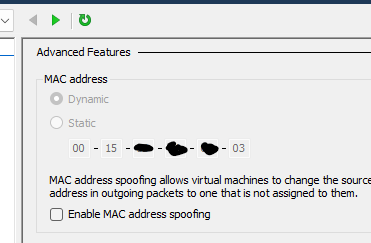
Here’s what the DHCP server sees in the request (notice, it repeats the MAC address and adds some additional 01 in the middle)

Hence it doesn’t get the right IP address and keeps getting new ones . Rather than keeping the same MAC address.
The workaround is what I mapped above, where you have to go in and specifically tell it to use the hardware MAC address.
Chris
Not sure we’ll get those Hyper-V workarounds in place on the ISO within the next rev or two…
But, the above mentioned ISO in my earlier post is now passing our QA (for INTernal spice) so happy for more folks to try that out and report back their BETA findings: https://downloads.freepbxdistro.org/ISO/SNGDEB-PBX17-amd64-12-13-0-2603-2.iso (sha256 6865550348794f2ecbe18975659c564a321ef3df99c6badad131acb082162125 which again you can verify today with the same inputs and command line also mentioned in above post.)
I’m sure the fix wasn’t included for Hyper-V, but still getting the same issue with DHCP on SNGDEB-PBX17-amd64-12-13-0-2603-2.iso.
Chris
In regards to the earlier partition concerns, a new SLAB option was added in the “slab-nvme” branch in sngfd12 PR #48, which gets you only boot, root and swap partitions (while retaining the previous partition scheme as the default.)
While this new ISO undergoes internal QA before it is available for public download, you can make your own bit-for-bit copy of the same ISO today by checking out the “slab-nvme” branch, then running:
./abuild-fpbx-installer-iso -i /path/to/debian-12.13.0-amd64-netinst.iso -p /path/to/mini.iso -k 6.1.0-35-amd64 -d /path/to/debs/ -o /path/to/debian-12.11.0-amd64-netinst.iso -b 2603.3 -w -x
…and since it is reproducible, your hash should match (assuming the included packages do not change before you read this):
$ sha256sum SNGDEB-PBX17-amd64-12-13-0-2603-3.iso
86e9848d056e69b830d2d24ebe710ea38babf2055002a1bb8784341f9c87a209  SNGDEB-PBX17-amd64-12-13-0-2603-3.iso
Sample screen shot of the latest ISOLINUX non-UEFI boot menu – which got both a little behind the GRUB UEFI boot menu and a little in front of the PXE boot menu in this version – will aim to synchronize those more in the next rev (but 99% of the time you should probably be using the GRUB UEFI option when your system allows it):
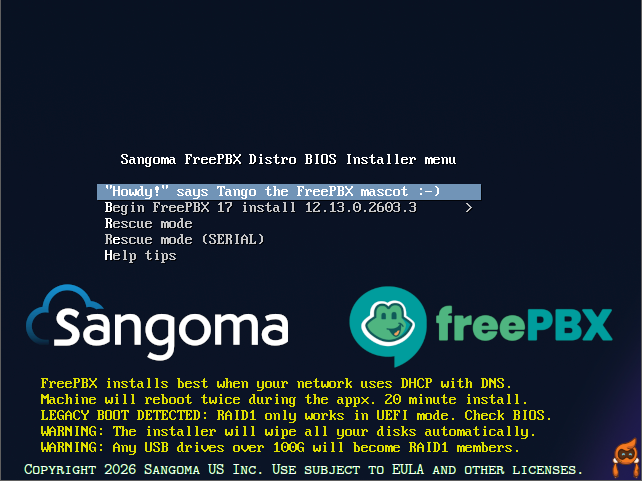
The two new ISOs recently mentioned are now up on the main freepbx.org Downloads page. With some more positive public feedback, this can probably leave BETA soon.
Lots of documentation and screen shot updates regarding the latest v17 ISO or on our wiki:
Stumbled by this related idea today from a forum post a few years ago about how to handle large backup restoration jobs: