What would you like to see added in FreePBX 18?

Pretty much this post from nearly a decade ago, when $V=15, and the CentOS 7 which the FPBX distro was based on was almost half-way through its 10-year life cycle, but now $V+=3 :frog: :frog: :frog: :

^^^ Lots of great ideas in there – excited to see many of them made their way into that version and/or subsequent versions. :hugs: And knowing that the FreePBX community is always welcome at AstriCon brings joy as well – contributing over 25% of our podium content at AstriCon 2026. (Check out the replay on YouTube!)

So let’s keep the :brain: flowing by looking at the survey and v18 tagged forum topics, the FreePBX Versions topic, the v18 milestone in the FreePBX issue tracker on GitHub, and natch in 2026 FreePBX > AI updates like Frogman.

What’s on your list?

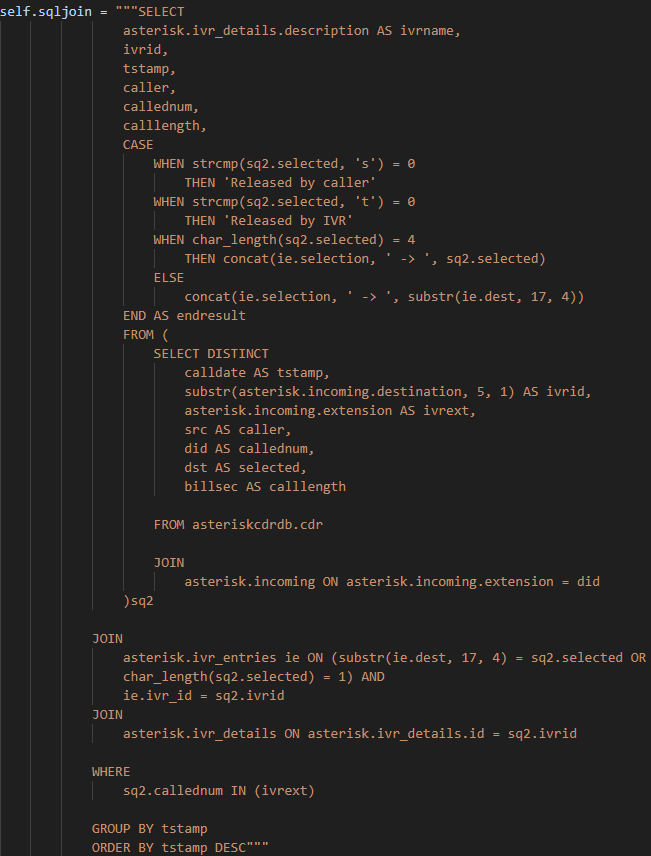
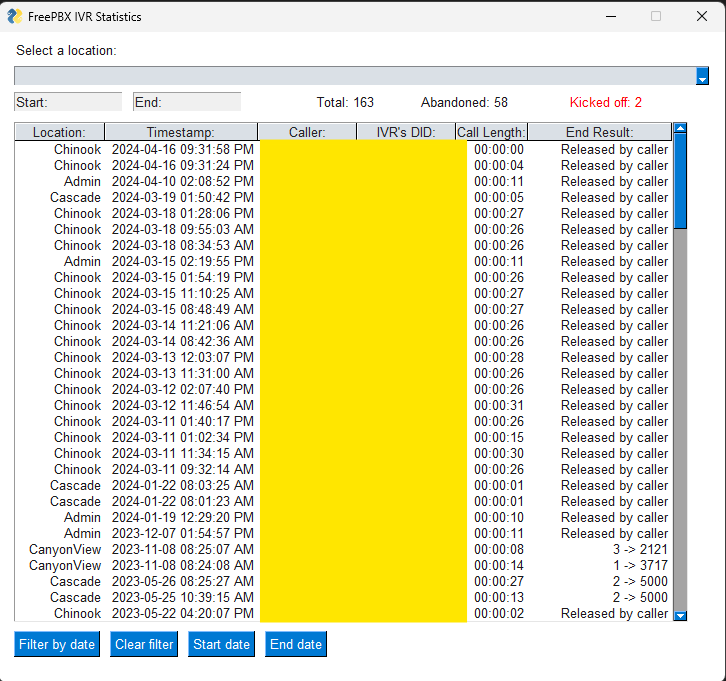
I had cobbled together something in Python a couple years ago (and then later changed it to a web page - all before I ever heard of ChatGPT), but it would be nice if something like this was available out of the gate: an IVR analyzer of sorts. With our current PBX (we haven’t moved to FreePBX yet - might be a pipe dream at this point) you can see all the IVRs, who called them, timestamps, and importantly what option they chose. So then later I can show a principal or secretary how many people over time chose what options, and the IVR options can be adjusted accordingly. It involved a long SQL query that joined I think three tables to do it in FreePBX.

I could also use it to emulate the current product like showing how many were abandoned (the caller hung up) vs. for one reason or another the system disconnecting them.

Just my two cents! I always thought it would be useful.

Frogman :frog:

Nice query - would be happy to review that in a (new?) report module.

So you ever going to disclose how much of frogman was written in AI? We, as the community, have to do this when we submit stuff even here on the forum. Are you going to do the same?

Seems clearly enough attribution… Did you get a chance to :frog: Meet Frogman Module (and my new friend Claude) ?

For the last few weeks I’ve been pair programming with Claude on Frogman

The AI part: Why pair programming and not vibe coding??? I bring the architecture and the conventions… AI writes the code… We review and test every change before it ships.

A module for PBXact that works with Sipstation SMS to automate appointment and payment reminders sent via SMS message.

It appears lsome of the other Sagoma products offer that solution. If that solution does exist for PBXact, please point me in the right direction, and I will buy it.

If it exists for FreePBX it exists for PBXact. What other products are you actually referring to? Since Sangoma has a wide range of commercial solutions that aren’t FreePBX related.

Is there anything for PBXact or FreePBX like this?

Appointment Suite

Easily manage appointments with Sangoma Appointment Suite. Let customers book directly, reduce no-shows, and keep them informed with instant notifications and SMS reminders. Integrates with Google Calendar, Outlook, and Apple iCal.

  • Barber shops

  • Home services

  • Health and wellness practices

  • Salons

  • Real estate

  • Professional services

  • Multi-channel (stereo) support for improved speaker clarity

That is it’s own service/product and not related to FreePBX. Appointment Reminders is the closest you’ll get in FreePBX so far.

That is exactly what I found too. The Model you mentioned Appointment Reminder will do CALL reminders but not SMS. SMS reminders would be cool, right? That would be a nice feature. As I pointed out and attached, Sangoma has it in other offerings. If they made it for FreePBX I would buy it. Unless anyone else knows of a SMS reminder solution that will work with Sipstation.

Regardless, you asked what we would like to see. That is our suggestion.

Sure. Just FYI, if you’re in the US you will need to do 10DLC registration in order to send SMS.

@penguinpbx thanks for jumping in. I’ll add that we minted the FreePBX/AI category to kick off the frogman discussion and to see similar conversations and work.

@BlazeStudios any chance you’ve had a chance to check it out yet?

Guys, I didn’t ask if you used AI for this. That was clear from the very beginning. I asked how much AI was used? Clearly the readme was written in AI and I see AI generated code in places but I haven’t done a deep dive.

It’s one thing to use AI to help with the code, it’s another when AI is the coder or does the majority of it. I use it to help double check my work or offer up examples of how to do what I’m looking for but it always needs to be double checked and have something done to it to match what I really need in the flow I need.

However, I’ve tried all the big players and they are all fallible. If you don’t understand what fouls are happening you can’t call the game cleanly, so to speak. So knowing how much is the coder or AI is kind of needed. Tested to many ā€œI had AI write 80% of this moduleā€ and it be garbage through and through.

Thank you. We currently have our 10DLC registration with Sangoma. If you ever run across a solution for SMS appointment reminders for Freepbx/PBXact please feel free to reach out.

You know what I want to see in FreePBX ? Basic things that clear up the constant irritations. AND, a bit more details to assist in troubleshooting. Free PBX is freggin awesome, but I sometimes get sooo irritated that the basic things are just overlooked.

We been using FreePBX since like version 14 or 15, and some of these have always been issues. When FreePBX is working, its great. But when we have to track down some issue, its stupid time consuming, even for basic problems and troubleshooting.

1) Sticking ā€œrememberā€ settings. I look at volumes of data and calls. Most screens revert to ā€œ10 rowsā€ of data (Extensions, "Reports>Asterisk Info> Channels, Call Event Logging, Call Recording Reports, etc, etc) I am constantly changing it to view like 100 rows at a time or more. Have to leave the screen to go find and view something else, come back and I have to change that default from 10 back to 100. I want to set this 1 time in some setting someplace and never have to change that 10 default again, Its a constant time waster to have to constantly change that 10 value to something else that gives me a larger view.

2) More ā€œcompleteā€ info in the screens. As mentioned above, having to leave one screen to go look at another. Right now to get basic info and do troubleshooting, we have to jump to sometimes 2, 3 or 4 different screens to get a view of basic things that are going on. Those 2, 3 and 4 screens essentially contain much of the same data, except 1 or 2 pieces are not present, and that is why we have to jump to another screen. Again, another time waster to have to constantly change from screen to screen

  • Extensions List - does not tell me if the extension is currently registered, that is a different screen under - Reports>Asterisk Info> Channels.
  • Reports>Asterisk Info> Channels does not tell me the name of the extension, only the extension number (resource)
  • Neither of those 2 screens shows me the last date and time it was registered, nor the IP address it was registered from.

In trying to troubleshoot why a particular person is not able to make calls and I have to use 4 different screens to find out, their extension (or list of multiple extensions they use), their name, if they are registered, when was the last time it was registered, and what IP address it registered from. That process, that info must be pretty universally needed. Build 1 screen with it or expand the existing ones to include it.

In several of those screens it would be helpful to be able to select additional fields that we want to look at, that are already contained in the data. :

  • Extensions List -
    • Show if the Voice Mail is turned on ? If so, Is the email address set up ?
    • When was the last date/time this Extension registered ?
    • What was the last IP Address it registered from ?
  • Include RING GROUPS as part of the extension listing, Its something I can dial, I want to see ring groups with the extensions as well because that is how I often group the ring groups and extensions.

3) Include REAL Help Info with those question marks, not just repeating what the field name is. Example :

4) Making a report of extension registrations :

  • Give me a list of extensions (screen already exists), is it currently registered or not and from what IP, let me CLICK on one of the extensions and then give me a historical view of every registration during a date range, and what IP address those registrations happened from. This would save some of us hours of hunting when we have a client that has an extension, but then installs a VoIP app on a new phone, or new device, and has multiple devices trying to register the same extension. Or why a certain clients keeps loosing their connections, oh beause their buildings IP Address keeps changing and its not whitelisted, or any other number of reasons why knowing what IP addresses they registered or failed registration from.

5) Show the systems current DATE and TIME on the screen or the menu bar at the top. All of these reports say when something happened, but if for any reason the systems time is off or set different - deliberately or otherwise - it makes it more cumbersome to figure out when something happened or why something happened. So far the only place I know of the see the systems date and time is in the ā€œTime Groupsā€ and ā€œTime Conditionsā€ configurations screens. We have several servers and some I have to keep on different time zones. Looking at a report and thinking ā€œdid this really happened 10 minutes ago or was that 5 hours ago ?ā€ then having to jump to a different screen (again) to see the current time, is another waste of time.

6) Make a new report called ā€œCall Pathā€ Where you can go to the ā€œInbound Routesā€ click on a route and it shows you the full path of how a call can travel through the system. Yes, I know this can end up quite extensive.

Call Path Report :

  • DID : 808.xxx.xxxx > Announcements (Main Greeting) > IVR (HH Menu) (4) Options :
    • IVR Option 1 : Extension 125 (Sherry)
      • Voice Mail Enabled
      • FmFm Destination : Time Conditions
        • (True : Voice Mail)
        • (False : Extension 126 (Sherry’s Cell))
    • IVR Option 2 : Extension 150 (James)
    • IVR Option 3 : Announcements (Business Hours) (return)
    • IVR Option 4 : IVR (Support menu) (3 options) :

etc, etc, etc.

7) Make a new report, (or callable with credentials maybe) that can be launched and stay active that shows the BLF status of a listed / selected set of extensions and if they are online (registered) or not and if they are on an active call or not. This could be helpful for a switchboard operator or receptionist, and even for US when we have to reboot the system in the middle of the day for some goofy reason. I don’t want to kill off active calls, but again, I have to run to 2 different screens to find that info, and by the time I look it up some status may have changed.

Those are my first 7 off the top of my head. I have more, let me work on those. But the first 5 on this list would save me HOURS every month.

Hi Curtis,

Some of what you’re asking for here is solved in the new Registration Watch module. Have you had a chance to test it?

It also remembers sort preference and number of rows, which I thought was a nice touch. Testing hundreds of times shows up those irritations quickly and, like you, I find that annoying. I don’t see why that can’t be easily replicated across other modules. Although, I don’t agree it should be a universal setting: just remember what I did last time.

I will also consider some of your other suggestions for future Registration Watch releases. If you have any feedback after testing on either v16 or v17, please let me know in the other thread!

Cheers,
Kieran

EDIT: v16 compatibility now available in 1.3.x

There is a zero or many to 1 relationship between both registrants and IP addresses and what FreePBX calls extensions. It’s zero to one for DAHDI, as well as when unregistered, and many to one for chan_pjsip. Asterisk, itself allows 0 to one for registrants, on SIP, as well.

Registration isn’t needed to make calls.

You will need loop detection for this.

This list contains a lot of ā€œThis is how I do things. Make it easier for how I do thingsā€ which isn’t very helpful for others.

You keep going on about ā€œhistory of registrationā€ and that is something that majority of PBX and even proxy systems just don’t do. That is the type of data that can get out of control very fast. This is why there are already tools and solutions for this like SIPCAPTURE/VOIPMONITOR allowing you to send that data to a collection system and then you can review the SIP transactions that happen.

But more importantly, without putting something like Kamailio or OpenSIPs to run in front of Asterisk, you’ll never get the registration information since there’s no method in Asterisk to get that information. Good news is that contacts registering or being removed for whatever reason are tracked in the full log. It’s really not that hard to grep those files and get the information you need. You say it takes you hours but it generally takes me minutes. Then again, I’ve been doing this since Gangsta’s Paradise was dropped and GUI options didn’t exist. I use the various cli tools (ngrep, sngrep, etc) and logs that actually have this data and it doesn’t really take long to get it.

Also, a registration is something that happens every X seconds and is held in memory. So if a device registers with an expiry of 30 minutes and then 10 minutes later that device drops because of Internet/networking issues. You know what the system still shows? A registration for that device because it’s keeping it in memory until it 1. expires or 2. it has qualify active and it fails the qualify process which can take a few minutes. Only then will it be dropped from memory. So this data could be filled with a variety of false positives (i.e. show a contact during a time frame the device was actually down)

Yeah, if it’s not making it past the firewall it’s not making it into Asterisk or anything else that would ā€œlogā€ this. In order to really know if an IP is being blocked by the firewall because it’s not whitelisted you need to watch the traffic on the network interface coming into the system.

No. This is not what should happen because Ring Groups are not Extensions. How you group them together is a you thing not a general use thing. Again, suggestions for what goes into FreePBX in general should be things that can benefit a wide range of use cases not just specific ones that relate to you (or another others suggesting).

Some of your suggestions have a wide range benefit but a lot of the others are based around how you deploy things and how you troubleshot things. These are not beneficial to the wider user base as they are your business use cases.