Why does "apt upgrade" of FreePBX packages always crash anything?

Hi,

I’m really fed with the new “dist-upgrade” method to update the FreePBX core. “apt update” showed me a couple of new things, like Asterisk 26 … but also this one here:

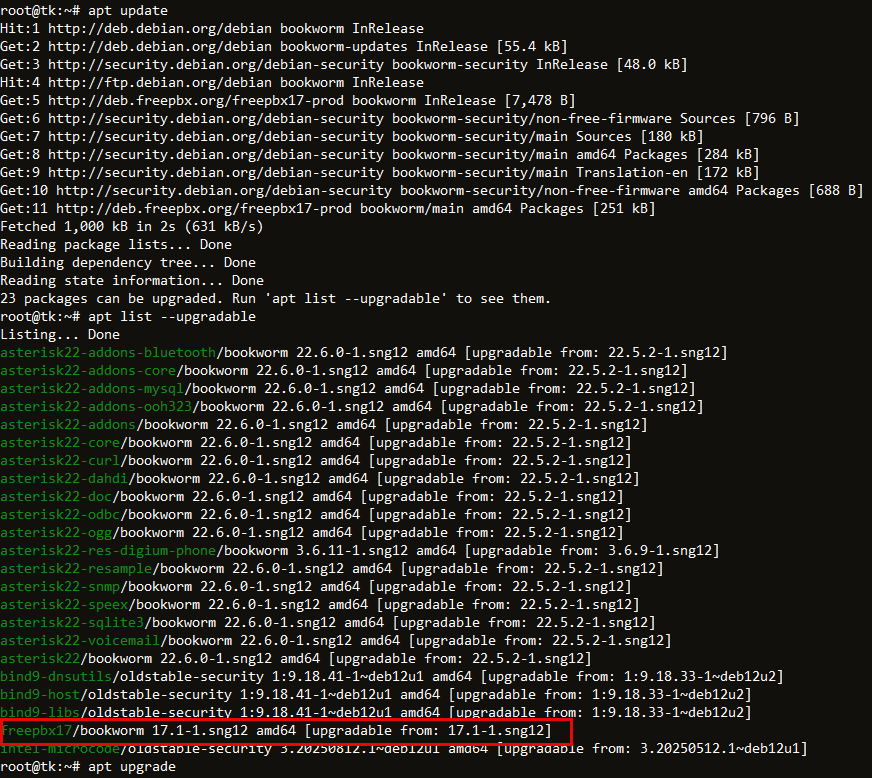
freepbx17/bookworm 17.1-1.sng12 amd64 [upgradable from: 17.1-1.sng12]

Why is the core (or whatever that is) replaced with the same version when Sangome releases some other updates? :thinking:

Unpacking freepbx17 (17.1-1.sng12) over (17.1-1.sng12) ...

My installations are well up-to-date with all modules, no open module updates.

After the dist-upgrade finishes, the GUI greets me with this:
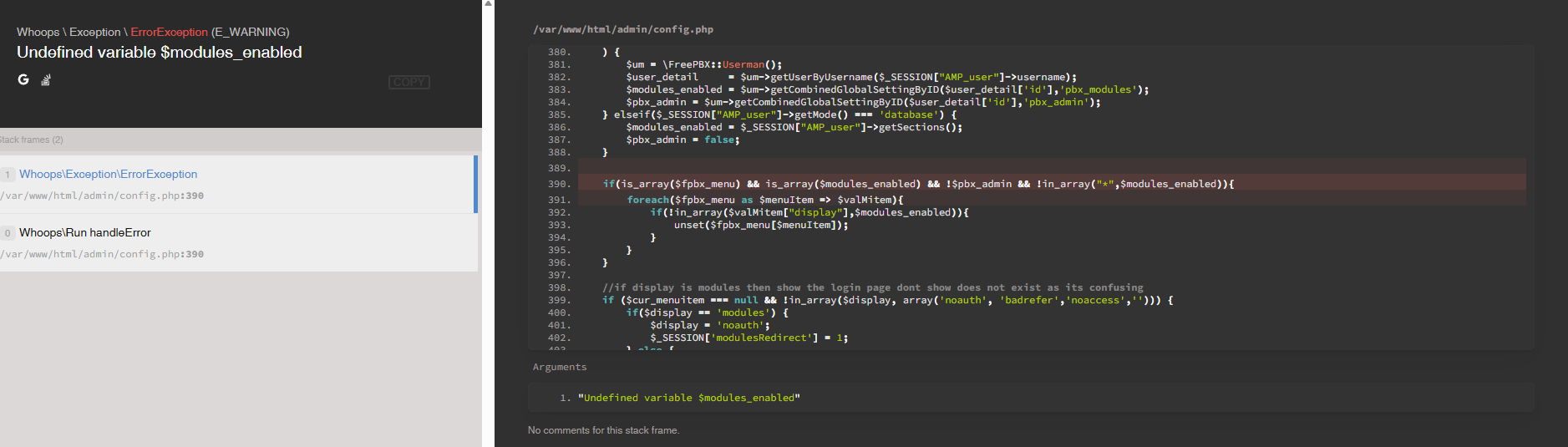
So … modules are fu**ed :face_with_spiral_eyes: :

That happens basically beacuse stupidly the update had disabled modules which it wants to downgrade :zany_face: - partially to old, insecure versions. Why ever!

image

After I have installed the 5-6 modules the CLI tells me, I can finally do an

fwconsole refreshsignatures
fwconsole ma upgradeall
fwconsole reload

Now everything looks OK again. But in fact FreePBX is in a pretty strange state. All extensions show registered, they really are registered and they can do the echo test without issues.

But: Nobody can call them! Calls from an internal extension to another are failing, external calls are getting the FreePBX system announcement that the extension is offline. :face_with_symbols_on_mouth:

fwconsole restart does not help at all.

The only way to fix this is to open every extension in the GUI, then clicking “Submit” and finally “Apply Config”. Whatever needs to be fixed needs the extension to be “touched”.

I’ve had exactly the same with all my three instances. All installed with the official script on a new Debian 12. As recommended.

What is going wrong here?

Up to FreePBX 16 the “Upgrade” feature in the FreePBX GUI worked like a charm, with ZERO problems ever. Now, the new “apt-upgrade” method is a pure pain in the ass.

And how does this actually work? I don’t have that command/function. And the core module is not updated that way, it’s updated the normal way you update modules.

I highly doubt that since there is no Asterisk 26, the most current major release of Asterisk is v23 which was released last month. I don’t even think FreePBX has it yet and based on my system updates I just ran the most recent version is Asterisk v22.

You update OS level packages with apt update (looks for packages to update) and apt upgrade (upgrades those packages). These do not touch the modules if you want to update modules you have to us the fwconsole ma options or use the Module Admin in the GUI.

So exactly what did you do? What commands did you run? Because none of what you are reporting is sounding completely accurate.

Oh and I ran apt update, apt upgrade and fwconsole ma upgradeallbefore I made this post and didn’t have any issues what so ever. So we need to know what you did to try to replicate the problem.

@BlazeStudios Tom,

this is what I basically did and saw after “apt update”:

I have marked the culprit - it seems Sangoma has marked the “17.1-1.sng12” package as updated without changing its version. Hence it seems to overwrite what is already there and probably it “brings” older module versions in its list as the ones which are already newer due to updates. Just guessing why it’s disabling modules because it wants to downgrade them after applying the update.

However, that’s exactly what Sangoma recommends for System Updates:

I have no clue what this “17.1-1.sng12” package does. That version is nowhere listed in the modules - it’s not a module, it seems to be some “base package”.

But it’s definitely in the Sangoma repository, that’s the only repo I use here:

image

Maybe I should apt-mark hold freepbx17 to prevent it from updating - but I’m not sure what I’ll miss then.

Again, I have zero problems. You’re equating two different things.

root@fpbx17-dev:~# apt list --upgradable
Listing... Done
freepbx17/bookworm 17.1-1.sng12 amd64 [upgradable from: 17.1-1.sng12]
libnode-dev/oldstable,oldstable-security,oldstable,oldstable 18.20.4+dfsg-1~deb12u1 amd64 [upgradable from: 18.19.0+dfsg-6~deb12u2]
libnode108/oldstable,oldstable-security,oldstable,oldstable 18.20.4+dfsg-1~deb12u1 amd64 [upgradable from: 18.19.0+dfsg-6~deb12u2]
node-minipass/oldstable,oldstable,oldstable 3.3.6+~cs9.4.19-1+deb12u1 all [upgradable from: 3.3.6+~cs9.4.19-1]
node-postcss/oldstable,oldstable,oldstable 8.4.20+~cs8.0.23-1+deb12u1 all [upgradable from: 8.4.20+~cs8.0.23-1]
node-serialize-javascript/oldstable,oldstable,oldstable 6.0.0-2+deb12u1 all [upgradable from: 6.0.0-2]
nodejs/oldstable,oldstable-security,oldstable,oldstable 18.20.4+dfsg-1~deb12u1 amd64 [upgradable from: 18.19.0+dfsg-6~deb12u2]
root@fpbx17-dev:~# apt upgrade
Reading package lists... Done
Building dependency tree... Done
Reading state information... Done
Calculating upgrade... Done
The following packages have been kept back:
  freepbx17 libnode-dev libnode108 node-minipass node-postcss node-serialize-javascript nodejs
0 upgraded, 0 newly installed, 0 to remove and 7 not upgraded.

Note how it didn’t attempt to upgrade any of those packages. So you think it tried to upgrade but it really didn’t. So it did nothing.

The OS updates/upgrades have nothing to do with individual modules upgrades/updates.

Hi Tom,

look at your screenshot:

Your Debian is holding the package back. That’s what saves you. If that would be installed, you’d have exactly the same issue. If you have a Test-VM you can do an apt install freepbx17 … create a snapshot before :smiling_face_with_sunglasses:

I have zero clue why it does not hold it back here. Three VMs, all created with the official Sangoma install script on a virgin Debian Bookworm … exactly as recommended. I guess we need someone from Sangoma commenting … also why the same package reappears as an update here after a while.

Finally I found that that package not only creates the module issues, but it seems to also initialize some tables which are used. Allowlists, Blacklists and some more config points are all gone. Luckily I’ve set a snapshot before the update, so I rolled all of them back and will redo the update with setting the package on hold before.

I hope that Sangoma reads this thread and can lift that mystery.

It is installed has been for ages.

root@fpbx17-dev:~# apt list freepbx* --installed 
Listing... Done
freepbx17/now 17.1-1.sng12 amd64 [installed,upgradable to: 17.1-1.sng12]

Yap … maybe wrong phrase from my side. I meant if you would force-upgrade it or issue an apt install –only-upgrade freepbx17 the fun starts …

It always was installed on my FreePBX’s as well - but my Debian decided to run the upgrade … and the mess started.

I’ll start by saying I’m not an expert. But we had an issue like this, and I pulled this section out of the install script and put it in a custom bash script to run to mark the Debian packages to not upgrade:

    # List of package names to hold
    local packages=("sangoma-pbx17" "nodejs" "node-*")
    if [ ! "$nofpbx" ] ; then
        packages+=("freepbx17")
    fi

    # Loop through each package and hold it
    for pkg in "${packages[@]}"; do
        apt-mark hold "$pkg" >> "$log"
    done

To check, run:
sudo apt-mark showhold

The note I left myself says, “Basically any package that has pbx in it, nodejs, or node- should be held and NOT UPDATED.”

We ended up rolling back our VM to fix the issue, but then we had to reregister the system…it was a mess… So now I check apt-mark every so often to make sure that those packages the install script uses to install modules do not update via Debian and overwrite the modules that the FreePBX system installs.

@RedTC Yeah, I did that manually on my instances now. But it should be checked by Sangoma. By putting the package on hold we’ll not get future updates of the base. Tricky.

However, a Debian package must detect if it’s updating something. Currently the “update” resets/deletes a lot which it shouldn’t to.

It’d be interesting why @BlazeStudios package is kept back and ours not (which put us in big trouble)

Did you even double check that it was or wasn’t? What’s the output of apt-mark showhold?

It wasn’t by default. I now did it manually after restoring my pre-update snapshots and then I performed the update with no issues (as the bad guy is now on hold)

The OP claims to be doing dist-upgrade, which, I believe, overrides hold backs on packages. However, the picture of the log does show just “upgrade”.

Yap, on the last two instances I did an apt upgrade but that did not change anything.
I’ve changed the topic to make it more clear.

It does not. apt dist-upgrade will perform an upgrade/remove of a package and install new dependencies and remove conflicts/older packages it does not try to update/remove held packages. If a package is held you need to remove the hold for anything to happen to it.

root@fpbx17-dev:~# apt dist-upgrade 
Reading package lists... Done
Building dependency tree... Done
Reading state information... Done
Calculating upgrade... Done
The following NEW packages will be installed:
  linux-headers-6.1.0-41-amd64 linux-headers-6.1.0-41-common linux-image-6.1.0-41-amd64
The following packages have been kept back:
  freepbx17 libnode-dev libnode108 node-minipass node-postcss node-serialize-javascript nodejs
The following packages will be upgraded:
  linux-compiler-gcc-12-x86 linux-headers-amd64 linux-image-amd64 linux-kbuild-6.1 linux-libc-dev
5 upgraded, 3 newly installed, 0 to remove and 7 not upgraded.

The held packages are not going to be updated. I asked @JaCoTec for the output for apt-mark showhold didn’t get it so we have no idea what the OP has done on their system.

There are reports that it can break holds, although maybe it is only indirect holds, where something is held because something else depends on a certain version.

Especially given the Debian 13 issue, I would think that doing a dist-upgrade (full-upgrade) on a FreePBX system would be high risk, as the package it might choose to remove might be FreePBX.

If Sangoma are suggesting it as a way to remove a module that is no longer supported, it might be better to provide a dummy module, and use a normal upgrade.

Incidentally, dist-upgrade isn’t documented in Debian 12 apt. I think it may be the same as full-upgrade, and it is in apt-get.

So glad we haven’t touched 17.

I’d not generalize this. 17 is great and absolutely stable. CentOS is dead. The move to Debian was fine (although I’d personally have chosen Ubuntu as the underlying platform) … it’s just the issue that the underlying freepbx deb package seems to have some issues and does not recognize if it’s already installed. It seems wanting to initialize everything with any “pseudo update” which in that case kills existing installations.

I haven’t seen this with my installs. How did you do this install? What method?

Haven’t had any of the issues OP is talking about. I created a freepbx17 install on Debian 12 and customized apt upgrades to automatically run and just made a snapshot of that. We have over 200 servers on 17 and it’s been more stable than 15 and actually gets security updates!

1 Like


