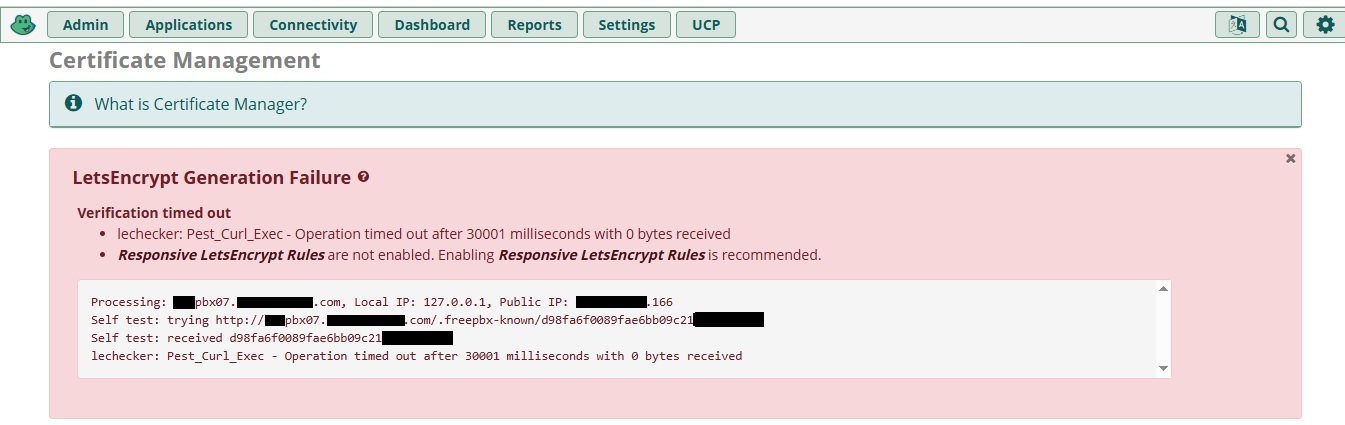
I’m at my wit’s end here. Quick history: Every time I do a major upgrade to my FreePBX, which runs in a VM bridged directly into my network, I simply delete the virtual disk and install the new FreePBX version in the new vhd. This keeps all the rest of my “hardware” the same (most notable the MAC address) as to no trigger a hardware license reset in the system activation. This also allows me to keep my IP and firewall rules untouched between upgrades. I did the same thing here when I upgraded to FreePBX17 and there are absolutely no issues with any other area of this fresh FreePBX17 install besides this Let’sEncrypt issue. FreePBX16 (CentOS) was working perfectly fine including Let’sEncrypt. I did update my FQDN to read xxxpbx07.xxx.com from xxxpbx06.xxx.com and updated the DNS in my registrar appropriately and gave it many days to update and propagate. DNS checker verified it’s very propagated lol.
Network setup:
Business fiber internet with 5 static IPs, fairly simple pfsense router setup (2.8.1) with all appropriate ports forwarded in NAT, 1 of my 5 static IPs dedicated to this FreePBX17 vm along with a 1:1 NAT, firewalls rules auto-created to match NAT settings and double-checked before posting here, sub-domain pointed to dedicated IP and DNS resolution checked backward and forward so that my FQDN definitely resolves to the appropriate dedicated static IP and vice versa, hostname set properly in System Admin, “Detect Network Settings” in Asterisk SIP Settings correctly sees itself internally and externally with the static IP that I expect. Left the responsive firewall for the Let’sEncrypt service as default but also tried turning it off and manually choosing to allow the service through internet and local in the firewall advanced settings. Can’t think of anything else significant enough to post here.
Not sure why it doesn’t work. Doesn’t seem to have a reason not to. The only thing I noticed is in that error message I get. The local IP is shown as 127.0.0.1. Should that be my actual local IP for this VM? If so, where do I change that? I’m grasping at straws here and don’t know what I’m missing. I also tried disabling the FreePBX firewall altogether to see if that helped and it didn’t. The only thing I can think of is disabling my entire firewall (or allowing all to this vm), but I shouldn’t need to as it was working just fine before. Forgot to mention that I have a DNS reflection in my pfsense for the FQDN so that I can reach various other devices (hardware and vm) internally via their FQDN instead of local IP. All local extensions and extensions outside of my network connect fine using the FQDN. Ext to ext calls work fine, DIDs from outside to inside exts work fine, internal ext to outside numbers work fine, etc. You get the picture. No issues anywhere except Let’sEncrypt. Anyone know where I could be going wrong here? Thanks so much in advance!
Try to go to System Admin > Hostname and put your FQDN there.
Also, did you check with tcpdump to see if the server is receiving any packets while you try to generate the cert ?
Omg…..
So I noticed THIS when I tried to generate the certificate and lo and behold….that was it. I unbanned these IPs, tried again, and success. How does FreePBX not know to unblock its own attempts at a Let’sEncrypt cert??? It’s set at port 80 everywhere where it matters! Since the IPs for Let’s Encrypt are always changing, it means that every time the cert renews it will require manual intervention. This isn’t going to work. Going to have to revert back to FreePBX 16. How dumb. Please fix this, devs!
To note from earlier, I’ve had the Responsive LetsEncrypt Rules in the advanced firewall settings set to either Enabled or Disabled and both resulted in failure. Either setting doesn’t matter and results in failure unless you manually unban the IP(s) after the initial failure. What an overall failure.
Has anyone found a permanent fix for this? I’m not going to manually unban these IPs every time. That’s just stupid. FreePBX17 needs to fix this issue asap as many people use Let’sEncrypt for certs. I’ll just have to avoid v17 until I hear of a fix.
Your frustration is understandable. There should be more elegant solutions. The manual process of opening port 80 to the world, renewing the LE cert, then closing port 80 again can be cumbersome. Secure alternative suggestions encouraged!
This is a perfect example of something that can be scripted.
Setup a cron job that runs once a day and parses the logs from certbot
When it sees an entry in there indicating certbot failed, it does the following:
a) Turns off fail2ban
b) Runs the certbot renew
c) Turns back on fail2ban
My personal opinion of fail2ban is it’s a half-assed, half-completed program, it needs to allow whitelisting of ports as well as IPs - using it on an internal server is as useless as teats on a boar. Considering if you are running the FreePBX management interface https that nothing is ever going to be running on port 80, save certbot, thus there’s no danger of a permanent forward from the outside to port 80 on the PBX, I don’t see any use of fail2ban on an internal PBX that isn’t allowing extension registrations from the outside.
Of course now I’m sure a zillion dogs are going to jump up on their haunches yapping at me for throwing a rock at their precious fail2ban….sigh.
Maybe take a look at this discussion: Let’s Encrypt (LE) certificate request and installation / auto-renewal configuration and pay particular attention to responses from @dicko. I’m now on FreePBX 17 / Debian 12, so my approach is a bit different from before. I use the acme.sh script with DNS challenge which I prefer to HTTP challenge, and switched back from ZeroSSL to Let’s Encrypt. I don’t have the certificate renewal (particularly updating/importing/installing on the FreePBX side) process entirely automated, but I think I can get there or very close with the acme.sh Le_RenewHook variable. With my approach, the better I understand acme.sh and fwconsole certificates (certificate manager / certman module), I think the closer I can get to fully automating certificate renewal. I don’t (currently/yet) use HAProxy with FreePBX as @dicko suggests, but that seems like a reasonable approach and could make the certificate renewal process more simple.
Maybe one day we’ll see a robust Let’s Encrypt implementation in FreePBX, including DNS challenge support. Until then, I think using acme.sh is a better option.
Just faced the same issue
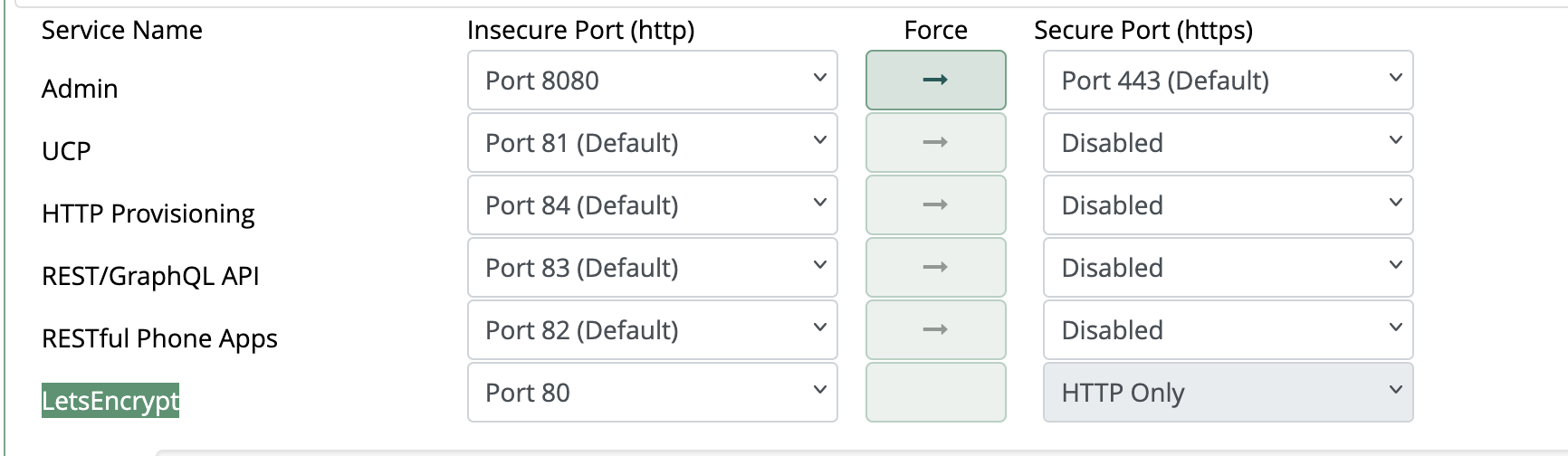
Solution for we was to assign manually the Let’s Encrypt port 80
inside
Admin → System Admin → Port Management
Probably a new BUG introduced