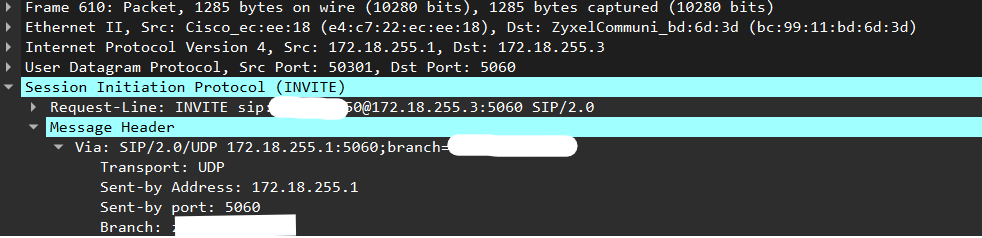
We have our trunc provider box on the WAN side and the Asterisk PBX on the LAN side. When I get a call the Trunc is sending an INVITE message from a random port (example: 50301) to my PBX dest port 5060.
Our firewall forwards that message (NAT) to the PBX.
The PBX is responding from port 5060 back to the trunc to port 50301 (since the request came from there).
Now here is the magic: On our firewall I have “SIP ALG and Transformation” activated. The firewall changes the header. Replacing dest port 50301 with port 5060. And everything works.
The new firewall doesn’t support “SIP Transformation” because of security issues. The reply goes now to port 50301 and the trunc box ignores the answer since it expects the answer on 5060.
Can I force Asterisk to always reply on port 5060 even if the request came from a different port?
Something is missing from this description, as, as it stands, I don’t think the described provider box would work with any conforming SIP UAS.
Note that I think force rport would be going in the wrong direction, as that causes the source IP address and port to be used for replies. Similarly for rewrite contact. You may find you need to positively turn both of these options off.
The standard SIP behaviour is that initial replies are sent to the address and port in the Via header, unless the incoming INVITE includes rport, in which case they are sent to IP and UDP source address. Once the session is established, the address in the Contact header is used.
I think we need to see the Via and Contact headers, from the provider’s box.
Can I tell Asterisk to respond on the “Sent-by” port?
Our provider box is already very old. Not sure if they are still in business. We tried to call them but is was a dead road. Need to get it running without their help.
You need to turn OFF force rport. If the provider’s box is doing the same with RTP, you also need to make sure symmetric RTP is off. I believe the current default is force rport on, as that is normally safe. I have a feeling that symmetric media is off by default, but do check.
Incidentally, and only of historical note, in your case, the strong advice is normally to disable SIP ALG.
OK. I see you are using Cisco. Cisco is known to have problems with force rport. I can’t remember all the issues with Cisco, but I believe there are some special settings that are often needed, and weren’t in early versions of chan_pjsip. Cisco used to take the market leader position on standards: if they got it wrong, they were defining the de facto standard. They really wanted completely Cisco systems.
The normal case for using force rport is where the UAC is behind NAT and is transmitting its local network address in the Via header. It can volunteer that that is the case by adding an rport option to the Via, but, if it doesn’t the Asterisk force rport setting causes Asterisk to pretend that it had done so. As providers generally have a Via tha matches the IP and UDP information, forcing rport is normally tolerable, and it means Asterisk can cope with phones which are behind remote NAT, without the phone having to know that is behind NAT.
FreePBX is defaulting to a non-compliant configuration because that makes remote extensions work more often, and, in most cases, doesn’t break anything. But, in your case, you need strict compliance.
Based on what you have posted so far, turning off both Force rport and Rewrite Contact would work properly, were the PBX on the same LAN as the Cisco box. If the Zyxel were doing transparent NAT (no modification of port numbers or packet contents), that would also work.
Since it’s not working, show us SIP traces (for the same call) on both sides of the Zyxel. We can then see how the Zyxel is modifying the traffic and we can look for settings change(s) that will fix the problem.
I was able to turn force rport off. Response is now on 5060. At least that is fine.
My setup: provider trunc is on the wan side, pbx on the lan side
I looked at the payload with and without “sip transformation”. It’s different. The old zyxel is changing some ip addresses if transformation is on.
I can post the traffic/payload. Depending which message is the important one. The first invite or the response? I think at that point it’s a nat setting problem within asterisk.
On the PBX side, at the Asterisk command prompt, type
pjsip set logger on
and the complete SIP trace will appear in the Asterisk log and on the console, so you can easily post the entire conversation.
On the Zyxel WAN interface, if it is difficult to analyze multiple packets, please post at least the initial INVITE and the 100 Trying response. There is no need to expand individual headers (as you did for Via in your penultimate post), because SIP and SDP are plain text protocols. This should allow all headers and the SDP packet to fit in one screenshot.
Frank, if you really want to help please post the make and model of the firewall because your post only said “new firewall” and Stewart said “Zyxel” which I took to mean “generic cheap firewall” since that is what Zyxels are…
Agree, zyxel are at the lower end. But the place I’m helping out always had zyxel.
Old firewall: zyxel USG210
“SIP ALG and SIP transformation” was turned on. Pbx was working.
New firewall: zyxel USG flex 200H
“SIP transformation” is NOT supported anymore because of security. Pbx stopped working.
After correcting and changing the asterisk configuration (as described in my previous post) it’s running again without the “SIP” features activated in the firewall.
In general (and that what I found everywhere else) it’s always recommended to turn “SIP ALG” off. Not needed if your configuration is good.
No, the Wireshark capture in post #4 shows the destination Mac address, with the OUI decoded as Zyxel, so I was pretty confident that’s what the OP has.
Thanks, Frank, It’ll make the search engines happy.
I’ve long ago concluded that firewalls are like razors and they are like printers. Their existence is solely to sell firewall subscriptions, just like printer’s reason for existence is to sell toners, and razors purpose is to sell blades. God’s truth is they SHOULD be giving them away for free - since you pay and pay and pay on the back end…
With cheap ones, the support you get is pretty much limited to the manufacturer fixing obscenely ridiculous and outstanding software bugs you may run across, rather than, you know, actually -helping- you with network breakages their product causes. And, with certain manufactures of expensive ones - while they SAY they provide comprehensive support - their support is pretty much the same as the cheap ones.
SIP ALG is one of those features that if it’s PROPERLY implemented it works - but so many software devs don’t understand SIP so it’s often broken - thus the general recommendation to turn it off. I guess, after the marketing people stopped pushing the developers for the “feature” to be included in firewall code, the devs quietly dropped it - since they knew they didn’t understand it. And the marketing people had to find some reason for it - and “for the security” is the most common shorthand for “we aren’t going to admit the REAL reason we are dropping this feature and we are going to try to make you look like a fool if you keep bugging us about it” that is out there. Sort of like the “for the security of the children” is used to justify the money wasted painting zebra crossings in unnecessary locations on the streets….
 ):
):