I am trying to set up Freepbx 17 with Asterisk 22.6 on a Raspberry PI5. I have this running and I can load the Freepbx UI. I have also set up a trunk with Flowroute, and flowroute shows a registration. However, whatever I try, I don’t seem to be able to place or receive calls. Any call ends up in a message that the “number you have dialed is not in service”.
Any suggestions what I can do? I have tried many different settings in the trunk and inbound and outbound rules, and sometimes I get different messages (for example, “all circuits busy”), but that’s all.
Thanks.
Obtain the full log with pjsip set logger on in effect.
Thanks. I will try that. In the meantime I looked at the Asterisk logs and I see 2 weird things:
On incoming calls (placed from my cell phone to the PBX):
res_rtp_asterisk.c: 0x7ffe9803fbc0 – Strict RTP switching to RTP target address 206.146.97.5:64878 as source
This is not the IP address of the trunk provider. I also tried another phone and the RTP switched to a very similar IP address. I will try to talk to Flowroute, but if I have to set this manually, where would I do that?
On outgoing calls:
pbx.c: Executing [s-INVALIDNMBR@macro-dialout-trunk:1] NoOp(“PJSIP/100-00000022”, “Dial failed due to trunk reporting Address Incomplete - giving up”
This looks like the registration string is malformed. Again, I’ll check with Flowroute, but I don’t know where I would set the correct string in Freepbx. I am using pjsip for the trunk, and there is really not an option to define the registration string. Or is there?
Thanks.
You can’t do that, and it quite likely is their address for media.
They tell you what to use, in the c= line in the SDP, and for a provider there is really no need not to give the correct address, especially as not doing so will break the service for a lot of people using VoIP phones directly. However if they give the wrong address, but media arrives from the correct address, Asterisk will discover the address from that, as long as symmetric media is turned on.
This is usually due to specifying an outbound proxy without the backslash-semicolon-l-r (preformatted mode is playing up and garbling when it used not to).
It is often associated with specifying a proxy when there isn’t actually a proxy.
There isn’t a registration string in SIP; chan_sip’s string was a shorthand for giving it the settings it needed, not something that is sent over the wire.`
Hi David,
first: some progress. After playing around with a number of settings I was able to get the inbound calls working. I can call my system from my cell phone and have bi-directional sound. So, that is good!!
However, the outgoing calls are still not working. I have kept on trying setting different options, but nothing has enabled the calling out yet. I looked at the proxy settings in the trunk, but there is nothing set there, so I suppose that is not the issue here. I have contacted the provider, but not heard back yet. Anything I can try?
You need to get the logs and see what is in the request URI. It is behaving as though there is no user part in the requests, or the numbers are simply too short.
In the Trunk, Dialed Number Manipulation Rules, make sure that you have Outbound Dial Prefix set to your tech prefix (an 8 digit number) followed by *
Also confirm that the number sent to the trunk logic starts with the country code.
For example, to call (800) 437-7950 (a caller ID test number) your PBX would send
INVITE sip:12345678*[email protected]
where 12345678 is your tech prefix and the domain part is as set up for your account.
Thanks. As I mentioned, I also asked Flowroute, and they told me that the “FPBX is sending your tech prefix as the caller ID. This is invalid and getting the call blocked”. Ok, I was following some instructions to put in the tech prefix as the user into the trunk definition.
I now changed that, but there does not seem to be an effect. So I am wondering where I go wrong. I see various options where the caller ID could go. They specifically say that I need to give my UserID (which they gave me) instead of the tech prefix. As far as I can tell there are only two places where this could matter: The trunk definition and the pjsip settings in the trunk.
the trunk definition has the trunk name (which I assume is just a string to identify it with, and the outbound caller ID. Is the latter one what is used to identify the trunk? I set it to what they gave me, but it did not make a difference. Also set the option to “force trunk ID”.
the other option is under the pjsip settings for the trunk. There is a username, an “auth username”, ad a “secret”. I set the options to outbound and send, then both username and “auth username” to what Flowroute gave me and the “secret” to the password for the flowroute account.
None of this let me make outbound calls. Is there another place I need to specify the username that is used for the trunk verification?
I found a line about the callerID in sip_general_additional.conf. There are two lines that say “callerid=Unknown”. Not sure if that gets overridden when a call is placed, or if I need to change this manually.
I’m going to guess that they mean From user, rather than caller ID, in which case there is on a option to set this. Sending an account name as caller ID would be a misuse of caller ID.
However, the complaint appears to be about the request URI.
On my Flowroute account, From User is blank and Send RPID/PAI is Send P-Asserted-Identity header.
Then, if Outbound CID for your extension is properly formatted, something like
"John Doe" <12123456789>
and it’s not overridden by the Outbound Route and CID Options is set for Allow Any CID, you should be good to go.
I think you are right. checking on request URI pointed me to the outbound proxy setting in the pjsip section of the trunk. I tried various permutations of sip:us-west-or.sip.flowroute.com:[port];lr and sip:us-west-or.sip.flowroute.com:[port]\ as well as sip:[userID]@us-west-or.sip.flowroute.com:[port];lr and sip:[userID]@us-west-or.sip.flowroute.com:[port]\ for both “Client URI” and “Server URI” (In this scenario, is the Freepbx system the client or the server?). All to no avail. “All systems are busy”. And now I have lost the incoming calls again as well …
I was able to get ONE outgoing call through by setting the proxy to sip:192.168.0.1;lr (saw that on another thread), but the call was to my cellphone, and while the extension was ringing, my cell phone did not respond. Subsequent calls ended up again in “All systems busy”…
Is there a better explanation of all the fields in the advanced tab of the trunk pjsip page than the one-liners visible by hovering over the question mark?
Is there a website or manual that explains the options and fields and what needs to go in there in more detail? I hate to bother you for these things that should be trivial to resolve.
On my Flowroute trunk, Outbound Proxy is blank. You shouldn’t need it, provided SIP Server is correctly set. Something like
us-west-or.sip.flowroute.com
but adjusted for your account.
Thanks, Stewart.
Where do you see that on your Flowroute account?
Yes, the settings you mention are all set the same way, but now I am back to square one: no inbound or outbound calls.
Ok. removed outbound proxy and got my incoming calls back …
Here are some settings from our working FreePBX 16, Asterisk 18, with PJSIP setup with Flowroute trunk. I hope this helps you sort your situation.
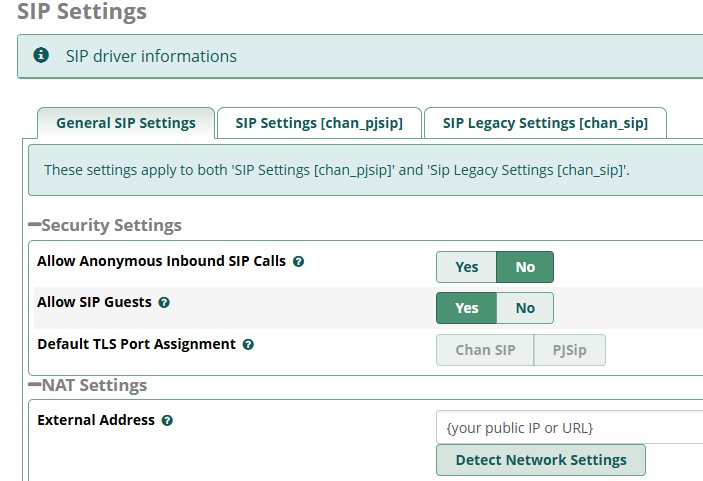
Always be mindful that your gateway router / firewall to the internet must be properly setup to pass the SIP and the RTC traffic in both directions and without rewriting the original IP port #'s. Some NAT setups want to obfuscate the IP port being used; if your router does this then the packet headers will not match the packet flow and FreePBX/Asterisk or server on the other end will not handle it.
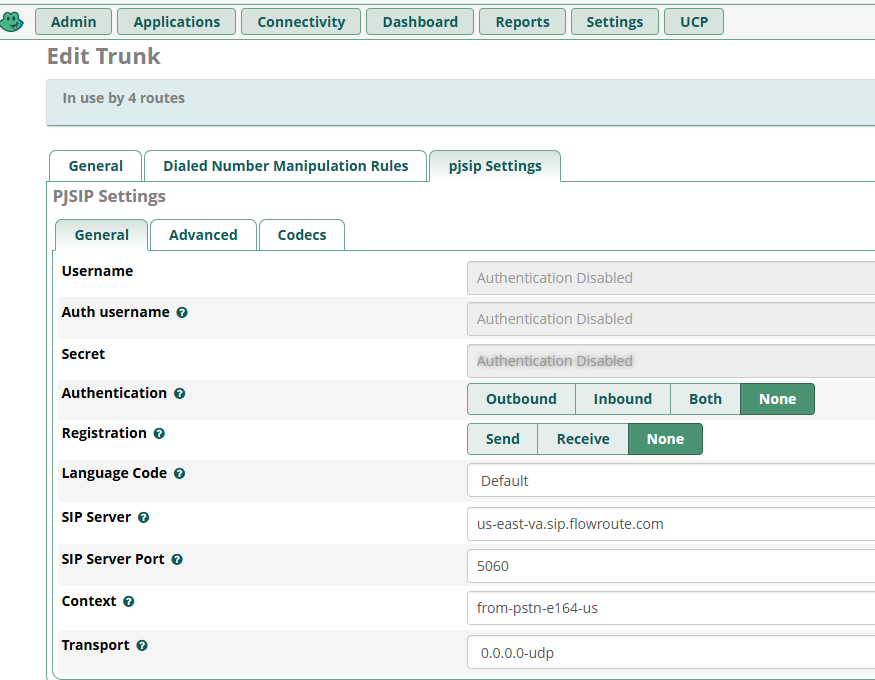
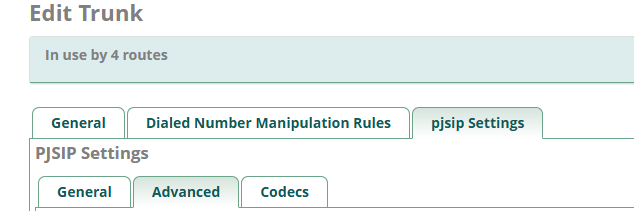

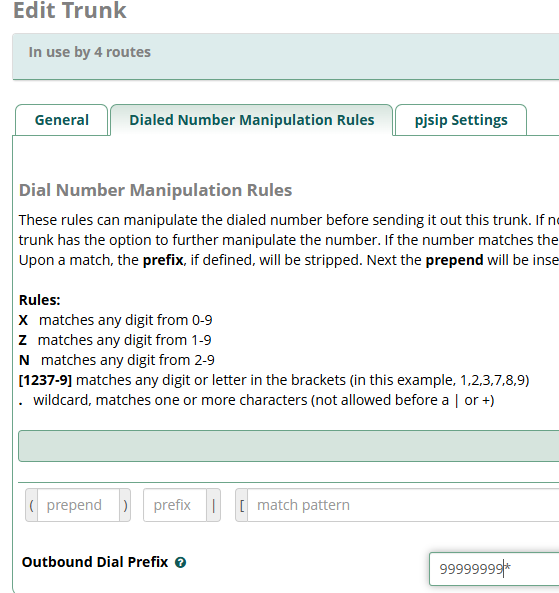
This is where your Flowroute Tech Prefix goes so that it will be prepended to your dial string and authenticate. We do not register our trunk, but rather authenticate with each call by doing this. You must also have this setting ON at Flowroute to allow this type of in call authentication (not sure what Flowroute calls this).
Routes → Dial Pattern will give you the rest of the correctly formatted dial string to Flowroute.
We insert the Flowroute required “1” here.
I think most providers will do the equivalent of Asterisk’s force_rport, symmetric rtp, and rewrite_contact, to largely mitigate this.
In reply to @david55,
Admittedly it was 2019 when we did our production setup with FreePBX and Flowroute. Our issue during those early days was that our Sonicwall NSA router firmware did not have the checkbox at our firmware level that allowed “Disable Source Port Remap” on our Incoming NAT policy. We had to upgrade our Sonicwall router firmware to a version that had the “Disable Source Port Remap”.
Before the Sonicwall “Disable Source Port Remap”, the SIP packets received by our FreePBX installation had a SIP header that said it wanted to connect FROM port 5060 and the actual packet forwarded to FreePBX was presented to the server as being from port 13564 (random example). I will admit that my knowledge was and is limited about “force_rport, symmetric rtp, and rewrite_contact”, I just know what it took for us to get our calls flowing in 2019.
I’m sorry but that did not help. To recap:
I am now able to receive calls through Flowroute and they are correctly routed inside FreePBX.
I CANNOT initiate a call from the extension. I get two diffrent responses when I dial:
If I dial an 11 digit number (as in 13031231234) I get “All circuits are busy”
If I dial a 10 digit number (3031231234) I get " call cannot be completed as entered. Check number"
The trunk has no manipulation rule specified:

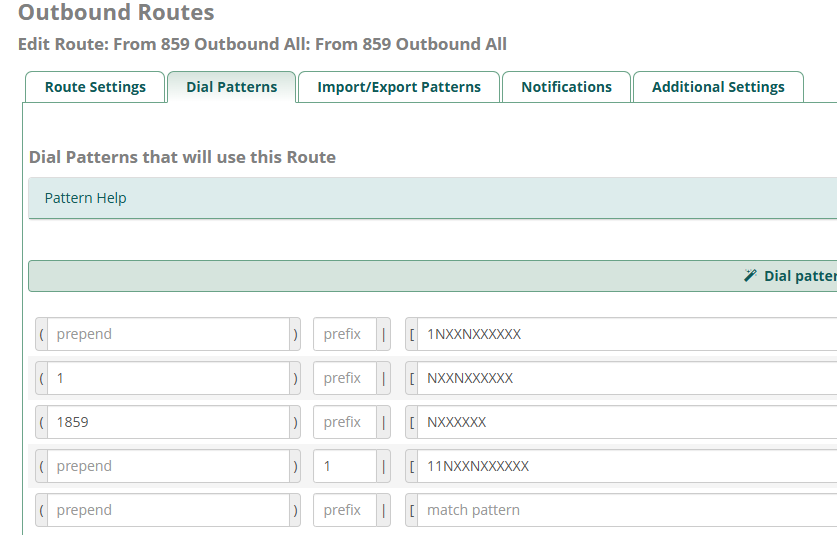
The outbound route has a very simple dial pattern:
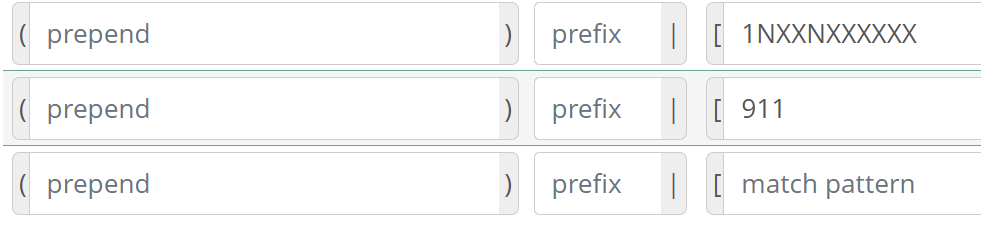
The weird thing is that I don’t seem to be able to add a pattern for NXXNXXXXXX with a prefix of 1. I can add it, but after submitting and applying it is gone again.
I have spent days now to resolve this issue with no progress. Frustrating.
In my case, FreePBX 16, Asterisk 18, and Flowroute SIP Trunk, we DO NOT register our outbound trunk to Flowroute, we use IP based per call registration with Flowroute.
In FreePBX16, the Trunk configuration, Dialed Number Manipulation Rules, the dial pattern section is empty. The Outbound Dial Prefix field contains our Flowroute Tech Prefix and is ended with a “*” (asterisk). Please refer to my post of October 29th and take a look at the Edit Trunk screenshots.
Please check your Flowroute Portal setups and compare to ours below:
Interconnections menu
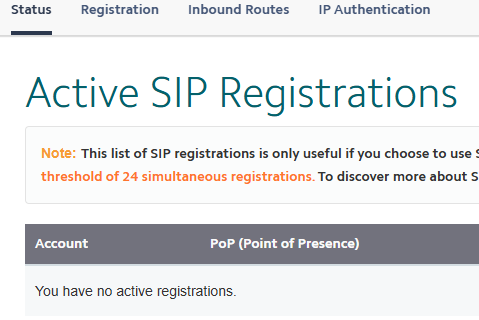
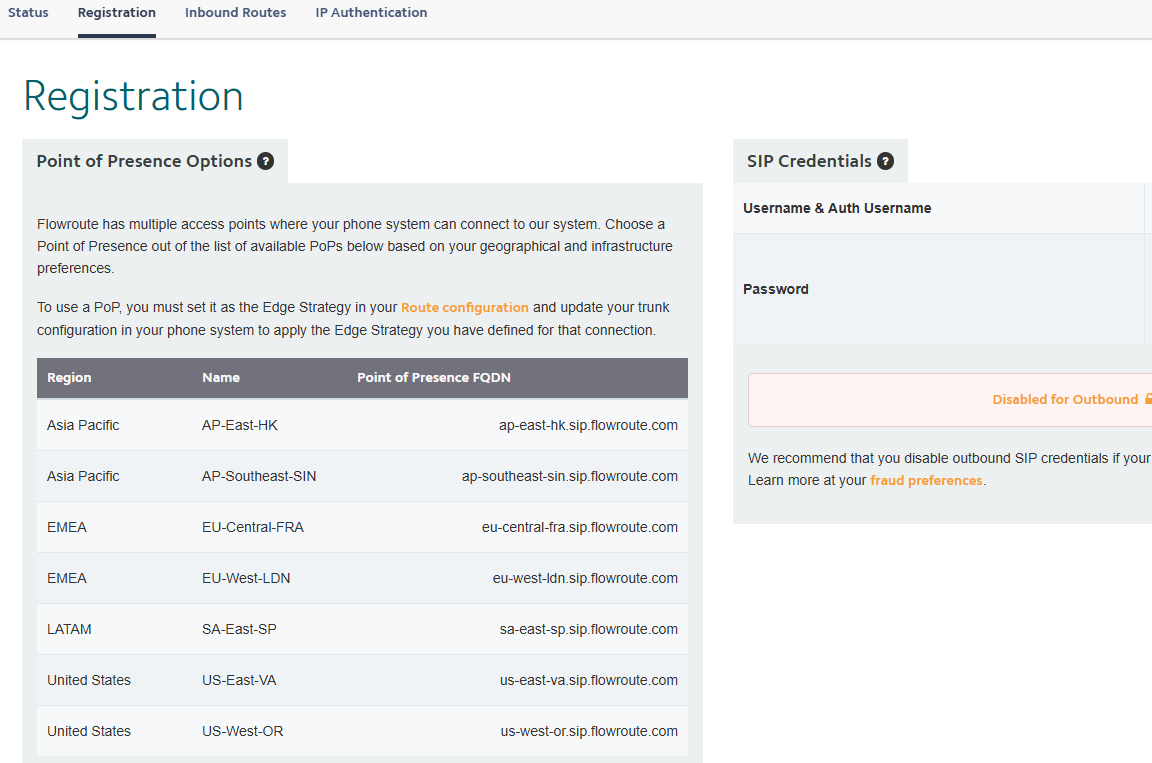
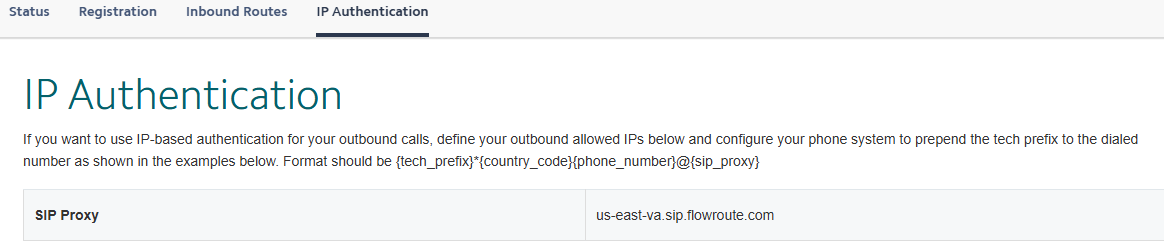
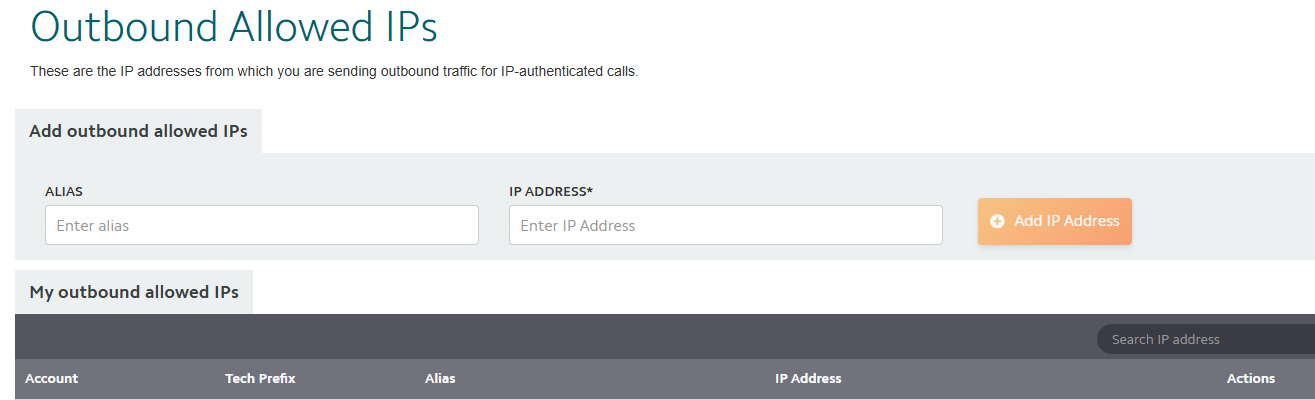
Set your own WAN IP address from which your FreePBX will be seen contacting Flowroute. These are the only IP addresses that will be allowed to make an outbound SIP connection from your Flowroute account.
Big note: You select either to Register your FreePBX Trunk with Flowroute OR do IP Authentication. IP Authentication is what my example setup is. If you choose to Register your FPBX Trunk then your DO NOT prepend your tech prefix to the dial string. You also have to accomplish all of the FPBX Trunk Registration setups. We chose IP Authentication because it would allow our 2 WAN solution to have a primary and fallback path to Flowroute and have them both work; this also requires some additional gateway routing setups and WAN & Domain setups in FPBX.
I feel your frustration in getting this setup. It is part of the price of freedom in an open source world.