I’ve configured FreePBX to use our Okta instance as an LDAP user directory. I’m using the OpenLDAP integration. It works, the Okta LDAP directory in our FreePBX UserManager lists our Okta users and also our Okta groups.
However, the users in the Okta LDAP directory on FreePBX do not get any inheritance set. I have to modify each user individually to allow UCP login. I’d like to have that set automatically.
They also don’t seem to be members of any groups, not even “All Users” or the groups they are members of in Okta. Is this the expected behavior?
What’s the best way of configuring default settings to automatically apply to all of my LDAP users?
If groups are created in the Okta instance and synced with FreePBX, group membership in FreePBX is automatically updated—provided the LDAP directory settings in Userman have “Manage Groups Locally” set to “Yes.”
To allow users to log in to the User Control Panel (UCP), simply enable UCP access for the corresponding Okta group in FreePBX. No individual user configuration is required.
Groups are synced. “Manage Groups Locally” is set to “Yes.”
I have an Okta group called “FreePBX Users.” It shows up in UserMan under Groups, along with all my other Okta groups. I’ve moved it to the top of the list to set priority 0, and I’ve changed UCP “Allow Login” to “Yes.” My FreePBX users are all members of that group in Okta.
But it still doesn’t work.
I think my problem is that group membership is not synced to FreePBX. When I look at my Okta users in UserMan, they all show as not being members of any group.
Is group membership controlled by the “User group attribute” in the Directory Setting in UserMan?
I’ve checked the Okta LDAP documentation, it specifies the “memberOf” attribute to use for group membership, so that’s what I’m using.
Is there anything else I should do to get group membership synced?
(Edit: thanks for the Wiki link. I’ve been going through it, but all it says is:
User Group Attribute: The attribute is a multi-valued attribute that contains groups of which the user is a direct member, depending on the LDAP server from which this attribute is retrieved
Which seems to indicate that I’m using the correct setting, but for some reason it’s not working.)
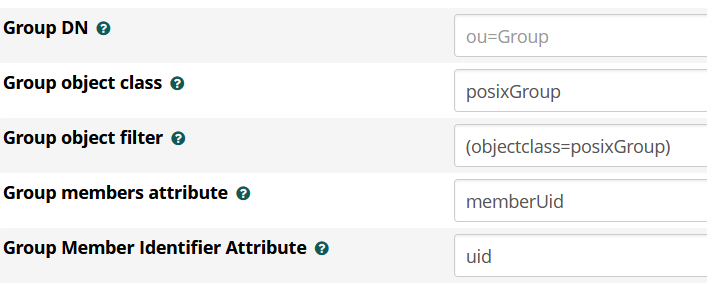
If all settings are correct in “User Configuration”, then please check “Group Configuration” of directory settings in userman. Particularly check the setting “Group members attribute”
When I try that, I get no groups returned. If you look at the link to the Okta LDAP docs I posted above, you’ll see that they use slightly different attribute names than the standard OpenLDAP that Synology uses.
The way I found to configure FreePBX with my Synology was to install a LDAP browser on my windows system and test and check settings and next, I’ve applied them to FreePBX.
Instead of configuring UCP login for each user individually, streamline the process by using LDAP groups in freepbx:
Steps to Enable UCP Login via freepbx LDAP Group
1.Navigate to the LDAP Group
Go to Admin → User Management → Groups and select the desired LDAP group.
2.Add Users to the Group
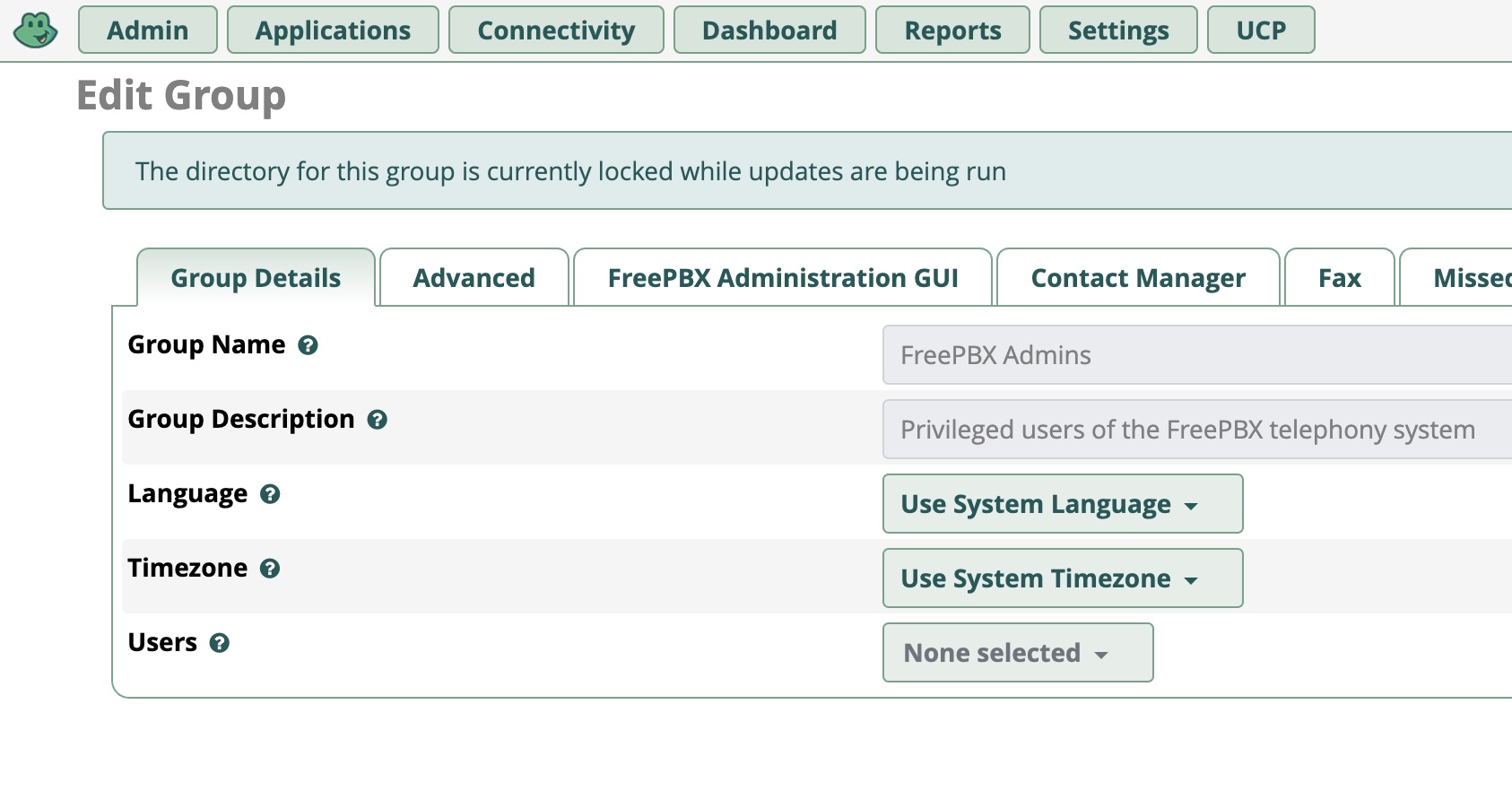
In the Users dropdown, select all users you want to include in this group.
3.Configure UCP Settings for the Group
Click Edit Group
Go to the UCP tab
Enable UCP Login and configure any other relevant settings
4.Save Changes
All users in this group will now inherit the UCP login permissions. Same type of steps can be used for all other features like contactmanager, conferences, etc.
I can’t. The pull-down is gray and there’s nothing to pull down. It’s empty. If I try clicking it anyway, nothing happens. This is true even for the built-in All Users group.
I’ve worked with LDAP integration in FreePBX and totally understand the confusion around UCP permissions. Setting up inheritance properly isn’t always intuitive. What helped me was double-checking group bindings and making sure template-level settings don’t get overridden. If users still don’t inherit correctly, restarting the UCP daemon sometimes forces it to refresh access rights based on group policies.