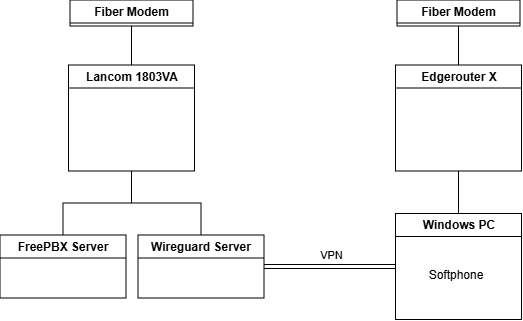
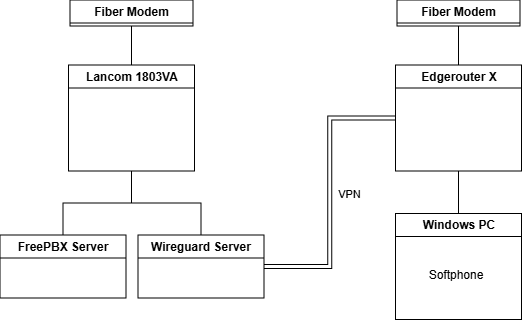
I have a scenario as shown in the two images. FreePBX Version is 17.0.19.27.
In the first case (Windows PC connected as a WireGuard client), the echo test with the softphone works without any problems.
In the second case (site-to-site WireGuard), the audio only works in the direction from FreePBX to the softphone (I can hear the announcements during the echo test but not my own echo).
I wonder what settings or configurations could lead to this behavior?
I attach logs and sip traces for both cases. I would really appreciate some help.
You don’t have a true site-to-site VPN. It is NATted; it’s not possible (for example) to ping a host on the 192.168.178.x site from one on the 192.168.177.x site. This is not in itself a problem, but you need to see whether the NAT setup is somehow causing trouble.
Also unusual, Asterisk is requesting that MicroSIP send RTP to 192.168.177.111 port 48540. By default, Asterisk uses UDP ports 10000-20000 for RTP. Did you change the RTP port range? If not, this is very strange. If yes, please explain why.
I recommend that you capture traffic for a test call with both Wireshark on the MicroSIP machine and tcpdump on the PBX. Move the tcpdump file to the MicroSIP machine (or another machine with a desktop) and open it in Wireshark. See whether MicroSIP is sending RTP to the address and port that Asterisk asked for, and whether it arrives ok at the PBX. We can discuss the details once we know approximately what is happening.
Also, try pressing # once you hear “You are about to …”. This should interrupt the announcement and start listening for incoming audio to echo. If # works but not the audio, it could be a problem with codecs, packetization, etc.
@Manon are you using pfSense as the firewall ? pfsense randomizes outbound ports by default. You might have to set a static out for the 10k-20k. BUT, In a true VPN, you don’t need to set outbound ports between sites as the traffic is over the VPN and not out ports.
Your PC is working because it is a client server setup.
Your site to site is a server to server setup, and likely not working because one site is not aware of the other side.
Have you set up a full VPN before ? In a site to site VPN, you have to set exit points on both sides of the VPN and make sure both sides are aware of the other network subnets. We have a 3 site VPN set up for one of our clients,
You’re right, it’s not a real site-to-site VPN. I changed the RTP range to 40000-50000 because the VoIP Call Manager already uses the default port range in that setup.
I did traffic captures for both sides and attach them.
With the latest firmware, the Lancom 1803VA can also use Wireguard, so I tested a real site-to-site VPN between the Lancom 1803VA and the Edgerouter X. Unfortunately, the result is the same.
I would be grateful if anyone has any other ideas. I am having difficulty interpreting the captures.
I am aware of this and have configured the routes and firewalls on both sides accordingly, in my opinion.
Edit: I finally solved the problem. Hardware offloading was enabled on the Edgerouter X, and unfortunately that destroys the WireGuard connection at a certain point. Without hardware offloading, everything works fine.