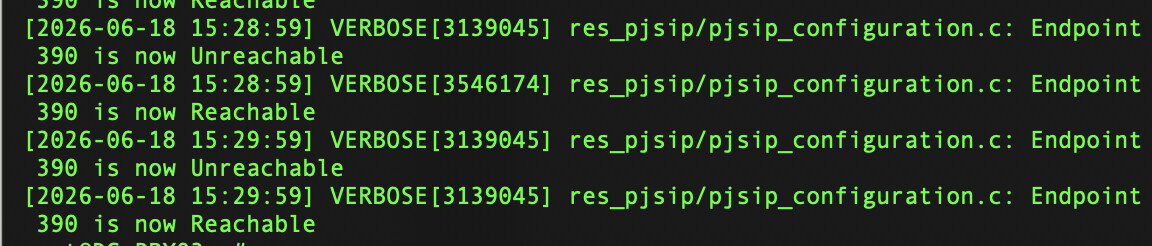
So on FreePBX v17 here, remotely hosted. We have one specific extension which seems to be randomly flagged unreachable, then reachable shortly thereafter. Happens maybe one or twice an hour. A Yealink SIP-T54W desk phone.
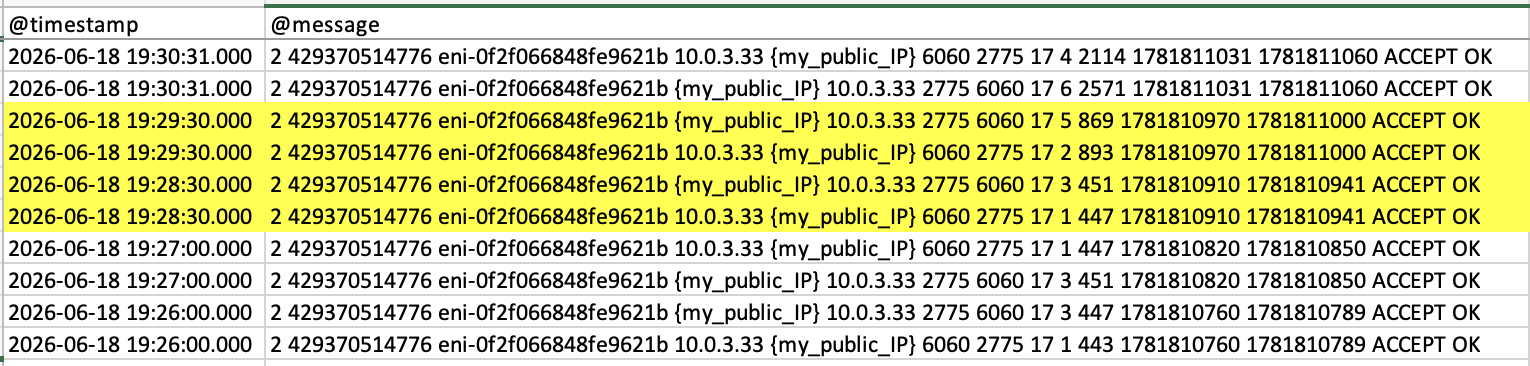
I’ll paste a snippet of the Asterisk logs below. What’s odd is even this snippet show timestamps when there is literally next to no network activity. No active users, and no active traffic on the network (I should know since I’m also sysadmin of said network  ).
).
We use a Cisco Meraki network, so I can peek into the managed switches and hardware firewall. Looking at the specific switch port the desk phone is patched into, I see no connectivity loss. And the hardware firewall likewise shows no connectivity loss. There are other Yealink desk phones also patched into the same switch, going out the same hardware firewall, and they don’t exhibit this behavior.
Looking at some config settings, this particular extension has Qualify Frequency defined at the default 60 seconds. The Meraki firewall has a hard-coded UDP connection timeout defined as 300 seconds. When the extension is registered I see the reported latency as around 21 ms. Not terrible.
Checking the logs on the desk phone itself, I don’t see anything popping up. I do have a packet capture that I just snagged, so I can share that once I sanitize it. Any ideas, other than perhaps a bad phone?
[2026-06-18 00:05:18] VERBOSE[3139045] res_pjsip_registrar.c: Added contact 'sip:390-1f3cb539c4e0441c3b385ab9dcf2efce@{provider_public_IP}:5060;x-ast-orig-host=10.18.102.175:5060' to AOR '390' with expiration of 3600 seconds
[2026-06-18 00:05:18] VERBOSE[3139045] res_pjsip_registrar.c: Removed contact 'sip:390@{my_public_IP}:2775;x-ast-orig-host=10.0.0.25:6060' from AOR '390' due to remove existing
[2026-06-18 00:05:18] VERBOSE[3546174] res_pjsip/pjsip_options.c: Contact 390/sip:390@{my_public_IP}:2775;x-ast-orig-host=10.0.0.25:6060 has been deleted
[2026-06-18 00:05:18] VERBOSE[3546174] res_pjsip/pjsip_configuration.c: Endpoint 390 is now Unreachable
[2026-06-18 00:05:18] VERBOSE[3139045] res_pjsip/pjsip_configuration.c: Endpoint 390 is now Reachable
[2026-06-18 00:05:18] VERBOSE[3139045] res_pjsip/pjsip_options.c: Contact 390/sip:390-1f3cb539c4e0441c3b385ab9dcf2efce@{provider_public_IP}:5060;x-ast-orig-host=10.18.102.175:5060 is now Reachable.  RTT: 24.765 msec
[2026-06-18 00:09:58] VERBOSE[3546174] res_pjsip_registrar.c: Added contact 'sip:390@{my_public_IP}:2775;x-ast-orig-host=10.0.0.25:6060' to AOR '390' with expiration of 600 seconds
[2026-06-18 00:09:58] VERBOSE[3546174] res_pjsip_registrar.c: Removed contact 'sip:390-1f3cb539c4e0441c3b385ab9dcf2efce@{provider_public_IP}:5060;x-ast-orig-host=10.18.102.175:5060' from AOR '390' due to remove existing
[2026-06-18 00:09:58] VERBOSE[3217546] res_pjsip/pjsip_options.c: Contact 390/sip:390-1f3cb539c4e0441c3b385ab9dcf2efce@{provider_public_IP}:5060;x-ast-orig-host=10.18.102.175:5060 has been deleted
[2026-06-18 00:09:58] VERBOSE[3217546] res_pjsip/pjsip_configuration.c: Endpoint 390 is now Unreachable
[2026-06-18 00:09:58] VERBOSE[3139045] res_pjsip/pjsip_configuration.c: Endpoint 390 is now Reachable
[2026-06-18 00:09:58] VERBOSE[3139045] res_pjsip/pjsip_options.c: Contact 390/sip:390@{my_public_IP}:2775;x-ast-orig-host=10.0.0.25:6060 is now Reachable.  RTT: 25.517 msec
[2026-06-18 00:53:53] VERBOSE[3177897] res_pjsip_registrar.c: Added contact 'sip:390-1f3cb539c4e0441c3b385ab9dcf2efce@{provider_public_IP}:5060;x-ast-orig-host=10.18.102.175:5060' to AOR '390' with expiration of 3600 seconds
[2026-06-18 00:53:53] VERBOSE[3177897] res_pjsip_registrar.c: Removed contact 'sip:390@{my_public_IP}:2775;x-ast-orig-host=10.0.0.25:6060' from AOR '390' due to remove existing
[2026-06-18 00:53:53] VERBOSE[3139045] res_pjsip/pjsip_options.c: Contact 390/sip:390@{my_public_IP}:2775;x-ast-orig-host=10.0.0.25:6060 has been deleted
[2026-06-18 00:53:53] VERBOSE[3139045] res_pjsip/pjsip_configuration.c: Endpoint 390 is now Unreachable
[2026-06-18 00:53:53] VERBOSE[3177897] res_pjsip/pjsip_configuration.c: Endpoint 390 is now Reachable
[2026-06-18 00:53:53] VERBOSE[3177897] res_pjsip/pjsip_options.c: Contact 390/sip:390-1f3cb539c4e0441c3b385ab9dcf2efce@{provider_public_IP}:5060;x-ast-orig-host=10.18.102.175:5060 is now Reachable.  RTT: 24.809 msec
[2026-06-18 00:54:58] VERBOSE[3217546] res_pjsip_registrar.c: Added contact 'sip:390@{my_public_IP}:2775;x-ast-orig-host=10.0.0.25:6060' to AOR '390' with expiration of 600 seconds
[2026-06-18 00:54:58] VERBOSE[3217546] res_pjsip_registrar.c: Removed contact 'sip:390-1f3cb539c4e0441c3b385ab9dcf2efce@{provider_public_IP}:5060;x-ast-orig-host=10.18.102.175:5060' from AOR '390' due to remove existing
[2026-06-18 00:54:58] VERBOSE[3159935] res_pjsip/pjsip_options.c: Contact 390/sip:390-1f3cb539c4e0441c3b385ab9dcf2efce@{provider_public_IP}:5060;x-ast-orig-host=10.18.102.175:5060 has been deleted
[2026-06-18 00:54:58] VERBOSE[3159935] res_pjsip/pjsip_configuration.c: Endpoint 390 is now Unreachable
[2026-06-18 00:54:59] VERBOSE[3217546] res_pjsip/pjsip_configuration.c: Endpoint 390 is now Reachable
[2026-06-18 00:54:59] VERBOSE[3217546] res_pjsip/pjsip_options.c: Contact 390/sip:390@{my_public_IP}:2775;x-ast-orig-host=10.0.0.25:6060 is now Reachable.  RTT: 26.083 msec