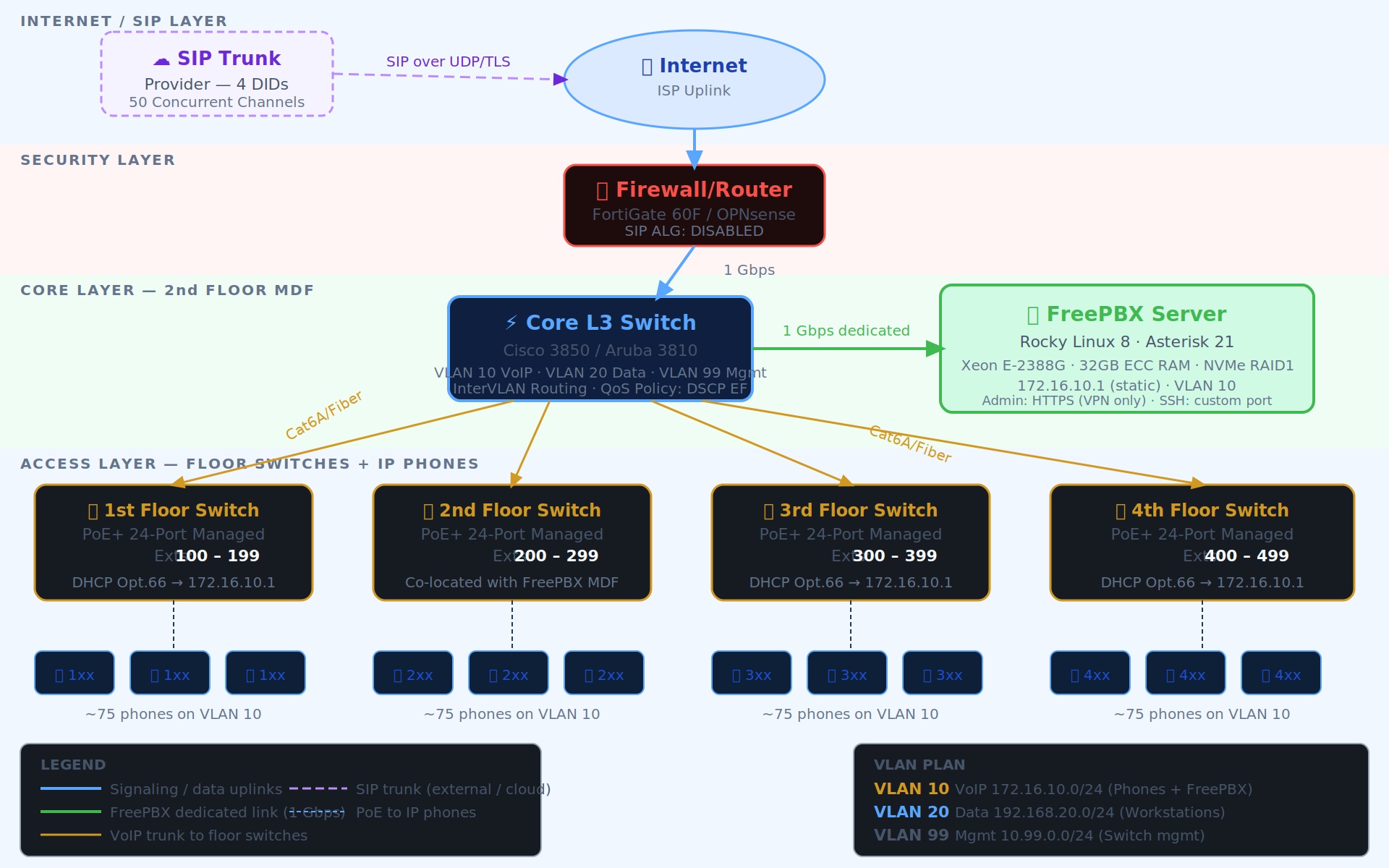
I am planning to implement a FreePBX server in our office and would appreciate some advice from experienced FreePBX administrators.
Our requirements are:
- Around 300 IP phone users/extensions
- 4 DID numbers
- Different IVR for each DID
- Mainly internal office communication with external inbound/outbound calling
I have a few questions:
1. Hardware requirements
What kind of server hardware would you recommend for 300 users?
For example, CPU, RAM, storage, and whether I should use a physical server or VM.
2. Concurrent calls / FreePBX limitations
How many simultaneous/concurrent calls can FreePBX handle on the free/community edition? Is there any licensing limitation on the number of extensions or concurrent calls?
3. Multiple DIDs and IVRs
Can I configure all 4 different DID numbers in FreePBX and assign a different IVR to each DID? For example:
- DID 1 → IVR 1
- DID 2 → IVR 2
- DID 3 → IVR 3
- DID 4 → IVR 4
Also, if there are any recommended hardware specifications or best practices for a 300-user deployment, I would really appreciate your suggestions.
Please feel free to check out Sangoma P-Series phones - they’re designed with FreePBX in mind and offer tight integration with the platform.
That said, from a spec perspective, wether you use our appliances or not (we hope you do) we do list the hardware specs online- I often recommend these as a good starting point when trying to determine how much computing power could be required for X number of users.
Thanks for checking out FreePBX and welcome to the community.
Unfortunately, Sangoma devices are not readily available in my region (Bangladesh). However, as a service provider, we are currently exploring FreePBX and Sangoma solutions. If the upcoming 300-user project goes smoothly, we would be interested in working with these solutions on a larger scale in the future.
Before starting the configuration, I would like to share our planned setup with you. I would really appreciate it if you could review the proposed architecture and recommend any changes or best practices to ensure good stability, long-term smooth operation, and a proper balance between call quality and system performance.
Proposed Setup:
PC/Server: Intel Core i5, 12th Gen
RAM: 16 GB
Storage: 512 GB, dual SSD
Virtualization: VMware
PBX: FreePBX
SIP Accounts/Trunks: 4 SIP accounts connected
Users/Extensions: Approximately 300 IP telephone users
I won’t dwell on the hardware, but I personally believe an i5 with 16 GB of memory would be inadequate although your diagram above shows a Xeon processor and 32 GB of RAM. Do your research on the Sangoma site for correct system sizing. For your trunking, 30 channels seems too small for 300 extensions unless most are just occasional users. How are the 4 DID’s going to be used? Are you running a call center? Call centers can use a lot more system resources and tie up your trunks if there is a lot of hold time for the caller.
As to the operating system, FreePBX is moving entirely to Debian for FreePBX-18. I do not recommend Rocky Linux because you will already be out of compliance with FreePBX for future releases. Use Debian now and avoid the pain later. Debian-12 for FreePBX-17 and Debian-13 when FreePBX-18 comes out.
Grandstream phones will be OK but I’d recommend the GRP series. Grandstream also provides a free cloud-based provisioning and maintenance system for their phones. Take a look at the Grandstream GDMS cloud based provisioning system provided for all to use. It can make your life much easier for setting up, upgrading and monitoring Grandstream phones.
I have never used FreePBX before, so I’m a bit concerned about missing something during deployment or facing issues later, especially since the overall investment is significant.
My maximum concurrent calls will be around 30 local extension calls, including up to 10 concurrent call-center calls through the DIDs.
I’m mainly looking for advice on selecting the proper server, OS, and phones, as well as any limitations or potential issues I should be aware of.
You have already mentioned the OS and phones. It would be great if you could also share any important resources, documentation, or policies that I should review before deployment, so I can avoid potential issues or restrictions later.
Something doesn’t quite add up. You’re talking about designing and deploying a 300-user production system, but the questions you’re asking suggest you haven’t yet got to grips with the basics of FreePBX.
I suggest you build a test system first and learn how things work properly before attempting a deployment of this size. A serious 300-user environment is not the place to learn FreePBX as you go. What exactly are you asking the community to do for you here?
That’s ample, although the problem comes more likely with transcoding and if 300 users want to use it at same time, we have many installs in hotels and aged-care facilities, some older sites have i5, but they have 32G ram and it handles it well.
We now deploy supermicro’s with 16 cores 32G at medium sites (50+) and use lenovo micro think centres (M70) for anything less, although my testing says it can handle 200 plus concurrent calls in its sleep, i still prefer the supermicros for larger sites.
fun fact: we have one crazy nerd client, who has 32 extensions, often has all in use directly or via MOH and uses a … raspberry pi4 … spec wise i’m not surprised, and she showed me its still snappy response, my only caution to her was the sdcard reliability and make sure the backups work
Sometimes even IT people don’t have that luxury and have to dive head first in the deep end.
But yes, I would suggest OP gets an old PC to play around with, even for a weekend, depending upon the urgency of the job, at least they wont be going in totally blind, and if you can master a 5 user pbx, you can master a 5k user pbx - providing you, as this OP has done, has sought advice of gutsy enough hardware.
On the note of hardware, I strongly insist investing in decent switches and routers, not go using some 29.95 special from ebay/alixpress/temu/market-place etc… and avoid the fanboisms of ubiquiti those vendor-lockin things might be fine for home office, but not enterprise, the backplanes are gutless and have had an unacceptable failure rate, we have many mikrotik switches and routers in the field and in our own office, super reliable and you’re not locked into their ecosystem, we also have a couple juniper 4200’s and the a solitary single cisco (i avoid the latter if I can, your paying for the name in licenses more than anything else and over many years we find them no better) in the field too.
That serious overkill for that amount of users. I got 3K users on a multi-tenant box doing a wide range of things from call recording, queues, parking, paging, wake up calls all on 4CPU/8GB RAM. Granted the web stack exists somewhere else but for a FreePBX box…16 cores/32GBRAM is more like upwards of a 1000 users and that would require them to do some serious transcoding to justify it. No transcoding you can jam even more than a 1000 users on it. Low call volume, even more.
The user count is a factor to consider but it’s not the impactful factor to consider. A system running 500 users with barely anything being done will not need the resources for a system that is running 100 users doing having transcoding, recording, running a lot of AGI/ARI/System calls with high call volume.
The user count should not be how you base these things off of. It matters but what matters more is what the system and the users are actually doing. Again, a system with 500 idle users and low call volume will use less resources than a system with 100 actives users, applications, transcoding and recordings.
FreePBX is an excellent PBX for a single business. Many people have tried to shoehorn multitenancy into FreePBX without much success. If you plan to supply PBX services to multiple clients, you’d need to stand multiple instances of FreePBX, one for each client.