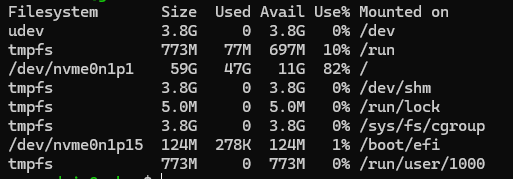
So as the long title says im having a weird issue (i did not set this server up, i just inherited it from the guy who retired so im kinda lost). So it starts off where none of my extensions will ring, i realized if i do a ndcu it shows this one drive full. i then reboot (i have to do via SSH as the web page will not display anything) and then that same drive goes down to about 81%. once ive done that reboot, i can call direct extensions but ring groups do not work. so then i need to edit a single ring group and apply the config and then all the ring groups work again? Any help would be appreciated!
You might also consider looking in to the logs for any error messages, as well as temporary files in /tmp or /var/tmp that are getting cleared out after a reboot. Do you have shell access ?
Generally speaking, NVMe is still a little quirkier than SSDs, especially on older Linux systems like yours. You are probably in the minority of users of FreePBX with that kind of setup – which points to potential other custom scripts and such that might be filling up temporary file holding areas (which are cleared at reboot.) Or, it could be some interaction with failed drive TRIM operations during normal operation, which only successfully complete during the next system startup – seems like a reach tho to get to that point right now, as there’s much other troubleshooting to consider.
NVME is a way of accessing solid state disks, not an alternative, and should only affect performance.
I wouldn’t expect a failure to trim to cause a loss of available space; I’d just expect it to make the wear uneven, and therefore reduce the device life.
I’d note one other thing that sometimes causes storage to deplete and recover on a reboot, which is people who delete log files, to save space, without telling the program that is logging that they have done so. This causes the file name to disappear, but the file continues to exist and grow.
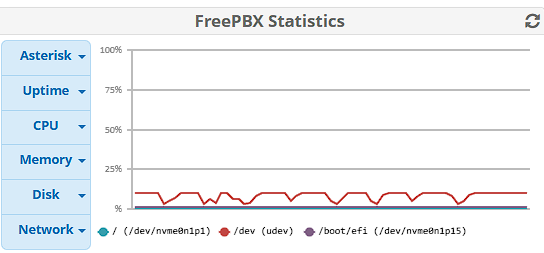
So i couldnt figure out how to enable that widget on the dashboard but when i ssh in i can run df -h and this is what i see. but when the phones stop working the /dev/nvme0n1p1 goes to 100% and only gets cleared after a reboot.

 Courtesy Reminder that FreePBX v15 is EOL Starting 1 October 2025