After extensive research on how to safely reduce the size of the ibdata1 file in FreePBX without negative consequences, I found a reliable solution. I’m happy to share this guide for the FreePBX community.
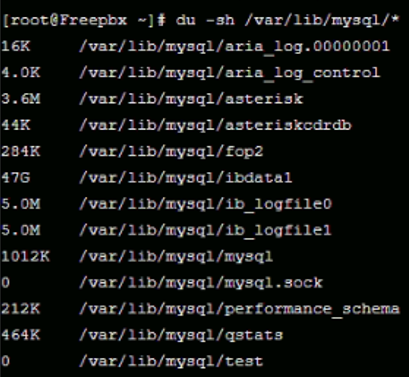
The ibdata1 file in my system had grown to 47GB, which can cause performance issues or storage problems on your server, as shown below:
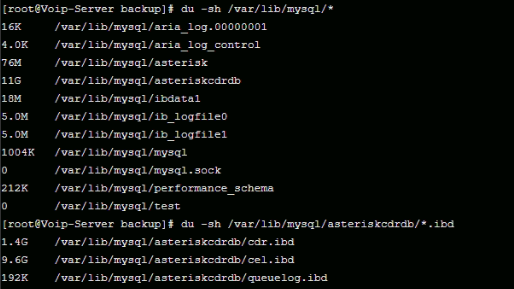
Note: The final screenshot in this guide (showing the restored database) is from a different server. Enabling innodb_file_per_table does not reduce the total size of the database files but instead stores tables like cel and cdr in separate files, preventing ibdata1 from growing uncontrollably.
Follow these steps carefully to reduce the ibdata1 file size while preserving your FreePBX data:
- Stop the Asterisk Service Begin by stopping the Asterisk service to prevent any database activity:
fwconsole stop
- Check the
innodb_file_per_tableSetting
Verify whether theinnodb_file_per_tablesetting is enabled by running. When prompted for a password, try pressing Enter without entering a password :
mysql -u root -p -e "SHOW VARIABLES LIKE 'innodb_file_per_table';"
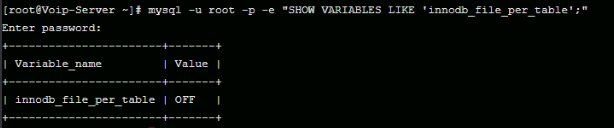
If it’s disabled, the output will look like this:
- Enable
innodb_file_per_tableTo enable this setting, create a new configuration file:
vi /etc/my.cnf.d/innodb.cnf
Add the following content:
[mysqld]
innodb_file_per_table = 1
- Restart MariaDB Apply the changes by restarting the MariaDB service:
systemctl restart mariadb
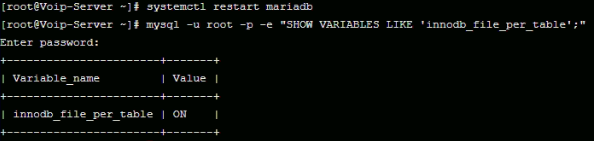
Verify the setting again to confirm it’s enabled:
- Back Up the Databases Create a directory to store the database backups:
mkdir /var/backup
cd /var/backup
Export the asterisk and asteriskcdrdb databases:
mysqldump -u root -p asterisk > asterisk.sql
mysqldump -u root -p asteriskcdrdb > asteriskcdrdb.sql
- Drop Databases and Stop MariaDB Drop the
asteriskandasteriskcdrdbdatabases:
mysql -u root -p -e "DROP DATABASE asterisk; DROP DATABASE asteriskcdrdb;"
Stop the MariaDB service:
systemctl stop mariadb
Confirm that MariaDB is stopped:
systemctl status mariadb
- Remove Old InnoDB Files Delete the
ibdata1file and associated log files:
rm -rf /var/lib/mysql/ibdata1
rm -rf /var/lib/mysql/ib_logfile*
- Start MariaDB and Verify Start the MariaDB service:
systemctl start mariadb
Check the status to ensure it’s running:
systemctl status mariadb
- Recreate Databases and Restore Backups Recreate the databases:
mysql -u root -p -e "CREATE DATABASE asterisk; CREATE DATABASE asteriskcdrdb;"
Restore the backups:
mysql -u root -p asterisk < asterisk.sql
mysql -u root -p asteriskcdrdb < asteriskcdrdb.sql
- Verify the Result After restoration, the
asteriskcdrdbdatabase will be recreated with separatecelandcdrtables, and the ibdata1 file size will be significantly reduced: