Freepbx install failing

I am attempting to install freepbx 17 on debian 12 and it keeps failing on a fresh debian install.

I am using the install script from the help pages.
cd /tmp
wget https://github.com/FreePBX/sng_freepbx_debian_install/raw/master/sng_freepbx_debian_install.sh -O /tmp/sng_freepbx_debian_install.sh
bash /tmp/sng_freepbx_debian_install.sh

it always fails at the same spot…

2025-07-29 17:42:09 - Reloading and restarting FreePBX 17
2025-07-29 17:42:11 - Installation failed at step Reloading and restarting FreePBX 17. Please check log /var/log/pbx/freepbx17-install-2025.07.29-17.21.32.log for details.
2025-07-29 17:42:11 - Error at line: 1205 exiting with code 1 (last command was: fwconsole reload >> “$log”)
2025-07-29 17:42:11 - Exiting script

Can confirm the same issue, its not installing asterisk properly.

Did a asterisk-version-switch and installed asterisk 20 without issue, though the GUI isn’t starting up properly.

Probably an update with Asterisk 22 that caused the scripts to crash?

Here is a work around that got fully installed

Install Debian 12
apt update && apt upgrade
Run the bash install

When it fails

“Asterisk-version-switch” to 20

fwconsole ma downloadinstall framework core sysadmin
fwconsole ma updateall
fwconsole reload && fwconsole restart “should get the asterisk error still”

rerun the bash script for the install

It will fail again but it will install freepbx the rest of the way

After the error, downgrade to asterisk 20 again,

fwconsole reload && fwconsole restart

Should be working, but if you upgrade to 22 again the error will come back.

Did you read the log??

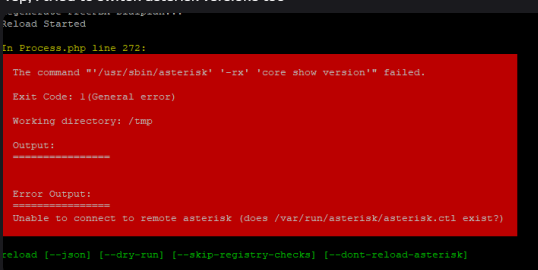
This is the error it spits out if you reload

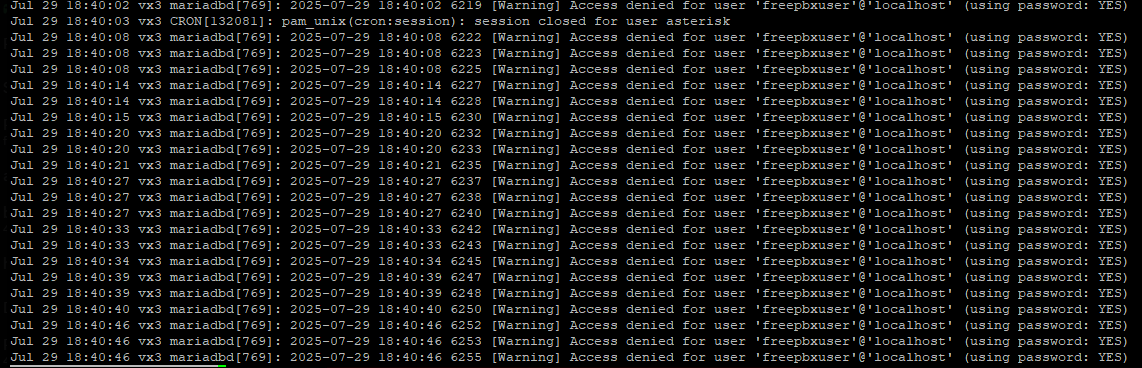
Here is the Journal

Tried updating password from /etc/freepbx.conf for that user and granting all privileges doesn’t help.

yes i read the log…

2025-07-29 17:42:09 - Reloading and restarting FreePBX 17
Reload Started

In Reload.class.php line 859:

Unable to connect to Asterisk Manager

reload [–json] [–dry-run] [–skip-registry-checks] [–dont-reload-asterisk]

2025-07-29 17:42:11 - ****** INSTALLATION FAILED *****
2025-07-29 17:42:11 - Installation failed at step Reloading and restarting FreePBX 17. Please check log /var/log/pbx/freepbx17-install-2025.07.29-17.21.32.log for details.
2025-07-29 17:42:11 - Error at line: 1205 exiting with code 1 (last command was: fwconsole reload >> “$log”)
2025-07-29 17:42:11 - Exiting script

What does this log say? You can put it in pastebin and link here or if there is an obvious error at the end just post that

i just posted the error in the the last reply.

Can you connect to the asterisk manager with telnet on port 5038?

Looks like it installed to an extent but can’t connect, also is asterisk running?

no it does not look like asterisk is running when i do a systemctl status

But if i do a systemctl restart asterisk i dont receive an error. Seems to me like asterisk 22 has an issue.

I was hoping this was just a quick fix, Since it looks like its a bigger issue i also created a ticket with Sangoma as this was meant to be a commercial version of PBXact. Hopefully the engineers can come up with a solution soon and not a work around. I will update here when i have something from them.

Urgh. I thought our installation script was broken, so that’s 4 hours of stress I won’t get back. Luckily I wasn’t working on it for that long as I had to be elsewhere until now. Thanks for posting guys! I can confirm the same having carried out over a dozen attempts around 5-7PM GMT+1.

  • Problem: Asterisk fails to start (Module initialization failed. ASTERISK EXITING!) after running the official FreePBX install script on Debian 12.
  • Cause: Critical Asterisk modules failed to load due to missing or broken .so files:
  • chan_local.so
  • chan_dahdi.so
  • pbx_lua.so
  • res_pjsip_phoneprov_provider.so
  • res_pjsip_endpoint_identifier_dpma.so
    …and others.
  • Reason: These modules were either:
  • Not compiled,
  • Not copied during install,
  • Or failed silently during Asterisk build.
  • Symptoms:
  • fwconsole reload fails with “Unable to connect to remote Asterisk”.
  • Asterisk status shows inactive (dead).
  • Logs full of ERROR loading module and No such file or directory.

Also running in to this one, was beating my head on my desk trying to figure out how the same install process I used just a few days ago wasn’t working anymore despite a total lack of errors until it tried to reload at the end of the script.

ugh running into the same issue right now. tried the work around and getting “Unable to connect to remote Asterisk”
Guess I’m waiting til support gets back to me…

I’ve reverted all the asterisk packages from 21.10.0-1 to 21.9.1-1 and now my asterisk will start without crashing.

sudo apt install asterisk21=21.9.1-1.sng12
asterisk21-core=21.9.1-1.sng12
asterisk21-addons=21.9.1-1.sng12
asterisk21-addons-core=21.9.1-1.sng12
asterisk21-addons-mysql=21.9.1-1.sng12
asterisk21-addons-ooh323=21.9.1-1.sng12
asterisk21-addons-bluetooth=21.9.1-1.sng12
asterisk21-curl=21.9.1-1.sng12
asterisk21-dahdi=21.9.1-1.sng12
asterisk21-doc=21.9.1-1.sng12
asterisk21-odbc=21.9.1-1.sng12
asterisk21-ogg=21.9.1-1.sng12
asterisk21-res-digium-phone=3.6.9-1.sng12
asterisk21-resample=21.9.1-1.sng12
asterisk21-snmp=21.9.1-1.sng12
asterisk21-speex=21.9.1-1.sng12
asterisk21-sqlite3=21.9.1-1.sng12
asterisk21-voicemail=21.9.1-1.sng12

Running into this issue after updating Debian packages on 2 systems today.
According to apt history log, here is what was installed / broke it.

Start-Date: 2025-07-29 16:17:46
Commandline: apt-get -y install asterisk21 asterisk21-addons asterisk21-addons-bluetooth asterisk21-addons-core asterisk21-addons-mysql asterisk21-addons-ooh323 asterisk21-core asterisk21-curl asterisk21-dahdi asterisk21-doc asterisk21-odbc asterisk21-ogg asterisk21-res-digium-phone asterisk21-resample asterisk21-snmp asterisk21-speex asterisk21-sqlite3 asterisk21-voicemail libapache2-mod-php8.2 libgnutls30 php8.2 php8.2-bcmath php8.2-bz2 php8.2-cli php8.2-common php8.2-curl php8.2-gd php8.2-intl php8.2-ldap php8.2-mbstring php8.2-mysql php8.2-opcache php8.2-readline php8.2-soap php8.2-sqlite3 php8.2-xml php8.2-zip

Upgrade: asterisk21-addons-ooh323:amd64 (21.9.1-1.sng12, 21.10.0-1.sng12), asterisk21-addons-bluetooth:amd64 (21.9.1-1.sng12, 21.10.0-1.sng12), php8.2-mysql:amd64 (8.2.28-1~deb12u1, 8.2.29-1~deb12u1), asterisk21-speex:amd64 (21.9.1-1.sng12, 21.10.0-1.sng12), php8.2-soap:amd64 (8.2.28-1~deb12u1, 8.2.29-1~deb12u1), libapache2-mod-php8.2:amd64 (8.2.28-1~deb12u1, 8.2.29-1~deb12u1), php8.2:amd64 (8.2.28-1~deb12u1, 8.2.29-1~deb12u1), php8.2-mbstring:amd64 (8.2.28-1~deb12u1, 8.2.29-1~deb12u1), asterisk21-snmp:amd64 (21.9.1-1.sng12, 21.10.0-1.sng12), php8.2-curl:amd64 (8.2.28-1~deb12u1, 8.2.29-1~deb12u1), asterisk21-res-digium-phone:amd64 (3.6.9-1.sng12, 3.6.10-1.sng12), asterisk21:amd64 (21.9.1-1.sng12, 21.10.0-1.sng12), asterisk21-resample:amd64 (21.9.1-1.sng12, 21.10.0-1.sng12), php8.2-bcmath:amd64 (8.2.28-1~deb12u1, 8.2.29-1~deb12u1), php8.2-opcache:amd64 (8.2.28-1~deb12u1, 8.2.29-1~deb12u1), php8.2-intl:amd64 (8.2.28-1~deb12u1, 8.2.29-1~deb12u1), asterisk21-core:amd64 (21.9.1-1.sng12, 21.10.0-1.sng12), php8.2-readline:amd64 (8.2.28-1~deb12u1, 8.2.29-1~deb12u1), asterisk21-sqlite3:amd64 (21.9.1-1.sng12, 21.10.0-1.sng12), asterisk21-addons-core:amd64 (21.9.1-1.sng12, 21.10.0-1.sng12), asterisk21-curl:amd64 (21.9.1-1.sng12, 21.10.0-1.sng12), asterisk21-doc:amd64 (21.9.1-1.sng12, 21.10.0-1.sng12), asterisk21-voicemail:amd64 (21.9.1-1.sng12, 21.10.0-1.sng12), asterisk21-addons-mysql:amd64 (21.9.1-1.sng12, 21.10.0-1.sng12), asterisk21-ogg:amd64 (21.9.1-1.sng12, 21.10.0-1.sng12), asterisk21-odbc:amd64 (21.9.1-1.sng12, 21.10.0-1.sng12), php8.2-gd:amd64 (8.2.28-1~deb12u1, 8.2.29-1~deb12u1), php8.2-sqlite3:amd64 (8.2.28-1~deb12u1, 8.2.29-1~deb12u1), libgnutls30:amd64 (3.7.9-2+deb12u4, 3.7.9-2+deb12u5), php8.2-bz2:amd64 (8.2.28-1~deb12u1, 8.2.29-1~deb12u1), php8.2-cli:amd64 (8.2.28-1~deb12u1, 8.2.29-1~deb12u1), asterisk21-addons:amd64 (21.9.1-1.sng12, 21.10.0-1.sng12), php8.2-common:amd64 (8.2.28-1~deb12u1, 8.2.29-1~deb12u1), php8.2-ldap:amd64 (8.2.28-1~deb12u1, 8.2.29-1~deb12u1), asterisk21-dahdi:amd64 (21.9.1-1.sng12, 21.10.0-1.sng12), php8.2-xml:amd64 (8.2.28-1~deb12u1, 8.2.29-1~deb12u1), php8.2-zip:amd64 (8.2.28-1~deb12u1, 8.2.29-1~deb12u1)
End-Date: 2025-07-29 16:18:06
Also hitting this issue,
it looks like as part of the issues mentioned above Apache doesnt enable the freepbx site, and when trying manually it gives:

Jul 30 15:12:16 test apachectl[13283]: AH00526: Syntax error on line 28 of /etc/apache2/sites-enabled/freepbx.conf:
Jul 30 15:12:16 test apachectl[13283]: Invalid command 'ExpiresActive', perhaps misspelled or defined by a module not included in the server configuration
Jul 30 15:12:16 test apachectl[13280]: Action 'graceful' failed.
Jul 30 15:12:16 test apachectl[13280]: The Apache error log may have more information.

The post here:

Included the Asterisk startup log which let me see why it is being prevented from loading. FreePBX is installing and loading the DPMA modules, but hasn’t configured things. The most recent version fixes some issues and does some configuration checking, which appears to be stopping it. I’ve raised it with the FreePBX team so we can can determine the correct resolution.

That’s what helped me.

Install and get error

cd /tmp
wget https://github.com/FreePBX/sng_freepbx_debian_install/raw/master/sng_freepbx_debian_install.sh  -O /tmp/sng_freepbx_debian_install.sh
bash /tmp/sng_freepbx_debian_install.sh

Switch asterisk to 21 version

asterisk-version-switch

Install older asterisk 21 version packages (as @memxit mentioned)

apt install asterisk21=21.9.1-1.sng12 \
asterisk21-core=21.9.1-1.sng12 \
asterisk21-addons=21.9.1-1.sng12 \
asterisk21-addons-core=21.9.1-1.sng12 \
asterisk21-addons-mysql=21.9.1-1.sng12 \
asterisk21-addons-ooh323=21.9.1-1.sng12 \
asterisk21-addons-bluetooth=21.9.1-1.sng12 \
asterisk21-curl=21.9.1-1.sng12 \
asterisk21-dahdi=21.9.1-1.sng12 \
asterisk21-doc=21.9.1-1.sng12 \
asterisk21-odbc=21.9.1-1.sng12 \
asterisk21-ogg=21.9.1-1.sng12 \
asterisk21-res-digium-phone=3.6.9-1.sng12 \
asterisk21-resample=21.9.1-1.sng12 \
asterisk21-snmp=21.9.1-1.sng12 \
asterisk21-speex=21.9.1-1.sng12 \
asterisk21-sqlite3=21.9.1-1.sng12 \
asterisk21-voicemail=21.9.1-1.sng12

Run installation again without updating asterisk

bash /tmp/sng_freepbx_debian_install.sh --noasterisk
1 Like

I have tested and it’s fixed :star_struck: Well done and thanks :+1:

I have also been notified that the DPMA package has been rolled back in the repo.