New FreePBX 17 cloud install on Debian 12 will not save static IP for the network interface. This is a two interface cloud install. Internet and LAN facing interfaces. Internet interface gets a public IP from DHCP from the host provider the LAN interface I configure to match with my other VMs on the same network. Whatever I try to set for IP and subnet, FreePBX will not save it. I had to go to edit the interface settings ( /etc/network/interfaces.d/ ) from the CLI and I managed to get the LAN inteface to communicate, but when i go to the FreePBX17 admin module > go to network it still shows the wrong IP for the LAN interface, which is a random assigned IP from the private network thats not routable. I have this same setup on 10+ other FreePBX15 instances and never had this network drama. Any help is appreciated.
Update: I did a brand new local server VM install and when I have two network interfaces by default FreePBX install wizard will ask which one is the primary so it can use it to download everything it needs. Well after the install I cannot setup a secondary interface. For some reason Debian 12 and FreePBX network scripts are not playing well together. I’m not sure if theres a bug for this but I will submit one for sure. This is not normal behavior. In FreePBX 15 I could have 3 interfaces all configured tru the admin page on FreePBX and never had an issue.
Please post bellow if you have any remedy for this problem as I I need to upgrade to FreePBX17 because Sangoma support will not solve other issues because I am on a old version (15)
Bug submitted.
Are you using a public cloud service for your compute instance/VM, and if so which one?
I use Vultr and recently migrated from FreePBX 16 (“stock” SangomaOS/CentOS 7) to 17 on Debian 12. On 16, I stuck with public IPv4 and IPv6 addresses and I don’t remember ever having network connection trouble that wasn’t ID10T/firewall/f2b related. On 17, I decided to play a bit with Vultr VPC (virtual private cloud), where I can have a VPC-connected “internal” interface with private IP address, and also have an interface with public IPv4 and IPv6 addresses. I don’t think I have a long-term need/use for VPC connection, and will probably get rid of it on the FreePBX 17 system. I’ve had some strange/unexpected loss of public IPv4 address on the FreePBX 17 / Debian 12 compute instance, and of course I lose web administration and SSH access when this happens. I did find that if I access the compute instance through the Vultr/VM console, I can simply do dhclient as root, and I immediately have my public IPv4 address back. I don’t think this is exactly what you are describing, but perhaps related… Please let me know if you discover a solution and I will do the same.
I am experiencing a issue w/ a 17 install I did late last month where the NIC “loses” it’s IPV4 settings. I think I figured this out though. It was acting as if the DHCP lease ran out so it dropped the V4 address but couldn’t get the IP as the DHCP client wasn’t working even though I set a static via the admin module.
journalctl -u networking.service showed the following:
Oct 08 03:22:33 voip.example.net systemd[1]: Starting networking.service - Raise network interfaces...
Oct 08 03:22:33 voip.example.net dhclient[631]: Internet Systems Consortium DHCP Client 4.4.3-P1
Oct 08 03:22:33 voip.example.net ifup[631]: Internet Systems Consortium DHCP Client 4.4.3-P1
Oct 08 03:22:33 voip.example.net dhclient[631]: Copyright 2004-2022 Internet Systems Consortium.
Oct 08 03:22:33 voip.example.net ifup[631]: Copyright 2004-2022 Internet Systems Consortium.
Oct 08 03:22:33 voip.example.net dhclient[631]: All rights reserved.
Oct 08 03:22:33 voip.example.net ifup[631]: All rights reserved.
Oct 08 03:22:33 voip.example.net dhclient[631]: For info, please visit https://www.isc.org/software/dhcp/
Oct 08 03:22:33 voip.example.net ifup[631]: For info, please visit https://www.isc.org/software/dhcp/
Oct 08 03:22:33 voip.example.net dhclient[631]:
Oct 08 03:22:33 voip.example.net dhclient[631]: Listening on LPF/enp1s0/11:11:11:11:11:11
Oct 08 03:22:33 voip.example.net ifup[631]: Listening on LPF/enp1s0/11:11:11:11:11:11
Oct 08 03:22:33 voip.example.net ifup[631]: Sending on   LPF/enp1s0/11:11:11:11:11:11
Oct 08 03:22:33 voip.example.net ifup[631]: Sending on   Socket/fallback
Oct 08 03:22:33 voip.example.net ifup[631]: DHCPDISCOVER on enp1s0 to 255.255.255.255 port 67 interval 8
Oct 08 03:22:33 voip.example.net dhclient[631]: Sending on   LPF/enp1s0/11:11:11:11:11:11
Oct 08 03:22:33 voip.example.net dhclient[631]: Sending on   Socket/fallback
Oct 08 03:22:33 voip.example.net dhclient[631]: DHCPDISCOVER on enp1s0 to 255.255.255.255 port 67 interval 8
Oct 08 03:22:33 voip.example.net dhclient[631]: DHCPOFFER of 11.22.33.44 from 169.254.169.254
Oct 08 03:22:33 voip.example.net ifup[631]: DHCPOFFER of 11.22.33.44 from 169.254.169.254
Oct 08 03:22:33 voip.example.net ifup[631]: DHCPREQUEST for 11.22.33.44 on enp1s0 to 255.255.255.255 port 67
Oct 08 03:22:33 voip.example.net dhclient[631]: DHCPREQUEST for 11.22.33.44 on enp1s0 to 255.255.255.255 port 67
Oct 08 03:22:33 voip.example.net dhclient[631]: DHCPACK of 11.22.33.44 from 169.254.169.254
Oct 08 03:22:33 voip.example.net ifup[631]: DHCPACK of 11.22.33.44 from 169.254.169.254
Oct 08 03:22:33 voip.example.net dhclient[631]: bound to 11.22.33.44 -- renewal in 39705 seconds.
Oct 08 03:22:33 voip.example.net ifup[631]: bound to 11.22.33.44 -- renewal in 39705 seconds.
Oct 08 03:22:33 voip.example.net ifup[766]: RTNETLINK answers: File exists
Oct 08 03:22:33 voip.example.net ifup[583]: ifup: failed to bring up enp1s0
Oct 08 03:22:33 voip.example.net systemd[1]: networking.service: Main process exited, code=exited, status=1/FAILURE
Oct 08 03:22:34 voip.example.net systemd[1]: networking.service: Failed with result 'exit-code'.
Oct 08 03:22:34 voip.example.net systemd[1]: Failed to start networking.service - Raise network interfaces.
the fix for me was running ip addr flush dev enp1s0
Interesting. Are you using something like Vultr, physical hardware, etc.? Your journalctl output looks familiar. In my case, I see failed to bring up enp8s0 errors. enp8s0 is the VPC network interface I mentioned in my previous reply. The routable (public) IPv4 and IPv6 addresses are associated with enp1s0 on my system. Additionally, I see this output for systemctl status networking.service
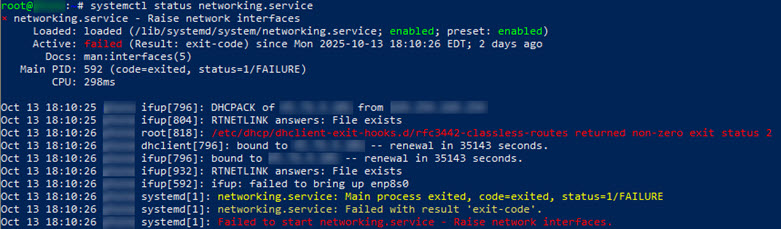
Something curious I found is that the contents of /etc/network/interfaces.d/enp1s0 and /etc/network/interfaces.d/50-cloud-init match on my system. There is no output for diff /etc/network/interfaces.d/enp1s0 /etc/network/interfaces.d/50-cloud-init. Maybe this is expected and both files are required for different purposes…
I wonder if ip addr flush dev enp1s0 will be a permanent fix for you. I tried that command from a console (cloud) session (not remote/ssh) and wasn’t surprised when ip a showed no IPv4 or IPv6 addresses for the enp1s0 interface. After doing that, I tried systemctl start networking.service which resulted in:
Job for networking.service failed because the control process exited with error code.
See “systemctl status networking.service” and “journalctl -xeu networking.service” for details.
A simple dhclient from the console quickly had the expected IPv4 and IPv6 addresses assigned to the enp1s0 interface again.
I’ve seen the same issue on FreePBX 17 where network interface settings wouldn’t save. It turned out to be a permission problem with /etc/sysconfig/network-scripts/. Running updates and fixing SELinux context solved it. Another workaround is editing the interface file manually and restarting the network service. Hopefully, future builds fix the GUI save bug permanently.
Yes. My issues are on Vultr hosted VM. I had no issues with the network interfaces on FreePBX15 but lots of hiccups on Debian12 and FPBX17. I had to manually edit 3 config files for the interfaces and I have it kind of stable right now.. but we will see. The files in question are under /etc/network/interfaces.d#
Three files. enp1s0 is the WAN and enp8s0 is the VPC interface.
50-cloud-init enp1s0 enp8s0
I also had to comment out some lines in the 50-cloud-init file, because it was adding the VPC IP automaticaly eben tho I had it configured as static on the enp8s0 interface
#auto enp8s0
#iface enp8s0 inet static
#    address 10.2.96.9/20
#    mtu 1450
What was the SELinux context fix ?
Thx