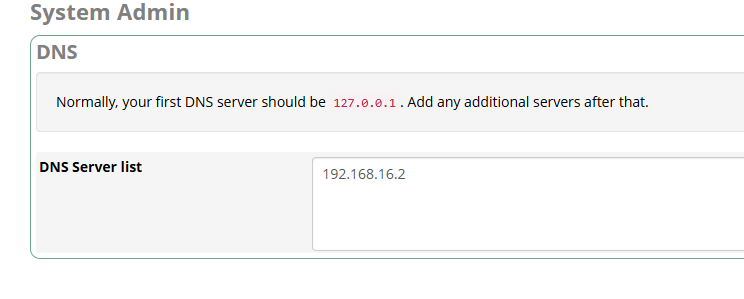
Yesterday afternoon, our emails stopped going out – after hours of investigation, I have discovered the DNS is broken in the server. After checking the resolv.conf file in the CLI, I see that it is auto-generated from the GUI - and then found the DNS setting in the System Admin - DNS section of the Settings.
The address 192.168.16.2 - I have no idea what that address is … it means nothing with respect to our network.
Here’s the quick story … we use a VoIP platform for our business which had no voicemail notify capability. I knew Freepbx had a VM Notify module, so we started a Freepbx server a few years ago. It has no phones. We only use the voicemail on the virtual extensions. Setup a trunk to be able to send calls to the Freepbx and the same trunk for outbound calls when the VM Notify makes the calls out. That’s it - well, then to send out emails for the voicemail.
On Friday, customers noticed it wasn’t sending emails - I got involved and after a day of investigation, I have discovered the emails were not resolving the domain we use for the SMTP server. Checked resolv.conf in the CLI and noticed only 192.168.16.2 was there. Tried to change that in the Freepbx GUI and that’s where we are - it will not save a new configuration. Whatever I type in there, it returns to only 192.168.16.2.
The server is in the AWS cloud infrastructure .. the issue is something to do with the Freepbx software not working properly. I just need to be able to set proper DNS servers (i.e., 8.8.8.8) in that DNS space of the Freepbx System Admin.
I’m looking at having to build another instance and move on, if I can’t figure out how to set DNS Servers.
if freepbx is set as DHCP client it will rely on dhcp server for DNS assignment, i think thats why its greyed out in DNS. can you go to System Admin > Network Settings and change it to Static
ok, you may have something there … but I do not have access to the AWS system that supports this instance and do not know if I set static on the Network Settings will break the connectivity. Thanks, I will talk with them tomorrow morning and see why the 192.168.16.2 stopped providing DNS if that’s the connection to the internet from within the AWS structure. Because this has been working for years and stopped out the blue on Friday —
Never saw something like that before, probably as a work-around you can chattr the /etc/resolv.conf file.
Edit the file as you prefer, and then run chattr +i /etc/resolv.conf, that way the file won’t be written by the GUI.
Well, I figured it out this morning … I was taking myself down a rabbit hole of DNS when the problem all along was that the smtp server we relay to was shutdown. That was why it was not resolving. I saw the no resolv messages in the mail queue and then when I saw the unknown ip address for DNS I was off on a tangent.
I learned alot for sure and appreciate all the help that was provided. We configured the email settings for the new relay and the emails were flowing again. Much appreciation!
It looks like FreePBX is automatically regenerating the DNS configuration, which is why it keeps reverting back to 192.168.16.2 after you submit changes. This usually happens when the system is set to manage DNS through the System Admin module or the network configuration service. You may want to check if DHCP is controlling the DNS settings, because if it is, any manual change in the GUI will be overwritten. Try verifying the DNS configuration in the network settings or your DHCP server, and make sure it’s not forcing that address.