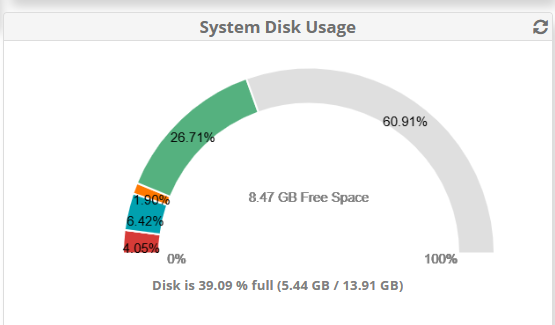
I have a FreePBX 17 Server. I need to add more disk space. We are going to be doing a lot of Faxing through the UCP. So far I just have some faxing and a few test extensions on the system and I am using quite a bit of the disk space. We are going to roll this out to about 150 users.
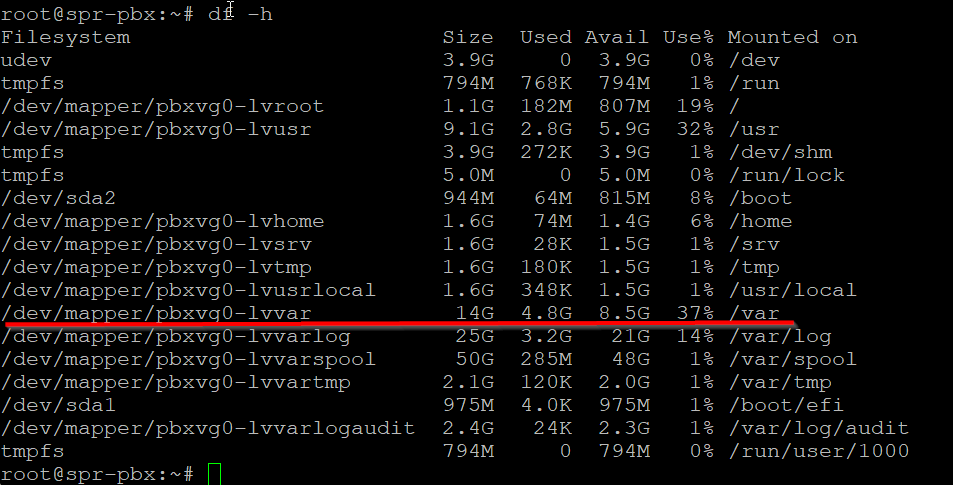
I believe that I know how to use gparted to resize the partition and lvm to resize the volume groups. What I don’t know is what volume group it the WebGui Reporting that I need to add the space too.
From What I understand is you have to boot to a gparted Live CD and then expand the partition. Then do a pvresize /dev/sdXn to add the extra space the volume group then do a lvresize -r --size +50GiB /dev/vg/lv to add the space. What I do not know though for sure is what space (mount point etc /var) is being reported in the GUI.
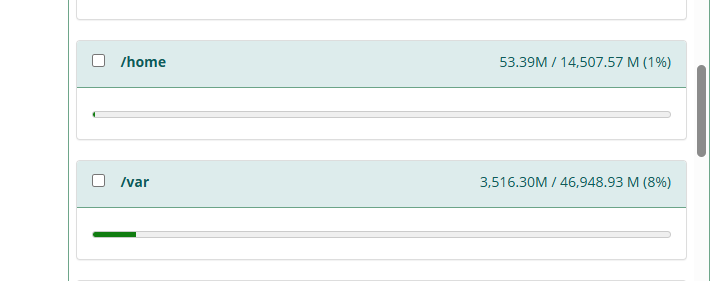
If you installed with the beta ISO, the System Disk Usage widget in Dashboard is misreporting. Check the actual usage in Admin > System Admin > Storage
Did you ever get an answer to this question? I just decided to give 17 a try also and my first realization is that my disk space looks like it’s much smaller and now I’m worried. Do I need to resize something before I think about using this in a production environment for about 40 users? Dashboard says I have 9GB free. Storage State says I have 47GB in /var/spool, that doesn’t seem right.
I wiped installed a new copy of Debian 12, gave it 2TB of disk space, and told it to do guided partitioning using all disk space. Then it did the freepbx install script and backed up my old system and restored it to the new one and now I have 2TB of usable disk space. I had to work with support to get my licenses transferred to my new install, but it only took a few minutes to get them moved to my new server and everything worked, first go around! I have 315 users in my production environment, and I was using up most of the diskspace with 5 test users. Doing a lot of call recording and faxing.