DDNS Hostname doesn't work in SIP Settings/NAT Settings/External Address

Hi all.

I’m running FPBX 17.0.28/Asterisk 21.11.0

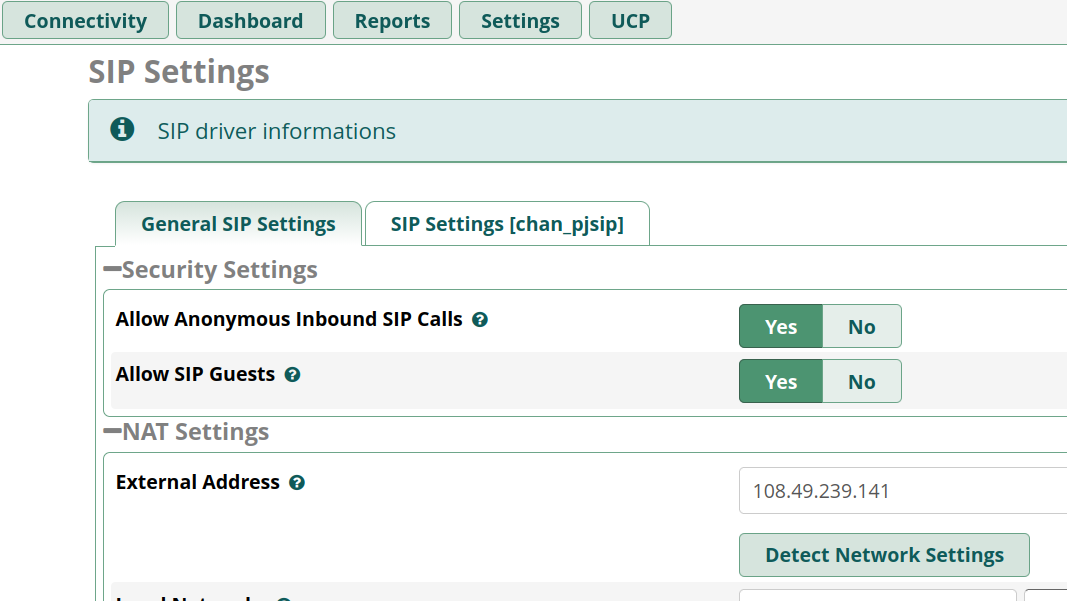
I’d love to use my DDNS hostname in the NAT External Address field, but it does not work. I lose the PJSIP audio when my ISP changes my external address, and the only way I have found that repeatedly works, is to use the “Detect Network Settings” button.

Additionally, the value stored in the sip_general_additional.conf file “externhost” variable does not seem to reliably update – I changed the value back from my DDNS hostname to the detected external IP and the file did not update, I had to go in and do it manually the next day.

This seems to be a constant issue, with people writing scripts to update the .conf file, others claiming the latest version of FreePBX has fixed this…it’s frustrating to have to change it manually when there’s a well known way to handle this.

If anyone has managed to make this work (entering a DDNS hostname in the External Address field), please let me know, because at this point I’m considering filing a bug report on it.

At the Asterisk command prompt, what does
dnsmgr status
show?

Did you restart (not just reload) Asterisk after changing External Address?

Does the FQDN you entered resolve (on the FreePBX machine) to your public IP?

Is this just a comment that may be useful for troubleshooting, or are you actually depending on chan_sip?

About how often does your public IP address change?

Hi Stewart – thanks for the reply.

dnsmgr status shows it is active

The FQDN does resolve to my external IP, I know this because I use it on some of my external extensions, and for other things unrelated to VOIP.

I have rebooted the entire PC several times after setting the field to the FQDN and the problem still occurs.

The comment about the entry in sip_general_additional.conf is because I read that it is where Asterisk stores this information. Everything SIP in my system uses chan_pjsip.

My IP address changes whenever FIOS decides it wants to change it, seems to be on the order of every few months. Yeah, I know it’s not a huge deal to update the field manually from the console, but it’s a bit of a PITA to find that none of my remote extensions can transfer audio when I’m not able to do the maunal updte.

Is there something you can see that I’m missing?

Thanks,

Peter

Here’s another question -

The setting I’m changing in FreePBX is on the SIP Settings page, under General SIP Settings/NAT Settings/External Address. Perhaps this is not the right place?

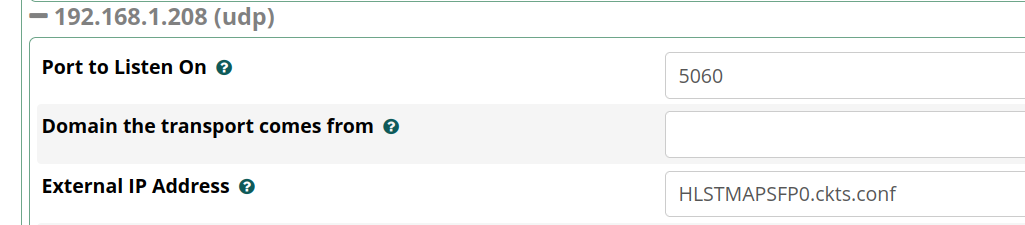
There also seems to be another place that maybe I should be putting this – in the SIP Settings (chan_pjsip) tab, under Transports, there’s a place for “External IP Address”, the information popup says if you don’t enter anything, the “default setting” is used, but maybe this is where the DDNS hostname should be entered?

I found lots of postings on this issue but no clear answer.

In the General tab of Asterisk SIP Settings, put your FQDN in the External Address field. Submit and Apply Config.

In the chan_pjsip tab, for each transport, all fields except Port to Listen On should be blank. Submit and Apply Config.

At a root shell prompt, type
fwconsole restart
(or reboot the whole server).

Does the system have the correct external IP (does pjsip logger show the correct address in SIP and SDP)?

OK, so I just tried the above (DDNS host in the transport “External IP Address field) and I get no audio on calls from outside my NAT.

Putting a DDNS entry in the NAT external address field on the General SIP Settings tab also prevents call audio from passing. Calls go through, but no audio either way.

Trying this now…previous posting overlapped with your latest)

pjsip logger on, is showing the DDNS hostname instead of the IP address:

“sip:[email protected]” instead of “sip:[email protected]”.

The IP appears at times, but I’m not really sure what I should be looking for.

No RTP audio now, even though I have set the numeric IP address back againand rebooted the system. It does seem to take a while to

It seems to me that FreePBX or Asterisk is not resolving the DDNS hostname once, then using the resulting IP address (which is what I would expect it to be doing), then waiting the appropriate interval.

I should mention again that this issue only occurs on my remote extensions (those on the outside of my NAT) and when I go back to using the numeric IP, RTP audio comes back (though it does seem to take many minutes). Calls always go through, no matter whether the field is set to a DDNS hostnae or a numeric IP, but setting a hostname kills the audio.

Here’s a screengrab of the log on a call I just made (after rebooting the PC with the numeric IP address in the NAT “External Address” field. 204 is my SIP Softphone coming in from my cellphone, and 203 is the IP phone on my desk. 108.49.239.141:2760 is the correct external address and port on my NAT box and 12.74.59.163 is my cell phone’s IP

1724875[2026-03-30 16:02:38] VERBOSE[2296] res_pjsip_logger.c: <— Transmitting SIP response (1140 bytes) to TCP:12.74.59.163:47720 —>

1724876SIP/2.0 200 OK

1724877Via: SIP/2.0/TCP 10.186.220.230:36031;rport=47720;received=12.74.59.163;branch=z9hG4bK-524287-1—040a8f281e6e0935;alias

1724878Call-ID: 687-d0WdsEkLKvB_C_b8_g..

1724879From: “Asterisk 204” sip:[email protected];tag=3123ea34

1724880To: sip:[email protected];tag=675d2873-4934-4976-8ba4-87d7f0014442

1724881CSeq: 2 INVITE

1724882Server: FPBX-17.0.28(21.11.0)

1724883Allow: OPTIONS, INVITE, ACK, BYE, CANCEL, UPDATE, PRACK, REGISTER, SUBSCRIBE, NOTIFY, PUBLISH, INFO, MESSAGE, REFER

1724884Contact: sip:108.49.239.141:2760;transport=TCP

1724885Supported: 100rel, timer, replaces, norefersub

1724886Session-Expires: 1800;refresher=uac

1724887Require: timer

1724888P-Asserted-Identity: “Peter desk” sip:[email protected]

1724889Content-Type: application/sdp

1724890Content-Length: 384

1724891

1724892v=0

1724893o=- 0 3 IN IP4 108.49.239.141

1724894s=Asterisk

1724895c=IN IP4 108.49.239.141

1724896t=0 0

1724897m=audio 12946 RTP/AVP 0 8 3 9 120 101

1724898a=rtpmap:0 PCMU/8000

1724899a=rtpmap:8 PCMA/8000

1724900a=rtpmap:3 GSM/8000

1724901a=rtpmap:9 G722/8000

1724902a=rtpmap:120 opus/48000/2

1724903a=fmtp:120 maxaveragebitrate=64000;useinbandfec=1;usedtx=1

1724904a=rtpmap:101 telephone-event/8000

1724905a=fmtp:101 0-16

1724906a=ptime:20

1724907a=maxptime:20

1724908a=sendrecv
I should mention that I have checked on the PC that runs FreePBX and that DDNS hostname resolves correctly to my external IP.

First, confirm that TCP port 2760 is used straightforwardly: In Asterisk SIP Settings for the TCP transport, you have Port to Listen On set to 2760 and, in your router/firewall, you have external TCP port 2760 forwarded to port 2760 on the PBX local address.

Next, confirm that the PBX received an ACK for the 200 OK you posted and it was processed ok (the PBX did not repeat sending the 200 OK).

Also, confirm that in your router/firewall, UDP ports 10000-20000 are forwarded to the PBX local address.

If all this is true, check (with tcpdump or sngrep) whether RTP is coming in from the mobile. Possibly, it’s being received by Asterisk but not being played for some reason.

All that (non-standard port translation (2760 outside translated to 5060 inside NAT), RTP port range forwarding, both TCP and UDP) has been verified to work, and does work, so long as I enter a numeric IP into the field in the SIP Settings/NAT section. If I change it to a DDNS hostname, calls complete, but there is no audio (which I think means RTP is not getting through).

I have also verified that the value in pjsip.transports.conf reflects what is entered in the field – it does change to the DDNS hostname but is currently set to my numeric IP

[192.168.1.208-udp]
type=transport
protocol=udp
bind=192.168.1.208:5060
external_media_address=108.49.239.141
external_signaling_address=108.49.239.141
external_signaling_port=2760
allow_reload=yes
tos=cs3
cos=3
local_net=192.168.1.0/24

The one thing I have found (and this is how FreePBX set it up, I did not set this) is that in sip_general_additional.conf the setting below is present. All the docs I have found on the web, say it should be set to “yes”. I have not found a corresponding “nat=” variable in any of the pjsip config files I’ve looked at.

nat=force_rport,comedia

There seems to be a lot of “moving things around” between Sangoma and FreePBX in the various revisions, so an awful lot of the available documentation and forum posts are outdated and give advice for making this work in systems that are not current.

I did find this article that seems to indicate it (DDNS resolution) should work, but, again, it’s from 2018. And I’m still seeing people with this issue in the forum posts I find.

Do you have personal knowledge that DDNS hostname resolution does work in FPBX 17.0.28/Asterisk 21.11.0?

No, my own system (which does use DDNS resolution and works fine) is older, and I won’t mess with others just because of this thread.

However, it should not be hard for you to troubleshoot the FQDN case a bit further:

  1. Is the signaling ok (ACK received, 200 OK not retransmitted)?
  2. Is any RTP being received from the remote caller? If so, is it being sent to the callee?
  3. If RTP not coming in, look at the mobile end to see where it is being sent.

It works for me - but only when I fixed a pesky problem… My FreePBX sits behind a UDM Pro. When FreePBX (Asterisk) was issuing a DNS lookup for xxxx.ddns.net the UDM correctly returned the local address 192.168.nnn.nn - which of course wont work if you are outside the network - no audio is the symptom. Fix is to do this on your FreePBX server

sudo nmcli con mod “your-connection-name” ipv4.dns “8.8.8.8 1.1.1.1”
sudo nmcli con mod “your-connection-name” ipv4.ignore-auto-dns yes
sudo nmcli con up “your-connection-name”

Use:- sudo nmcli con show to find out “your-connection-name”

That forces the router to insist on DNS resolution from outside your network,

Might work for you… Let us know

No, my own system (which does use DDNS resolution and works fine) is older, and I won’t mess with others just because of this thread.

Thanks for the giggle. I completely understand!

It works for me - but only when I fixed a pesky problem

OK, thanks, I’ll give those commands a try and report back.

I’m behind a USG PRO 4 which I have discovered is…quirky. But it does work.

Have you ever tried using pjsip.transports_custom_post.conf?

[transport](+)
external_media_address=108.49.239.141
external_signaling_address=108.49.239.141

I’m not having any problems when I use a numeric IP as in your snip. Calls complete and I get audio.

And pjsip.transports.conf does always show what I have entered in the NAT External Address fileld, be it a numeric IP or my DDNS hostname.

No change – using a DDNS hostname in the NAT/External Network Address field results in the Asterisk log showing the external host name being used in the signalling, as opposed to the external IP address. It should resolve, but it doesn’t seem to be.

I’m reading conflicting postings as to whether this is actually implemented (and how it’s implemented) in Asterisk…there seem to be discussions about modifying the /etc/hosts file…which I have done, BTW, I found a script online that will update the DDNS host ip address within the /etc/hosts file, maybe that’s worth a try.

I need to put this down for a while, but I will post if I discover anything new.