Using FreePBX 16.0.45. Rather simple question, but I wanted to make sure. Since I haven’t had to import in extensions in awhile. A month or two ago I was importing in updated dial patterns for an outbound route, and all existing entries were wiped. Only leaving the smaller subset I was trying to import in to add to what was already there. Hence wanting to play it safe with importing extensions, so I’m asking here. 
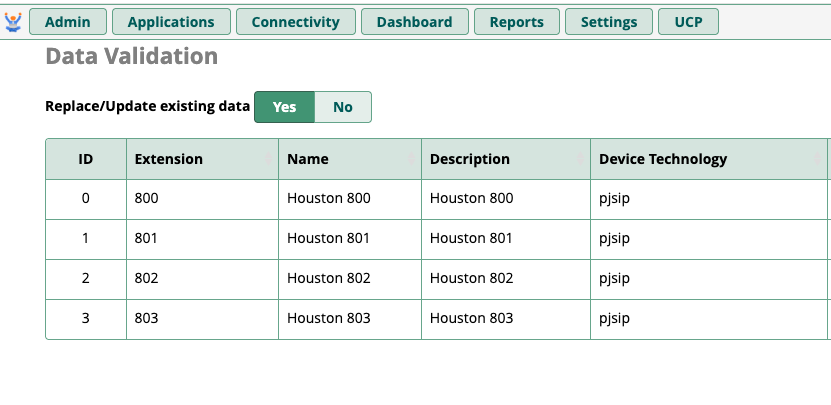
I just want to import in four new extensions, into the ~200 extensions I already have defined. If I select Yes to Replace/Update Existing Data, shown in the screen shot below, these four new extensions will be added and my existing ones will remain defined, correct?
I’d just select No as the documentation is vague and it sounds like using Yes will replace your existing (or update it) data with your CSV import.
Yes, the wording is a little confusing. Update would assume an existing record with the same ID would be updated to reflect the import fields. Whereas replace would drop all existing records and replace them with just what is in the import file.
There’s no unique ID generated for extensions. In fact, when you edit an extension and hit “save”, the update process is to remove the extension from the database and then insert the new data in to the database. If it’s a chan_pjsip (or chan_sip) the device details are also handled the same way. Works the same with your trunks, making changes to a trunk caused the existing data to be deleted and the new data inserted.
So if updating a single extension is 100% delete existing → insert new then the bulk process is probably the same.
Yep, done deal. I just chose No and the four new extensions were added to the existing extensions. I was just gunshy since that time when I imported a dial pattern for an outbound route, and all existing patterns were dropped. I guess just export first and have a copy so it’s not a risk either way!