Similar issue to these Topics, but circumstances of how we got there are different:
https://community.freepbx.org/t/critical-error-for-commercial-voicemail-reports/109803
https://community.freepbx.org/t/critical-error-for-commercial-voicemail-reports/109803
https://community.freepbx.org/t/expired-module-shows-as-a-critical-error-on-the-dash-fpbx-16/109774
Following a recent update of our FreePBX 16.0.45 installation, we have begun getting the annoying and repeated “Expired Commercial Module Maintenance” Critical Error in our FPBX Dashboard.
We had purchased a Commercial Module bundle “FreePBX Starter Bundle - 25 year”, when we were running a FreePBX 14 server. We were not actively using the following modules and allowed the individually purchased Annual Support for them to expire on 2021-11-30:
Paging Pro
Parking Pro
Fax Configuration Professional
We did a new server upgrade migration from FreePBX14 to FreePBX16 using the PBX Distro: 12.7.8-2306-1.sng7
This Distro came with newer module versions than we were entitled to and at the newer major version number 16.
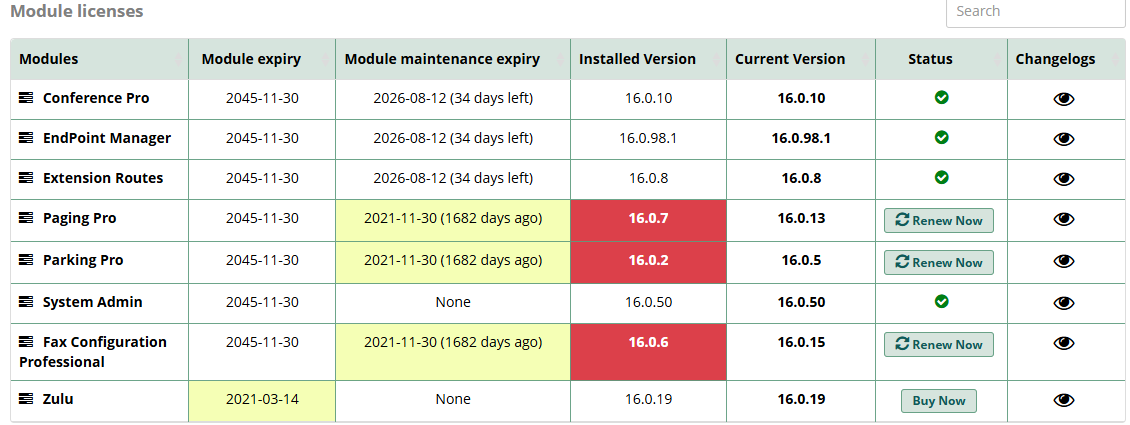
- If we rollback to a FreePBX16 version of these 3 modules that was released on or before 2021-11-30, will the recurring Critical Error cease?
- If so, how do we determine the latest versions of Paging Pro, Parking Pro, Fax Configuration Professional that were in effect on 2021-11-30 (our maintenance expiration date)?
- How or where do we find and install these versions?
I am guessing that if the answer to #1 is NO, then questions #2 & #3 are mute; and that will leave us needing to ask Sangoma Support to remove the offending modules from our deployment in the portal database.
Yes, we have tried disabling and uninstalling the offending modules with no change in the Critical Error recurring issue.
Thanks in advance for help from the community.