I installed the ISO (chose FOG), and I’m running through the setup. I skip activation, get to the firewall setup, trust the computer I’m using to set it up, and make it to the step "Should your current network be trusted?”
No matter what I click (yes, no, abort) I get this error:
"Ajax request broken or aborted for an unexpected reason. Please check console logs for more details.”
This has been an issue for me in the past, but I can’t imagine I’m the only one hitting it. I figured waiting a year and trying the ISO this sort of basic problem would be gone.
The SNGDEB ISO just installs Debian 12 for you and then automatically triggers the same install script that everyone else would use for a standard Debian 12 install (non-SNGDEB).
Did you look at the console log in the browser to get those more details as the error suggested?
I’m seeing a bunch of “Failed to load resource: Could not connect to the server.”
I believe the firewall has locked me out. I definitely clicked to allow my own computer to connect, and the firewall setup steps aren’t even completed. So how do I double check that the firewall on and blocking me already? And if it is, why?
And more to the point, if it is what do I need to do to finish the setup?
SSH into the box and do fwconsole firewall stop and that will stop the firewall services. Then you can double check everything and turn the firewall back on.
Thanks. Will do. By the way, I knew I had this problem before. I reported it over a year ago:
I hope somebody can fix this issue eventually. I’m sure most people don’t have this happen when they run the setup script, or it would have been fixed by now, but I also don’t know why I would hit it consistently. Something about my network setup?
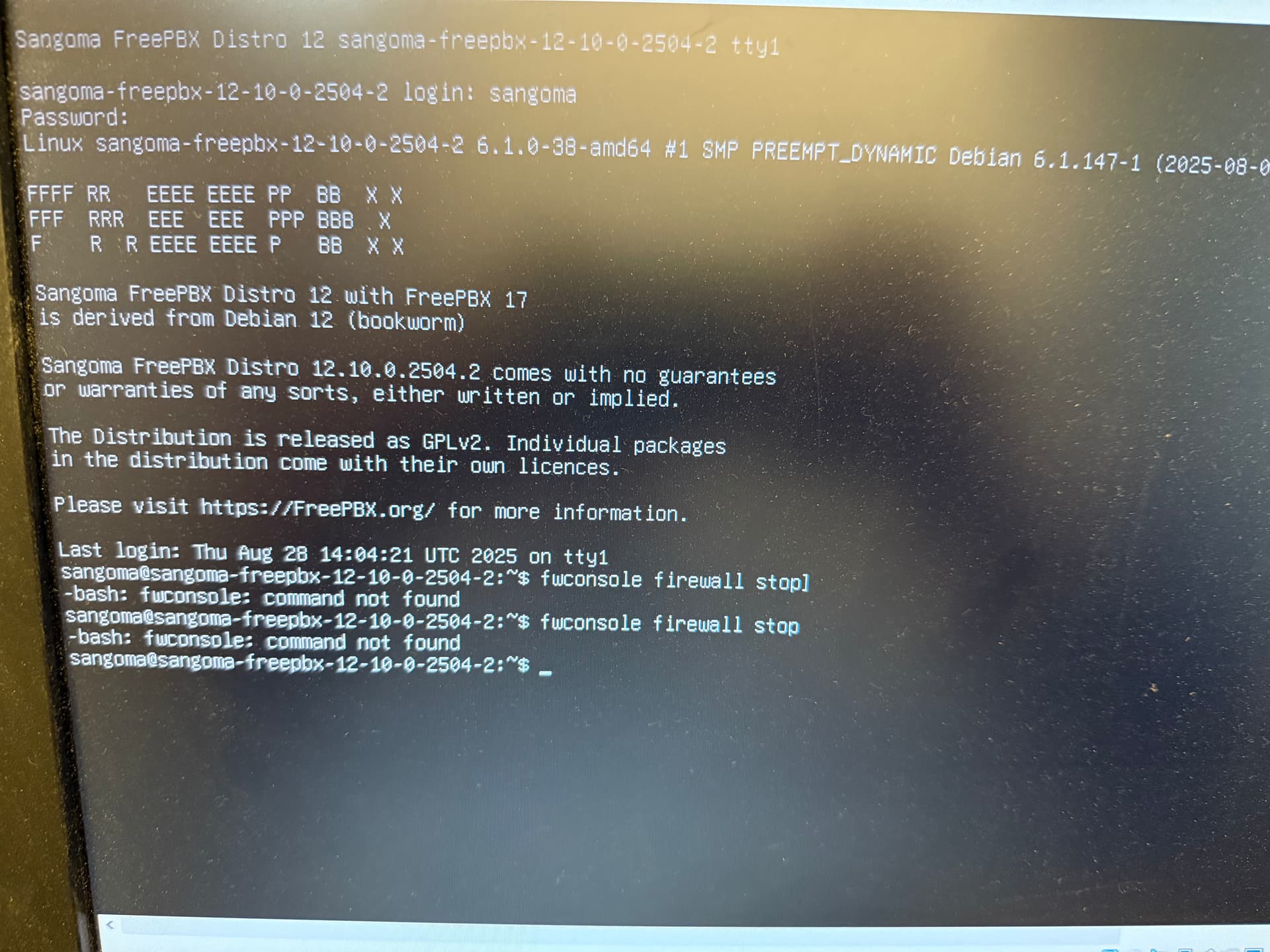
So, logging in as the user that was given to me when I ran through the ISO install, username: sangoma, pw (random), I don’t see the normal green FreePBX stuff.
Running fwconsole firewall stop gives me: bash: fwconsole: command not found
Dang. This is also an issue I reported back in 2024 in that same issue above.
That’s the output I see, yes. fwconsole is present
It appears usr/sbin is not in my PATH. Same as back then, running the install script and then running echo $PATH shows /usr/local/bin:/usr/bin:/bin:/usr/local/games:/usr/games
I also see I’m not the only one who hits this. It was reported in November on Github, but nothing was changed because it works for the root user.
But I don’t think I have a root user after running through the ISO install. I only saw one user (sangoma) and a random password for that user during setup. I followed the directions here for installing from ISO, and I don’t see any mention of a root user there, or any steps I skipped.
Edit: running sudo fwconsole firewall stop and putting in the password for the sangoma user worked to stop the firewall, but the moment I logged in to the web UI again, it started it up and locked me out as I was running through the firewall setup steps again. So I ran the command again and I was able to finish running through the firewall setup.
As I said above, I don’t have a root user after running through the ISO install script. So yeah, i’m logging in as sangoma, the only user I was given. I followed the official install steps, and I was only told about the sangoma user as I was installing everything.
Do I need to create a root user now? If the root user already exists, how do I set or reset the password? And finally, shouldn’t this be set up by the install script?
On most Linux distributions, including Debian, the root account is disabled by default!!.
This measure is implemented for security reasons, as it reduces the risk of unauthorised access to the system.
If direct root access is required, the account must first be enabled by resetting the root password.
Alternatively, if you prefer not to use the root account directly, you can create a new user and assign sudo privileges to that user. This approach is generally recommended, as it provides administrative access while maintaining better control and security.
You’re conflating the ISO with the install script, they are not the same thing. The ISO is what installed Debian 12, it is what makes the sangoma user and sets passwords. You don’t need to create a root user, it already exists. You can sudo to it using the sangoma password when prompted.
If you were to install a normal Debian 12 ISO you would be root automatically, unless you create another user. There would be no sangoma user by default and you would have generated your own passwords for all of this.
The install script has nothing to do with this part.
That’s not an absolute true statement. When you install an OS you are given options, if you choose to set a root password then the root user is setup to be what you log in as. If you leave it blank, then the root user is still created but locked and you have to log in and sudo to root in order to be root or run privileged commands.
Again, it’s about the choices made during the install.
That makes sense, but then all of the commands on this forum are incorrect unless the user somehow knows to prep them with sudo?
Got it. But the ISO is an official (beta) method of installing FreePBX, so all I mean is that after running the ISO (which runs the install script), using the official instructions, I’m left unable to log in and run basic commands that I’m told to run, like fwconsole. The expectation on this forum seems to be that I’m logged in as root (ie, I’m not told to run sudo fwoconsole …), but the instructions for the ISO don’t even tell me to create a root user, let alone how to.
Maybe this is all basic stuff to people with more sysadmin experience, but I’m just left wondering why I can’t run the ISO and the script it contains and use the system after it finishes.