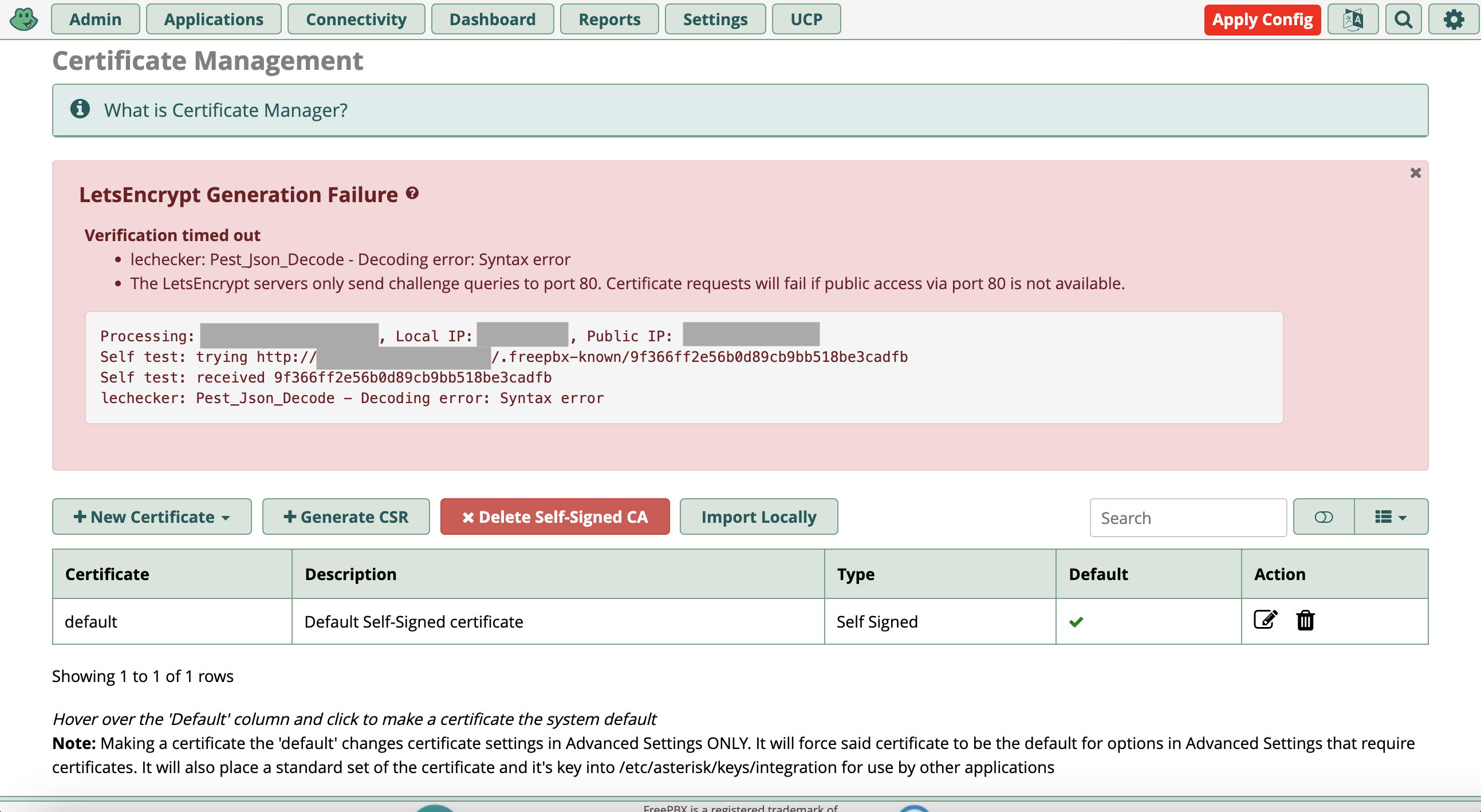
There was an error updating certificate: Decoding error: Syntax error

This is a duplicate of this post, however there was no resolution. After a lot of investigation, I found the following extra information.

Background

When renewing Letsencrypt certificates, we get an error There was an error updating certificate: Decoding error: Syntax error. We are using FreePBX 14 (although after understanding the issue and reviewing the code I think the issue can be on FreePBX 17+ as well).

Issue

I edited some try…catch… to get the traceback, instead of the neat error message, and here it is:

#0 /var/www/html/admin/libraries/pest/PestJSON.php(162): PestJSON->jsonDecode('
\nFatal...')
#1 /var/www/html/admin/libraries/pest/Pest.php(129): PestJSON->processBody('
\nFatal...')
#2 /var/www/html/admin/modules/certman/Certman.class.php(696): Pest->get('/lechecker.php', Array)
#3 /var/www/html/admin/modules/certman/Certman.class.php(181): FreePBX\modules\Certman->updateLE('debtline.pbx-ho...', Array)
#4 /var/www/html/admin/libraries/BMO/GuiHooks.class.php(290): FreePBX\modules\Certman->doConfigPageInit('certman')
#5 /var/www/html/admin/libraries/BMO/GuiHooks.class.php(252): FreePBX\GuiHooks->doBMOConfigPage('Certman', 'certman')
#6 /var/www/html/admin/config.php(445): FreePBX\GuiHooks->doConfigPageInits('certman', Object(component))
#7 {main}

I then reviewed the code, especially around the “pest” and “mirror1.freepbx.org” part in the function updateLE() and decided to test. I added a file to /var/www/html/.freepbx-known/test and checked https://mirror1.freepbx.org/lechecker.php?host=[REDACTED]&path=/.freepbx-known/test&token=test&type=http and saw the following response:

<br />
<b>Fatal error</b>:  Uncaught Error: Class &quot;Pest&quot; not found in /var/www/rework/html/lechecker.php:46
Stack trace:
#0 {main}
  thrown in <b>/var/www/rework/html/lechecker.php</b> on line <b>46</b><br />

The https://mirror1.freepbx.org/lechecker.php script works if there is an error, but ironically not when all is correct. For example, run https://mirror1.freepbx.org/lechecker.php?host=[REDACTED]&path=/.freepbx-known/test&token=test&type=http from your browser instead of your server.

{
  "status": false,
  "ip": "[REDACTED]",
  "message": "Requested host '[REDACTED]' does not resolve to '[REDACTED]' (Resolved to '[REDACTED]' instead)"
}

The error Decoding error: Syntax error now makes sense, because it is trying to convert the response to JSON, but can’t do it because the lechecker.php script hosted by FreePBX is returning a traceback.

Conclusion

Is it safe to conlude that there is something wrong on https://mirror1.freepbx.org/lechecker.php? And that this affects all FreePBX installations?
@eruzek

There is no support for v14.

Yeah, this affected all our 14 version installations. I did get it working with the acme.sh script but then we moved to a purchased SSL cert for all PBX installations.

Hi @BlazeStudios. Yes I know there is no support for FreePBX 14. But if you read the issue, it doesn’t look like it is relevant what FreePBX version you are using. If you look at the code, even FreePBX 17 calls the ‘lechecker.php’ script prior to attempting to issue a certificate using Letsencrypt. Can you confirm Letsencrypt certificates are working with your FreePBX instances?

Hi @eruzek. Thanks for your response. Can you confirm if it only affected FreePBX 14 and not current versions?

Yes, only version 14. Not any of our 15 or 16 versions were affected.

1 Like

Been working for quite a while. I haven’t had any issues with renewals on v17. My current cert renewed 11 days ago.

1 Like

After some extra research, I found that in FreePBX 15 and up, failure of the https://mirror1.freepbx.org/lechecker.php script will not throw an error, but will be stored as “hints” and it won’t cause the rest of the function updateLE() to stop [1]. The hints aren’t shown in the GUI, only full errors [2]. So even though you don’t see it, there is definitely an issue on https://mirror1.freepbx.org/lechecker.php which I will log a bug report for and hopefully they will fix. Thanks for your comments.

I take back what I said in the previous comment about the hints not causing the function updateLE() to stop. I just tested on a fresh install of FreePBX 17 and Debian 12 and the issue on the lechecker.php is actually blocking.

Is port 80 open?

Yes, port 80 is definitely open. I tested this by placing a file in /var/www/html/.freepbx-known and manually checking if I can access that file over port 80.

However, my port 80 being open, and the error I see on the lechecker.php script hosted on mirror1.freepbx.org isn’t connected. The stack trace from the script was:

<br />
<b>Fatal error</b>:  Uncaught Error: Class &quot;Pest&quot; not found in /var/www/rework/html/lechecker.php:46
Stack trace:
#0 {main}
  thrown in <b>/var/www/rework/html/lechecker.php</b> on line <b>46</b><br />

Note that this stack trace is from the script on mirror1.freepbx.org not from my server.

Let’s Encrypt Renewal in FreePBX 14, 16, and 17 + PHP 8.2 Module Issues

Over the weekend, I encountered a batch of Let’s Encrypt renewal failures across three FreePBX installs. Here’s a quick breakdown of what happened and how I resolved each one.

FreePBX 14: Resolved by manually installing certbot and disabling any certificate management inside FreePBX.

FreePBX 16: Fixed using the following CLI steps:

  • fwconsole firewall stop
  • fwconsole certificates --updateall
  • fwconsole chown
  • fwconsole firewall start

FreePBX 17 on Debian 12 has proven far more difficult. The shift to PHP 8.2 introduced strict syntax requirements and error handling that broke several modules relying on legacy PHP behavior. In my case, this affected four modules, including System Admin and Certman, which rely on array keys and JSON decoding that no longer behave the same way under PHP 8.2.

These issues didn’t surface on PHP 8.1, which handled the loosely written code more gracefully. I believe the move to 8.2 was premature given the current state of FreePBX module compatibility.

As the Let’s Encrypt problem includes paid PBXact versions, I’ve submitted a support ticket and uploaded full error logs documenting the PHP 8.2-related breakage. Hopefully this helps Sangoma prioritize module updates for the new interpreter.

If anyone else has run into similar problems on Debian 12 with FreePBX 17 and PHP 8.2, I’d be interested to hear what worked for you or what modules failed.

Thank you for the confirmation. It sounds like the issue with the lechecker.php script on mirror1.freepbx.org could also be related to them moving to PHP 8.2.

Can you perhaps share the logs you collected for the support ticket?

@fastdrw I could reproduce the issue you raised on FreePBX 17 Debian 12 with PHP 8.2. I fixed it by taking a look at the following (unmerged) pull request on the lescript repo: and manually adding those changes in /var/www/html/admin/modules/certman/vendor/analogic/lescript/Lescript.php.

This should fix your issue, however my original issue where the lechecker.php script on mirror.freepbx.org is broken is still an issue.

I gave up an bought a $15.00 Sectigo essential SSL for $15.00 and everything is working now and I don’t need to screw around with the every failing LetsEncrypt nightmare every few months.

1 Like

I have been unable to get certbot installed on our FreePBX 14. Would you enlighten me as to how you did that?

Here’s a step-by-step guide to manually install Let’s Encrypt and disable the built-in FreePBX certificate system:

Step 1: Install acme.sh (Recommended over Certbot)

curl https://get.acme.sh | sh -s [email protected]

This installs the lightweight and flexible acme.sh script.

Step 2: Request a Certificate Using DNS API (e.g., NameSilo)
Replace with your DNS provider’s API method:

acme.sh --issue --dns dns_namesilo -d pbx.example.com -d www.pbx.example.com

You’ll need to export your DNS API key before running this.

Step 3: Clean Up FreePBX’s Built-In Certificates

fwconsole certificate --list
fwconsole certificate --delete 0 # Repeat for each cert
rm -rf /etc/asterisk/keys/*

Be careful with rm -rf—back up first:

cp -r /etc/asterisk/keys ~/asteriskKeys.bak

Step 4: Install Your New Certificate
Once acme.sh generates the certs, copy them to FreePBX’s expected location:

cp ~/.acme.sh/pbx.example.com/fullchain.cer /etc/asterisk/keys/pbx.crt
cp ~/.acme.sh/pbx.example.com/pbx.example.com.key /etc/asterisk/keys/pbx.key

Step 5: Restart Services

fwconsole restart

Bonus: Auto-Renew with acme.sh
acme.sh sets up a cron job automatically. You can verify it:

crontab -l

Thx for the reply.

I was able to install the acme.sh script (less the [email protected] part), and did get an API token from our webhost (a2hosting (dot) com, now hosting (dot) com), yet there is no API method for this host in the dnsapi directory.
Our registrar, namecheap, is set to use our webhost’s nameservers.

When I run acme.sh, I get a timeout error (error code 28):
[Thu Aug 14 08:15:19 EDT 2025] Please refer to libcurl - Error Codes for error code: 28
[Thu Aug 14 08:15:19 EDT 2025] Cannot init API for: https://acme.zerossl.com/v2/DV90.
[Thu Aug 14 08:15:19 EDT 2025] Sleeping for 10 seconds and retrying.

What can I do from here?
Thx much for your help!

You have to do all of it manually if you’re trying to use DNS-01 if there is no api available.