The most important question: are you guys and galls working on Debian 13 support and is this just a temporary fix?
You’re showing commented out lines from the examples/how to parts of the config. What matters is the active configuration (not commented out) like below:
Since ${distro_codename} will be bookworm, nothing needs to be replaced here.
    "origin=Debian,codename=${distro_codename},label=Debian";
    "origin=Debian,codename=${distro_codename},label=Debian-Security";
    "origin=Debian,codename=${distro_codename}-security,label=Debian-Security";
Thanks Tom.
Just to give a more “root cause” explanation the below command should have been done during the install process to avoid the change over that happens when a new version is released. A well documented change that happens 2 years into the 3 year original life span of a version release.
sed -i 's/stable/bookworm/g' /etc/apt/sources.list.d/archive_uri-http_ftp_debian_org_debian_-bookworm.list
That is a good idea, thank you – will check on unattended-upgrades situation – as well as alternate mirrors – then update post accordingly.
 but the way the shell installer script was adding the ‘stable’ repo is really close to one of the official EXAMPLES offered in the man page:
add-apt-repository -S 'deb http://myserver/path/to/repo stable main'
vs. shell installer:
add-apt-repository -y -S "deb $DEBIAN_MIRROR stable main non-free non-free-firmware" >> "$log"
Maybe. With a -y added to force it – instead of prompting the user. Maybe. (It is likely that the sysadmin module update will take a similar approach using native Debian apt management commands.)
Not yet officially, no. We’ve made some mostly cosmetic updates to the FreePBX Versions schedule released earlier this year, but to answer this part of the question, FreePBX 17 will remain on Debian 12, while FreePBX 18 will be developed on Debian 13 with official work beginning on 2026-04-01 and a current estimated beta release date of 2026-09-01.
Good point, thank you.
There’s some variability there in the file name, depending on your environment and what the DEBIAN_MIRROR variable looked like during shell script execution.
Another helpful command to consider:
$ apt-add-repository -L | grep stable
…that’s the thing to check if you are going to have a problem or not – empty output there is a good sign (unless unattended-upgrades is overly aggressive with changing repo lines, but IDK if that it is the case – assuming it is not.)
So when @ncorbic said in his blog post:
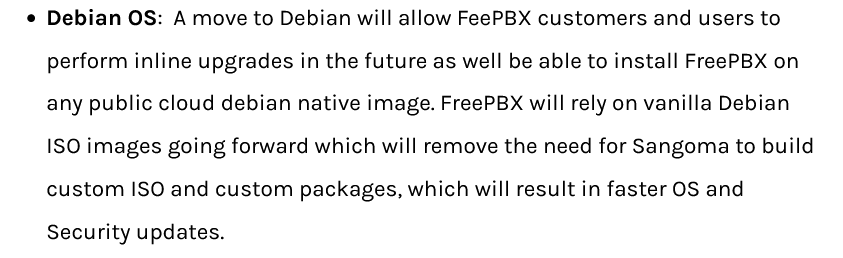
That was all misinformation or miscommunication?
Then Elvita
the officially supported FreePBX system will be based on Debian 12 and the project will no longer publish an ISO. The advantages of going with Debian have been enumerated before, but of note to users will be the strides to support the upstream versions of Debian services, which at the time of this writing is PHP 8.2.7, node.js 18.19.0, Fail2Ban 1.0.2, and Apache 2.4.57.
It would be nice if you set a train on a track, if it wasn’t derailed with every inconvenience.
I have not run the commands before I update the OS (Debian). So, my server is a Dell Poweredge R240 with two hard drives (RAID 1). So, is there a way can I run rescue mode and get to where it was before I did updated it.
just hand edited the sources file to fix in apt using unattended upgrdes, sends warnings not updating anything, fixed, apt update all good says bunch of stuff to upgrade, upgraded, says asterisk updates, updated, all installed good, rebooted for kicks, freepbx failed, userman not enabled, so I console in and enable, nah no can do userman needs to be installed first, WTAF? so install then enabled and allegedly all good, so to make sure no nasties, reboot - again, now no gui login site cant be reached, F F S what a total clusterf#ck, I agree with some others, this move to the messiah debian ( as some here seem to dribble over) is utter BS , especially giuven this is not the first apt upgrade thats caused problems.
Is there no developer at sangoma who knows WTF they are doing?
root@sip-qld-07:~# ls -la /var/www/html/admin/modules/sysadmin/hooks/check_ip_and_start_apache.sh
-rw-rw-r-- 1 asterisk asterisk 482 Jul  2 15:16
/var/www/html/admin/modules/sysadmin/hooks/check_ip_and_start_apache.sh
root@sip-qld-07:~#
chmod +x and all so-far is happy, though who knows what I’ll find screwed next
jezzzziiiisssss who ever did these QA should be sacked, and hire compitent devs that dont use chatgpt !
didnt take long
Unable to locate the FreePBX BMO Class 'Sysadmin'A required module might be disabled or uninstalled. Recommended steps (run from the CLI): 1) fwconsole ma install sysadmin 2) fwconsole ma enable sysadmin
add recording to that.. and i suspect ill be playing the wack-a-mole game for teh rest of the F’in things too, yes sipsettings not found, kind of important module eh.
add superfecta, restapps, pms (ohh the irony) pbxmfa, filestore, endpoint, contactmanager
hrmmm cant create a new post, so try editing this one…
 Security Warning
Details
Module: "FreePBX Framework", File: "/var/www/html/admin/assets/css/custom-theme/images/ui-bg_flat_0_999999_40x100.png altered"
Module: "FreePBX Framework", File: "/var/www/html/admin/assets/css/custom-theme/images/ui-icons_428bca_256x240.png altered"
Module: "FreePBX Framework", File: "/var/www/html/admin/assets/css/custom-theme/images/ui-icons_555555_256x240.png altered"
Module: "FreePBX Framework", File: "/var/www/html/admin/assets/css/custom-theme/images/ui-icons_999999_256x240.png altered"
Module: "FreePBX Framework", File: "/var/www/html/admin/assets/css/custom-theme/images/ui-icons_f0ad4e_256x240.png altered"
Module: "FreePBX Framework", File: "/var/www/html/admin/assets/css/images/ui-bg_flat_0_999999_40x100.png altered"
Module: "FreePBX Framework", File: "/var/www/html/admin/assets/css/images/ui-icons_428bca_256x240.png altered"
Module: "FreePBX Framework", File: "/var/www/html/admin/assets/css/images/ui-icons_444444_256x240.png altered"
Module: "FreePBX Framework", File: "/var/www/html/admin/assets/css/images/ui-icons_555555_256x240.png altered"
Module: "FreePBX Framework", File: "/var/www/html/admin/assets/css/images/ui-icons_777620_256x240.png altered"
Module: "FreePBX Framework", File: "/var/www/html/admin/assets/css/images/ui-icons_777777_256x240.png altered"
Module: "FreePBX Framework", File: "/var/www/html/admin/assets/css/images/ui-icons_999999_256x240.png altered"
Module: "FreePBX Framework", File: "/var/www/html/admin/assets/css/images/ui-icons_cc0000_256x240.png altered"
Module: "FreePBX Framework", File: "/var/www/html/admin/assets/css/images/ui-icons_f0ad4e_256x240.png altered"
Module: "FreePBX Framework", File: "/var/www/html/admin/assets/css/images/ui-icons_ffffff_256x240.png altered"
Module: "FreePBX Framework", File: "/var/www/html/admin/images/amp.png altered"
Module: "FreePBX Framework", File: "/var/www/html/admin/images/modules-current1.png altered"
Module: "FreePBX Framework", File: "/var/www/html/admin/images/modules-hover1.png altered"
Module: "FreePBX Framework", File: "/var/www/html/admin/images/schmooze-logo.png altered"
Module: "FreePBX Framework", File: "/var/www/html/admin/images/tab-first.png altered"
Module: "FreePBX Framework", File: "/var/www/html/admin/images/tab-hover.png altered"
Module: "FreePBX Framework", File: "/var/www/html/admin/images/tab-select.png altered"
Module: "FreePBX Framework", File: "/var/www/html/admin/libraries/Composer/vendor/splitbrain/php-archive/tests/tar/test.tar.gz altered"
Module: "FreePBX Framework", File: "/var/www/html/admin/libraries/Composer/vendor/splitbrain/php-archive/tests/zip/issue14-windows.zip altered"
Module: "FreePBX Framework", File: "/var/www/html/admin/libraries/Composer/vendor/splitbrain/php-archive/tests/zip/issue14-winrar.zip altered"
Module: "FreePBX Framework", File: "/var/www/html/admin/libraries/Composer/vendor/splitbrain/php-archive/tests/zip/test.zip altered"
Module: "Voicemail Reports", File: "/var/www/html/admin/modules/voicemail_report/assets/images/play.png altered"
Module: "Core", File: "/var/www/html/admin/modules/core/images/arrow_up_down.png altered"
Module: "EndPoint Manager", File: "/var/www/html/admin/modules/endpoint/assets/img/VVX301.png altered"
Module: "EndPoint Manager", File: "/var/www/html/admin/modules/endpoint/assets/img/VVX311.png altered"
Module: "EndPoint Manager", File: "/var/www/html/admin/modules/endpoint/assets/img/VVX350.png altered"
Module: "EndPoint Manager", File: "/var/www/html/admin/modules/endpoint/assets/img/VVX401.png altered"
Module: "EndPoint Manager", File: "/var/www/html/admin/modules/endpoint/assets/img/VVX411.png altered"
Module: "EndPoint Manager", File: "/var/www/html/admin/modules/endpoint/assets/img/VVX450.png altered"
Module: "EndPoint Manager", File: "/var/www/html/admin/modules/endpoint/assets/img/VVX501.png altered"
Module: "EndPoint Manager", File: "/var/www/html/admin/modules/endpoint/assets/img/VVX601.png altered"
Module: "Asterisk IAX Settings", File: "/var/www/html/admin/modules/iaxsettings/assets/images/arrow_up_down.png altered"
Module: "Sangoma Property Management", File: "/var/www/html/admin/modules/pms/images/free.png altered"
Module: "Sangoma Property Management", File: "/var/www/html/admin/modules/pms/ucp/assets/css/images/banner.png altered"
Module: "Sangoma Property Management", File: "/var/www/html/admin/modules/pms/ucp/assets/css/images/bgmodulenameleft.png altered"
Module: "Sangoma Property Management", File: "/var/www/html/admin/modules/pms/ucp/assets/css/images/bgmodulenamerepeat.png altered"
Module: "Sangoma Property Management", File: "/var/www/html/admin/modules/pms/ucp/assets/css/images/bgmodulenameright.png altered"
Module: "Sangoma Property Management", File: "/var/www/html/admin/modules/pms/ucp/assets/less/images/banner.png altered"
Module: "Sangoma Property Management", File: "/var/www/html/admin/modules/pms/ucp/assets/less/images/bgmodulenameleft.png altered"
Module: "Sangoma Property Management", File: "/var/www/html/admin/modules/pms/ucp/assets/less/images/bgmodulenamerepeat.png altered"
Module: "Sangoma Property Management", File: "/var/www/html/admin/modules/pms/ucp/assets/less/images/bgmodulenameright.png altered"
Module: "Sangoma Property Management", File: "/var/www/html/admin/modules/pms/ucp/images/0.png altered"
Module: "Sangoma Property Management", File: "/var/www/html/admin/modules/pms/ucp/images/1.png altered"
Module: "Sangoma Property Management", File: "/var/www/html/admin/modules/pms/ucp/images/dnd.png altered"
Module: "Sangoma Property Management", File: "/var/www/html/admin/modules/pms/ucp/images/free.png altered"
Module: "Sangoma Property Management", File: "/var/www/html/admin/modules/pms/ucp/images/frog.png altered"
Module: "Sangoma Property Management", File: "/var/www/html/admin/modules/pms/ucp/images/icone.old.png altered"
Module: "Sangoma Property Management", File: "/var/www/html/admin/modules/pms/ucp/images/m.png altered"
Module: "Sangoma Property Management", File: "/var/www/html/admin/modules/pms/ucp/images/transfer.png altered"
Module: "Sangoma Property Management", File: "/var/www/html/admin/modules/pms/ucp/images/warning.png altered"
Module: "Queue Wallboard", File: "/var/www/html/admin/modules/queuestats/ucp/assets/images/alert.png altered"
Module: "Call Recording Report", File: "/var/www/html/admin/modules/recording_report/assets/images/play.png altered"
Module: "Recordings", File: "/var/www/html/admin/modules/recordings/assets/images/play.png altered"
Module: "Asterisk SIP Settings", File: "/var/www/html/admin/modules/sipsettings/assets/images/arrow_up_down.png altered"
Module: "User Control Panel", File: "/var/www/html/admin/modules/ucp/htdocs/assets/images/settings.png altered"
Module: "User Control Panel", File: "/var/www/html/admin/modules/ucp/htdocs/images/freepbx_small.png altered"
Module: "Voicemail", File: "/var/www/html/admin/modules/voicemail/ucp/assets/images/mail.png altered"
Module: "Voicemail", File: "/var/www/html/admin/modules/voicemail/ucp/assets/images/settings.png altered"
Module: "WebRTC Phone", File: "/var/www/html/admin/modules/webrtc/ucp/assets/images/no_user_logo.png altered"
Just ran refreshsignitures and its downgraded half the packages, so maybe youve found what went wrong Chris?
The Debian install instructions located here point to a Trixie download.
Step By Step Debian 12 Installation - FreePBX Open Source - Sangoma Documentation
The Debian Bookworm link is here:
Fixed, thank you!
Maybe. It depends how much 12 → 13 updating you already did. You should at least be able to boot into Rescue mode and assemble the RAID array – either automatically or manually – then manually copy/backup your data to another medium e.g. USB stick. Trying Rescue mode from Debian 13 ISO, first, then Rescue mode from Debian 12 ISO, is probably the more robust method.
AFAIK the problems seem isolated to unattended upgrades and/or forced 'y’es on the apt update from 12 → 13 – neither of which are defaults in the FreePBX 17 Distro.
That’s a whole lot of errors  Do you recall pushing ahead manually with the upgrade from 12 → 13 when you last ran
 apt commands ? Or is/was that how the unattended upgrades are configured on your system ?
The sysadmin updates to lock FreePBX 17 into Debian 12 should be out soon to help automate the manual patches outlined in OP – will post/update more in a bit.
New sysadmin module solution is now available in testing
Please try it out, gently, and if there’s no errors, then we’ll likely automate this as the new default (so the next time a general module update is done, the problem will quietly disappear  )
)
$ sudo fwconsole ma downloadinstall sysadmin --tag=17.0.2.35
$ sudo fwconsole sa disable-deb-update-v13
$ apt-add-repository -L | grep stable
…that last command should show no output. Please let us know if that is not the case for you! Supplying your sources.list file(s) and filenames in pastebin.freepbx.org – then sharing the links in your replies – would help a lot, too. 
Finally, after those commands, your next apt update should show no nudges to update to Debian 13. (This change should stick until our planned release of an inline-upgrade tool next year to assist with FreePBX 17 on Debian 12 → FreePBX 18 on Debian 13 conversions.)
I ran apt update and upgrade, not using unattended-upgrades. I will get to it ASAP and let you know what’s going on.
I can boot into rescue mode, the version is already into Debian 13 Trixie. However, the backup was not created for a automatic download link, do I might need to reinstall the whole FreePBX from scratch or what do I need to mount it to?
I tried to download Debian 12 ISO in case if I have to reinstall the whole FreePBX from scratch, but I can’t find the version 12 (bookworm) ISO in Debian website, I looked other sites.
Well, I didn’t see this in time. I ran update and upgrade a short while ago and noticed this message:
dpkg: error processing archive /var/cache/apt/archives/fail2ban_1.1.0-8_all.deb (–unpack):
trying to overwrite ‘/etc/fail2ban/action.d/iptables-allports.conf’, which is also in package sangoma-pbx17 (2402-3.sng12)
dpkg-deb: error: paste subprocess was killed by signal (Broken pipe)
Errors were encountered while processing:
/var/cache/apt/archives/fail2ban_1.1.0-8_all.deb
E: Sub-process /usr/bin/dpkg returned an error code (1)
Then came over to the forum to investigate and found this post. I see that I’ve upgraded to Trixie:
PRETTY_NAME=“Debian GNU/Linux 13 (trixie)”
NAME=“Debian GNU/Linux”
VERSION_ID=“13”
VERSION=“13 (trixie)”
VERSION_CODENAME=trixie
DEBIAN_VERSION_FULL=13.0
ID=debian
So what should I do at this point? Can I revert back to Debian 12? Looking for some help!! How does one go about doing this? I’ve never downgraded before.
Jim
@penguinpbx
No, we did not force upgrade, unattended upgrades sent emails but we manually changed to bookworm before update/upgrades would work, so no trixie here, only things that updated were asterisk stuff.