Sangoma Silently Breaks S-Series Redirect — Manufacturer Neglect and Planned Obsolescence at Its Finest

When I needed to reprovision a phone at a remote job site, I learned the hard way that Sangoma is worse than any other manufacture in regard to planned obsoleteness.

I want to document what happened here because the community deserves a clear-eyed account, not the sanitized version Sangoma posted in the forum thread.

In early April 2026, admins started reporting that S-Series phones registered in the Sangoma Portal simply weren’t showing up in the Poll list — even after factory resets and fresh firmware installs. No announcement preceded this. No advisory was sent. Phones that had been provisioning reliably via rs.sangoma.net just… stopped. You found out when a phone failed to report in to the sangoma portal.

When a ticket was finally opened (Case #02139606), Sangoma support confirmed: “We are currently experiencing a redirection server issue that is affecting the provisioning of S series phones via the portal.” A redirection server “issue.” Not a deprecation. Not a planned change. An “issue” — which suggests they either didn’t plan this well, or chose not to communicate it honestly. Given what came next, I’m leaning toward the latter.

Then came the forum response, which deserves scrutiny. Rather than leading with an apology or a migration guide, the moderator’s first action was to edit the thread title to flag these as “EOL phones” and drop a link to the P325 as a direct replacement. The follow-up post confirmed that following “server security upgrades,” S-Series phones are permanently incompatible with the redirect server, and that no further firmware updates are planned.

Let’s call this what it is.

This is planned obsolescence with a thin coat of “security” paint on it.

Sangoma made a server-side change that they knew — or absolutely should have known — would brick the zero-touch provisioning workflow for an entire product line. They did it without warning. They did it without a migration path. And then, when customers raised the alarm, the first public-facing response was to rename the thread and point people toward buying new hardware. That’s not a support response. That’s a sales funnel dressed up as a forum post.

The S-Series went EOL in 2023. Fine — hardware ages out, that’s the reality of this industry. But EOL is supposed to mean “we won’t develop new features.” It is not supposed to mean “we reserve the right to remotely disable core functionality on hardware you purchased and deployed, at a time of our choosing, without telling you.” That’s a fundamentally different thing, and conflating the two is either dishonest or negligent. Possibly both.

What makes this worse is the years of manufacturer neglect that preceded it. The S-Series suffered from sluggish firmware update cycles, long-standing bugs that were quietly closed rather than fixed, and documentation that lagged badly behind real-world behavior. Admins on this forum have been papering over S-Series quirks for years with workarounds, community knowledge, and sheer stubbornness. The phones worked — not because Sangoma supported them well, but in spite of the support they received. And now, after all that, Sangoma’s parting gift is to yank the redirect service with no notice and suggest you spend more money.

There’s a word for a manufacturer that accelerates the death of its products in a way that just happens to benefit new hardware sales. It’s not a flattering word.
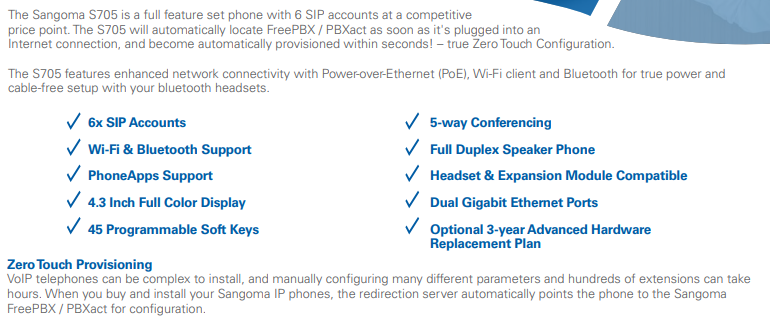
I ran into the same issue and I agree it’s very annoying that they just silently pulled support for a main feature like this with no alert and no warning. Look at the marketing data sheet for the S705 https://portal.sangoma.com/marketing/resources/1412/Sangoma%20Corporate/Datasheets/Sangoma-s705-Datasheet-web.pdf and right at the beginning it lists Zero Touch Provisioning.

Once ZTP is configured correctly, it works quite well. Seems to me you shouldn’t disable a key selling point on your phones just because they are EOL. It comes in very handy if the remote user is having an issue, you can just tell them to press the Menu button, press the * button 3x then press and hold the X button for 10 seconds and the phone reboots and resets and restarts twice and pulls down the configuration and is registered again.

I’ve ran into serious issues and spent hours and hours trying to get the “New” P series phones to register with portal redirection and it was a nightmare. You can lookup my other posts on that on here.

It’s quite common for phones to be used beyond EOL. They still have the same features they had before and there’s no reason to replace them. Shutting down the ZTP server should not be acceptable. It doesn’t inspire confidence to spend money on the P series phones that should support the freepbx projecrt, when phone functionality can be disabled without warning?

I don’t believe that Sangoma shut anything down. Running

against rs.sangoma.net shows that only TLS 1.2 and 1.3 are accepted. It seems nearly certain that the problem is that S series phones can only negotiate older versions.

TLS 1.1 (and older) was deprecated in 2021, so sometime between then and EOL they should have released firmware supporting 1.2.

Possibly, Sangoma could configure the server to accept the older versions; if it’s a newer phone and the connection is < 1.2, return an error.

IMHO, in most installations it’s not a good idea to depend on a remote server; after the first time, a DHCP option or hard coded provisioning URL can be used.

If someone managing these phones is bitten by this “bug”, in most installations one can still set up a DHCP option to configure. If not, connect by VPN to the site and configure the provisioning URL via the phone’s web interface. If also unavailable, ask someone on site to give you temporary access to their PC via Teamviewer or similar.

To expand on this, if they updated to OpenSSL 3.x there are now stricter enforcement policies including not supporting things under TLS1.2. Even TLS1.2+strict setups could break these phones from working right.

The reality most likely is, nothing was “turned off” but handshakes aren’t completely so the phones never really talk to the server anymore.

Can someone with an S series phone please report what TLS versions are offered?

Also, please confirm that DHCP option will override the zero-touch URL, or at least provide a fallback?

I have an S705 connected by SIP TLS 1.2 to a PBX.

That is the SIP stack and not the HTTPS provisioning client, but, it’s evidence the S705 does support TLS 1.2 just fine.

The phone having TLS 1.2 doesn’t guarantee it will work with the server in question. OpenSSL, et al have changed things over the last 4 years. TLS 1.3 is now default in current versions of OpenSSL with TLS 1.2 support only allowing modern crypto unless you loosen policies.

So an update to OpenSSL 3.x with default policies in places means the default crypto used by the phones in TLS 1.2 isn’t supported by the server. The phones would need a software update to stop using those crypto’s and default to ECDHE + AES-GCM / ChaCha20 which are now defaults for TLS 1.2.

OpenSSL 1.1.x and lower kept all the defunct crypto’s etc installed and lowering the policy (like in FreePBX) allows for those old defaults to work. OpenSSL 3.x requires you to actively go in and install all the legacy stuff on purpose before you can lower policies to make them work.

So the S-Series could 100% work with these updates on the server side. However, the S-Series would require a firmware update to update TLS 1.2 settings to make them work.

Yes, very frustrated myself and sent a request to our rep. I was told it was a certificate issue: the server’s certificate changed, and it had outdated the one on the phone. Even worse, the portal still exists and all the documentation, so it says it works, you can do everything, but it just does not work. We have hundreds of off-site phones. This just added a ton of work. Sangoma support response? “setup option 66” ya, I’ll do that on customer-owned routers that I have no access to… We stopped using Sangoma phones. The “D” or “P” phones are junk.

@davidpzk I understand the frustration, but I want to clarify a few things.

As you’ve mentioned, the S phones reached EOL in 23 and no longer receive firmware updates. Addressing the redirect server compatibility issue would require new firmware to be developed, which is not we do for EOL products.

That said, this was not an intentional effort to disable phones or force folks to buy new ones. Existing S phones continue to function and can still be provisioned through other documented methods. The impact is limited to our redirect provisioning service.

With regard to communications, I’ll take full responsibility here, we could have done better here and that’s very fair feedback. However, calling this as planned obsolescence is not accurate. This is the result of maintaining security standards while supporting hardware that is no longer under active development.

Mike W
VP OS

Mike, you defend against the accusation that Sangoma did not employ planned obsolescence by stating “this is the result of maintaining security standards while supporting hardware that is no longer under active development”. Which would be an accurate statement if that is what actually happened.

(1) You say “this is the result of maintaining security standards” when what really happened is “you changed security standards”

(2) You say “while supporting hardware that is no longer under active development” when what really happened is “you chose to not support hardware that is no longer under active development”

So to correct your statement to be true, you should have said. “Sangoma changed security standards and chose not to support hardware that is no longer under active development”.

Sure sounds like planned obsolescence to your entire former customer base.

I think you’re missing key context here.

The S phones reached EOL in 2023. Resolving the redirect issue would require new firmware development and we are not developing firmware for EOL products.

It’s fair to criticize the communication here for sure. However, deciding not to develop new firmware for hardware that has been out of support for several years is a product lifecycle decision, not planned obsolescence.

also, yes - we will update the docs.

To me this sounds harsh, given the big picture. As has been discussed in this and other posts, newer updates to better secure FreePBX inherently disabled less secure, deprecated TLS 1.0 and 1.1. OpenSSL 3.x specifically. This in turn appears to have broken HTTPS provisioning for older phone hardware that only employs old TLS.

I suppose that since Sangoma owns the actual phone hardware, some form of a firmware update to fix that wouldn’t be impossible. But seeing a product line has been EOL, I cannot imagine many companies that would follow through with that.

It reminds me of an old multi-function Ricoh we had as a main workhorse for one department. All of a sudden our users reported being unable to store scanned documents into network folders. That had worked for years. Once newer versions of Windows Server stopped supporting deprecated, less secure SMB1, the functionality was broken. Seeing the multi-function hardware was a few years past initial EOL, that solution path was a dead end in our case.

Mike,

Again there are issues with your statement. You say “Resolving the redirect issue would require new firmware development”

when a more accurate statement would be “Resolving the redirect issue would require new firmware development (OR) Sangoma not breaking the redirect server in the first place.”

You chose to break the redirect server.
You chose planned obsoleteness.

Wow, a lot of accusations, excuses and whining, but no solution.

I. know nothing about these phones, but am familiar with IP phones in general. I assume that the phone contains a list of root CAs that can validly sign the redirect server’s certificate. If at least one of these root certificates is unexpired, then if Sangoma acquires a cert from the corresponding CA and sets rs.sangoma.net to use it, with policy to accept whatever cipher methods, etc., that the S series phones can execute, the system should work. If there is a technical or security problem with this, can Sangoma please explain?

We did…

We can’t resolve or avoid this issue with EOL phones without developing new firmware.

I think that’s the point. Whatever cipher methods an updated server accepts doesn’t include < TLS 1.2. If the client isn’t supplying TLS 1.2 then no-worky. TLS 1.0 and 1.1 were both formally deprecated in 2021 by the IETF.

It’s been explained. Changes to OpenSSL (and it’s counterparts) over the past 3 years have moved to a TLS 1.2+strict policy. This impacts any device and/or client that hasn’t been updated to use that exact same policy. OpenSSL 3.0 didn’t enforce TLS 1.2+strict, OpenSSL 3.2+ does enforce it. As of OpenSSL 3.5 it doesn’t even install the legacy stuff anymore, you have to go in an active do that and setup a provider policy for it.

That’s not what is going on at all. TLS 1.2+strict doesn’t support the legacy ciphers and methods used by TLS 1.2 default. Clients need to have an update to enforce this. TLS 1.2 default uses an RSA based handshake. TLS 1.2+strict uses ECDHE handshakes. The clients can’t complete the handshake so it no worky

So the “solution” for this is to employ a weaker security policy opening a public facing service to known exploits and risks. I’m pretty sure many insurance policies and certifications in 2026 will frown upon this when the security audits show everything is ripe to be exploited.

IMO, @billsimon is an extremely knowledgeable and trustworthy poster, so it’s a FACT that S705 can do TLS 1.2. If that’s wrong, can someone at Sangoma provide details?

Please read my posts in this thread. TLS 1.2+strict uses ECDHE handshakes and ignores legacy ciphers. TLS 1.2 by default uses RSA handshakes and legacy ciphers. The handshake never completes so neither doesn’t the connection.

It doesn’t matter if the phone supports TLS 1.2 it matters that it supports TLS 1.2+strict which the S-Series does not without firmware updates

You don’t have to open everything – just the minimum needed to allow the S series handshake to complete. You can then analyze if this presents a vulnerability to the server.