I’ve tried this twice now on FPBX 16 distro same result both times
Create a user in user manager attached to an extension
grant that user select admin console login rights and UCP
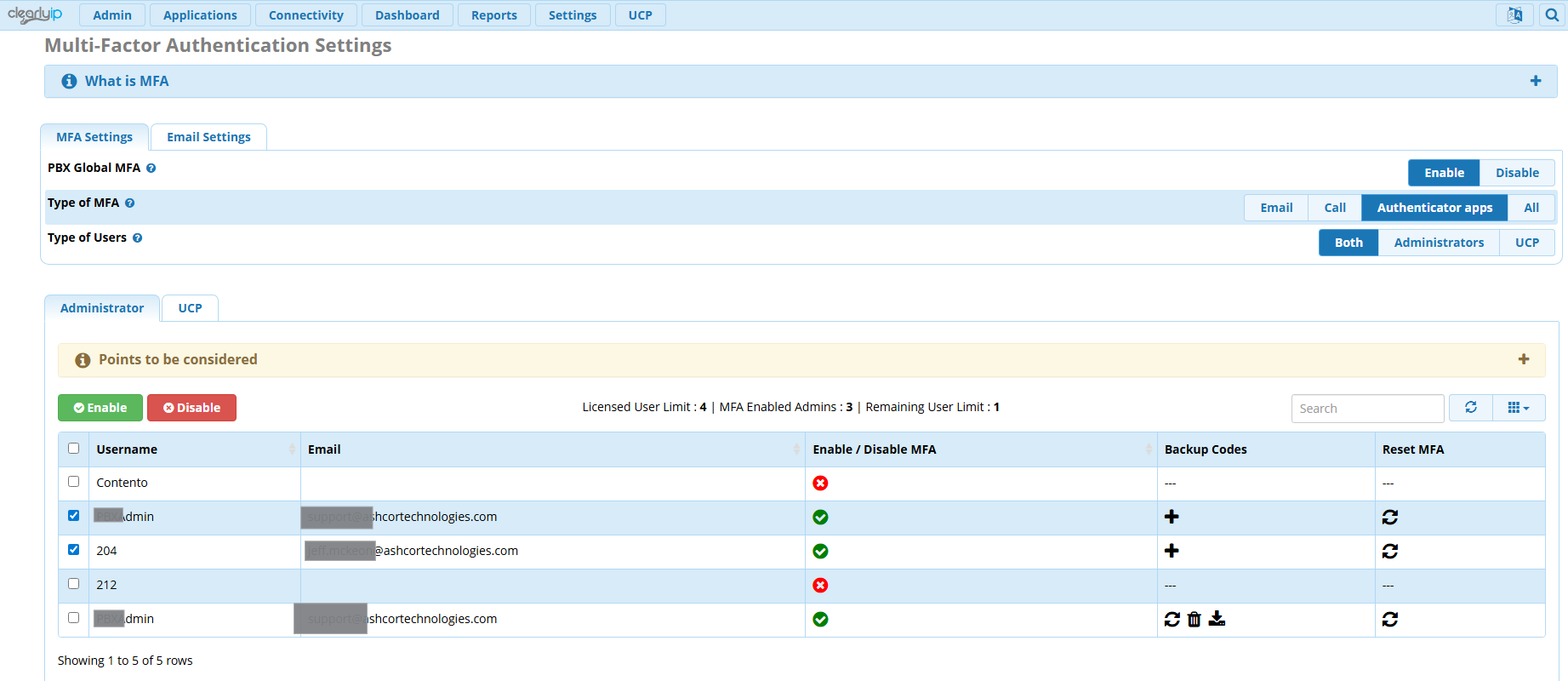
turn on MFA for that user for both Admin and UCP
Log out of the admin console, log back in using the new user credentitals… NO MFA prompt…
log into the UCP with the new user credentials MFA Prompt works as it should…
Setup MFA from the UCP prompt… works every time at UCP logins…
Never prompts at all for Admin console logins…
Is this a bug or a feature.. If feature, why and how do I force it to prompt for MFA on admin logins?
There are multiple screenshots in the several examples in the MFA documentation showing how to set it up and subsequent sample admin login authentication via email. Can you confirm that “Type of Users” = “Both” ? Maybe post some filtered screenshots of your MFA settings pages ?
As pointed out in the other thread in which you blamed it not being the distro, that image can be changed. All the logos, branding, etc. can be changed in FreePBX. There’s even spots in Advanced Settings to let you change that very icon you claim doesn’t make this the FreePBX Distro.
ClearlyIP’s branding module is not open source, but given the issue you are facing, I suspect the ClearlyIP module does similarly to what the open source TangoPBX branding module does, and replaces the login view with its own code, excluding the MFA features. tangopbx/views/login.php at master · tangopbx/tangopbx · GitHub
Therefore @penguinpbx request to test with the stock FreePBX seems valid and will probably solve the problem.
Interesting, Honestly didn’t think a simple branding module would interfere but your point is logical. I’ll try it on an unbranded system. Thanks @billsimon
 can you please try with just the distro ?