honestly, I will gladly spend a little time to tinker with it, first because I like it, second because of the price. I simply don’t see the point to spend more money if I can make it work, and I did. I got 15 7821s working and 2 7942s so for my purposes it’s fine.
@buba we, like most non full-cisco commits, abandoned cisco when they 200% increased certain lines overnight a few years back, we use and recommend alcatel line now, solid performers, solid made, beautiful audio. and a darn sight cheaper than cisco, and being alcatel we are probably still paying for the name, but all our clients on them also love them
you can’t beat $7 my friend
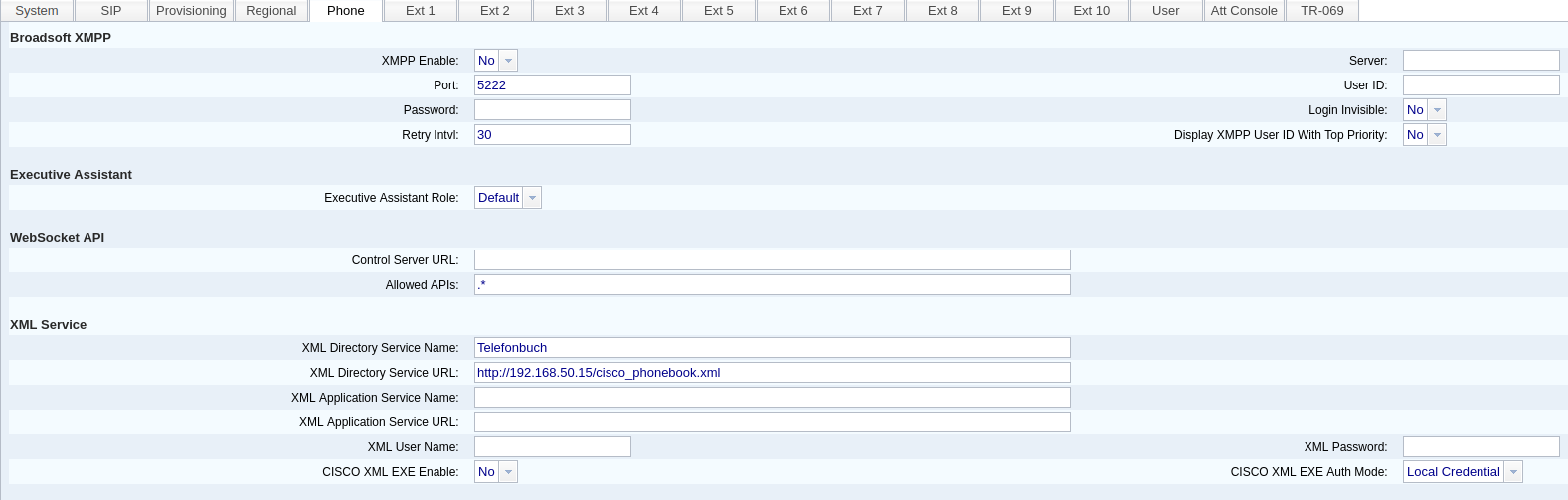
I have not worked with the 3PCC firmware using phonebooks but I can tell you the Enterprise firmware will NOT display the phonebook if you are handing the phonebook XML to the phone with doctype plain text. Perhaps the 3PCC is the same. Use an .htaccess file to set the doctype to XML. If you want more info on this, then post a screenshot of your phonebook config in the 3PCC configuration, and a snippit of the phonebook file layout, and I’ll post a suggested .htaccess file.
Depending on the site layout, and how many phones involved, the labor cost of placing the phones may eat up any savings of cheaper phones. Not everyone has the money for a greenfield deployment of a brand new PBX + brand new phones, many do need a new PBX also need it to work with phones already placed in service.
When you start spending hours and days trying to make them work right and have to involve a community to make them work…they are no longer $7 phones. The cost goes up.
2 Likes
A phone without a phonebook is no phone. 
I mean, i put like 6h into this for my dad’s firm, they work now so it’s 7$ for me still
In a corporation, yeah probably, but we have 15 phones with ext. from 1000 and up with a directory printed. And if i put some more work into it, I probably would have made a directory work
here are the first lines of the phonbook.xml:
[root@freepbx html]# cat cisco_phonebook.xml (without the brackets on each line beginning and end)
?xml version=“1.0” encoding=“utf-8”?
CiscoIPPhoneDirectory
DirectoryEntry
Name>Aktienschänke</Name
Telephone>82048</Telephone
/DirectoryEntry
an that’s a screenshot from the 3pcc web-config (i used the same settings as I did in the SPA504 at earlier times)
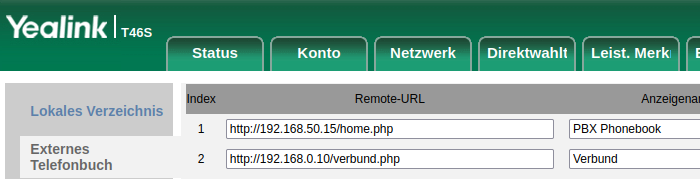
Yealink is using a php, mentioned around here somewhere else, which directly connects on the pbx to it’s contacts-database
The purpose of this file is to read all the Contact Manager entries for the specified group
and then output them in a Yealink Remote Address Book formatted XML syntax.
Instructions on how to use can be found here:
Updated December 26, 2019 to use FreePBX bootstrap
Update December 27, 2019
- to incorporate changes by mgbolts (from: GitHub - mgbolts/fpbx-yealink-xmlcontacts: php Script to Export Contacts to Yealink Remote Address Book)
- to incorporate patch to mgbolts version by susedv (from: Incomplete statement on line 45 · Issue #1 · mgbolts/fpbx-yealink-xmlcontacts · GitHub)
- improve logic flow and enable easy use of E164
Improvements over original:
a) Group all numbers for a common display name
b) Updated SQL to order by displayname
c) Add labels to each phone number
e) Enable E164 number convention
f) Allow the number labels to be customized.
g) Now you can specify the contact group in the URL, ex.: https://FQDN/cm_to_yl_ab.php?cgroup=SomeName
h) In order to use the E164 formatted number, you must pass a URL variable (e164=1) or change the default below.
And I also found this:
But variables seem to be very different defined.
In the webserver directory wherever you have the cisco_phonebook.xml file you probably need:
root@phony:/var/www/html/cisco# cat .htaccess
AddType text/xml .xml
root@phony:/var/www/html/cisco#
You can see what this does, correct?
But, someone only has to do that once. Then, they need to document what they did in a clear manner so that others don’t have to reinvent the wheel.
Also, if you have a corporation with 1000 phones - you only have to do that for the FIRST phone. Then you know how to do it for the remaining phones.
As I said, this is all depending on the site layout and how many phones involved. The cheapest phone at a site is the one that’s already placed and that the users are familiar with.
For a site with a very small number of phones, 5 or so - yes, dropping $200 per phone on a new phone might be cheaper than paying for 10 hours of time to figure out the next-to-nothing phones.
For a site with a large number of phones, even buying a large number of phones at a quantity discount, it might be the other way around.
There’s no right answer that applies in every situation.
I’ll try.
And once I have free time, I’ll try to combine those 2 php-scripts to a cisco-one, which uses the db-access based on the freepbx conf-file, and reads afterwards number and name from the contacts group writing it to a temporary xml-file.
I do no expect this will work on the first hit, but the idea is still alive.
There is still another problem. When somebody calls, whose name is in the xml phonebook. The Cisco phone is agnostic and just displays the number.
So you need a LDAP-server, which CID-superfecta can access.
For outgoing calls you need the outbound-cnam module.
For my part, I had a few 79xx at home and indeed, it is not easy to patch SIP by allowing BLF.
Before, I used FreePBX13 with chan_sccp.
- BLF worked well.
- You could customize the menus.
- Change language.
- Change ringtone.
- I have not tested the XML Menu. but it should be doable.
It was easy to manage Cisco 7940 or 60 with chan_sccp.
I still have quite a few 79xx at home, but they are in a box now.
This topic was automatically closed 7 days after the last reply. New replies are no longer allowed.