Hi,
I’m actually testing to replace our actual setup with FreePBX 17 and I got a problem with 2 Digium phones models.
In short, those phones cannot load the backgroupnd image nor charge any DPMA apps ( voicemail, history, status, etc.).
It’s a new installtion on Debian12 just activated. No commercial licence as it’s for testing purpose for now. O/S and modules are all up to date.
If I try the voicemail app on the phones, i got a 404 error.
Do you have any clue?
Thank’s in advance.
EDIT : Just looked the Apache logs and there is this error when I trie to access the Voicemail app on the phone :
script ‘/var/www/html/dphoneApi.php’ not found or unable to stat
The real path to this file is /var/www/html/restapps/dphoneApi.php
There is a path error somewhere?
Hi @SJacques
can you make sure restapps pm2 service is running, use below command to confirm, if its not running please restart the service.
*fwconsole pm2 --list
fwconsole pm2 --restart restapps*
Yes, it’s running.
+---------------------------+-------+--------+----------+------------------+------+----------+
| Process Name              | PID   | Status | Restarts | Uptime           | CPU  | Mem      |
+---------------------------+-------+--------+----------+------------------+------+----------+
| core-calltransfer-monitor | 3362  | online | 0        | 6 days, 10 hours | 0%   | 46.75MB  |
| core-fastagi              | 3541  | online | 0        | 6 days, 10 hours | 0.4% | 66.87MB  |
| sangomartapi              | 3744  | online | 0        | 6 days, 10 hours | 0.4% | 122.94MB |
| ucp                       | 4028  | online | 0        | 6 days, 10 hours | 0.6% | 92.54MB  |
| restapps                  | 31381 | online | 0        | 6 days, 8 hours  | 0%   | 55.29MB  |
+---------------------------+-------+--------+----------+------------------+------+----------+
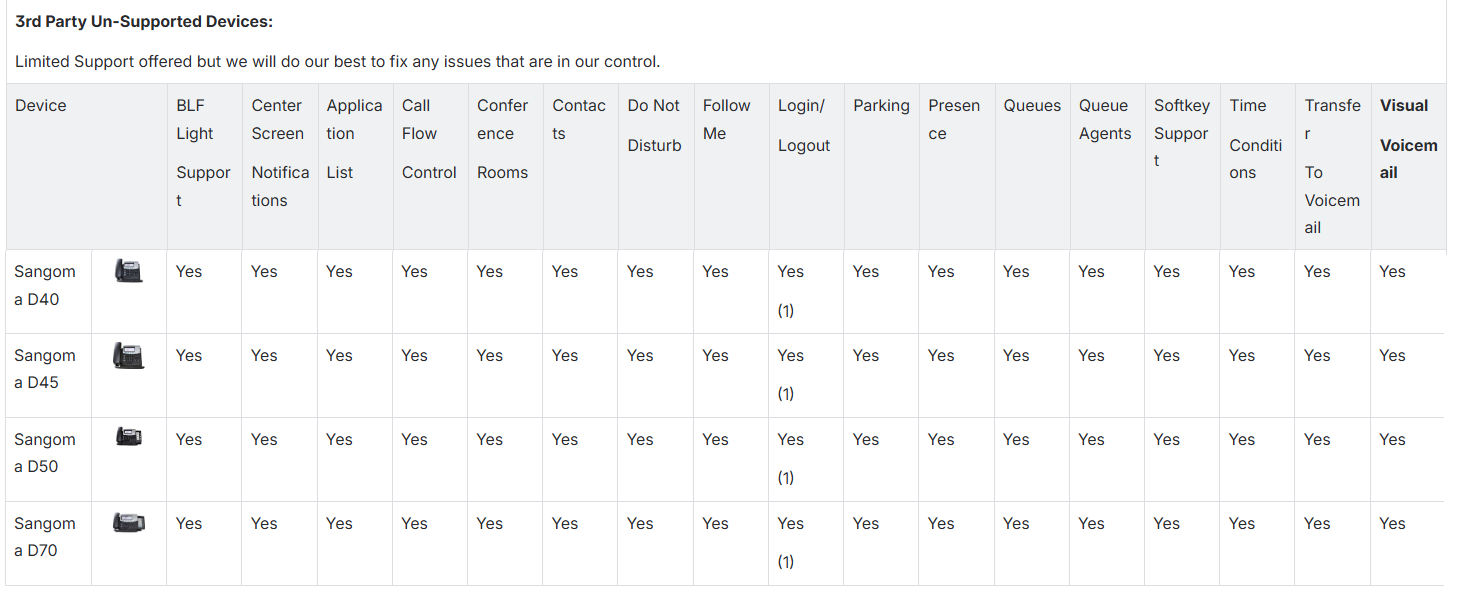
But do I need the PhoneApp Commercial licence for the apps to works on Digium DXX phones?
EDIT : Lost in documentation and licensing….
So even if not licensed, should works with D45 phones.
PhoneApp supported devices list according to the addon’s documentation:
Hi @SJacques
Please make sure Use DPMA Apps is set to Enable under phone template, then rebuild the config and update to the phones,
Also please Enable DPMA Apps Logging under Advanced Settings page, then try to see the logs for further clue.
Hi Santhosh
Thank you for your help.
DPMA already enabled in the Endpoint template for the D45.
DPMA Loging is enable.
dpma apps logs enable option comes under Advanced Settings page, enable this and check the logs
run this command to check the logs
tail -f /var/log/asterisk/dpmaapps.log
Ah ok…
Logs enabled.
I don’t have the “/var/log/asterisk/dpmaapps.log“ file. only “/var/log/asterisk/dpma” even after a restart of the server.
The dpmalog contails this lines at the end and nothing else:
530	[2026-01-07 10:15:08] DPMA[1633] phone_users.c: Reconfiguring triggered by identifier load
531	[2026-01-07 10:15:08] DPMA[1633] phone_users.c: Sangoma config detected with --phone-passwd-file '/etc/asterisk/dpma/passwords'. Attempting to load file.
532	[2026-01-07 10:15:08] DPMA[1633] phone_users.c: Successfully loaded phone-passwd-file '/etc/asterisk/dpma/passwords', parsing file.
533	[2026-01-07 10:15:08] DPMA[1633] phone_users.c: Added 3 users via phone-passwd-file.
Is this log file should exist in FreePBX17?
The only trace of something as I said earlier is in the apache2 error logs
[Wed Jan 07 10:21:50.002150 2026] [php:error] [pid 1210:tid 1210] [client 10.2.1.109:36594] script '/var/www/html/dphoneApi.php' not found or unable to stat
It’s the error after I tried to use the call log on the phone or the voicemail app.
So for testing, I reinstalled an new instance using the FreePBX17 ISO with the FOG option.
Activated it, no commercial licence at all so no HTTPS connection.
Enabled the DPMA logs.
Connected one D45 and one D60 and got the exact same result on both phones. I can make calls between phones but no app is working or background image.
Same error in apache logs and on the both phones.
The file “/var/log/asterisk/dpmaapps.log“ does not exist either.
Any help?