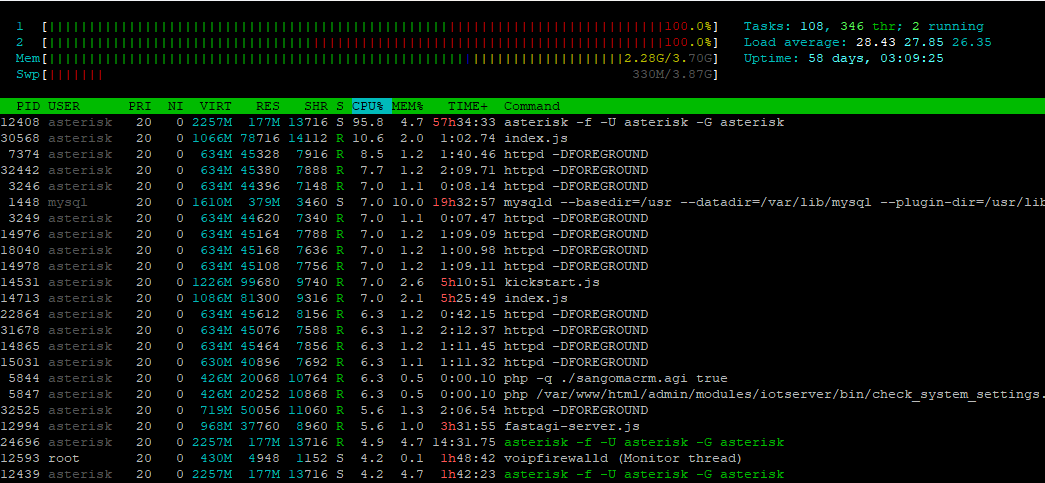
D80 flooding httpd log and high cpu usage

I have a client where they leave a D80 phone sitting on the parking list.

This floods the http access_log log with:
AA.BB.CC.DD - - [22/Dec/2025:12:20:52 -0500] “POST /dphoneApi.php/json HTTP/1.1” 401 28 “-” “Digium-D80/1_12_14/000FD30BXXXX”
AA.BB.CC.DD - 1013 [22/Dec/2025:12:20:53 -0500] “POST /dphoneApi.php/json HTTP/1.0” 200 450 “-” “Digium-D80/1_12_14/000FD30BXXXX”

This also causes the httpd service to take up considerable amount of CPU.

2 core VM that usually sits around 5-20% CPU now hovers around 50-90% CPU usage.

Outside of end user training what else can be done to reduce the CPU usage?

What’s also interesting is I took a P320 phone as well, opened up the Parked Calls menu and went ham on the refresh button. I was able to cause the CPU load to spike and stay at 100%

Anyone else seeing this behavior?

Getting hounded by customer on this. Is there something more I need to look into?

Back to the top!

Has anyone else seen this shit?

I am able to easily reproduce this issue on a fresh install of FPBX 17 as well.

Maybe try less ham ? :pig_face: Is this typical user behaviour ?

How about some BLFs for each Parking Lot Space ?

If you think about it, if you’re expecting someone to put a call on park, then yeah I can expect someone to keep pressing refresh. If you know a call is parked then I would expect to see the Parker call when I first go into the app. If it’s not there then I’d hit the refresh button once or twice.

The BLF option would be nice but unless I’m the one parking the call and knowing what lot location a specific call is in then I’d need CID/CNAM info.

What is interesting is the p370 phone were testing with refreshes a lot slower then the D80 were testing with. The D80 updates every 2 seconds. The p370 is almost every 5-10s it seems.

This topic was automatically closed 31 days after the last reply. New replies are no longer allowed.