I am going around in circles for a week on this:
I have an Adtran Total Access 908 (V1).
And FreePBX with Sangoma **Sangoma A101DE Single T1/E1 PCIe Card
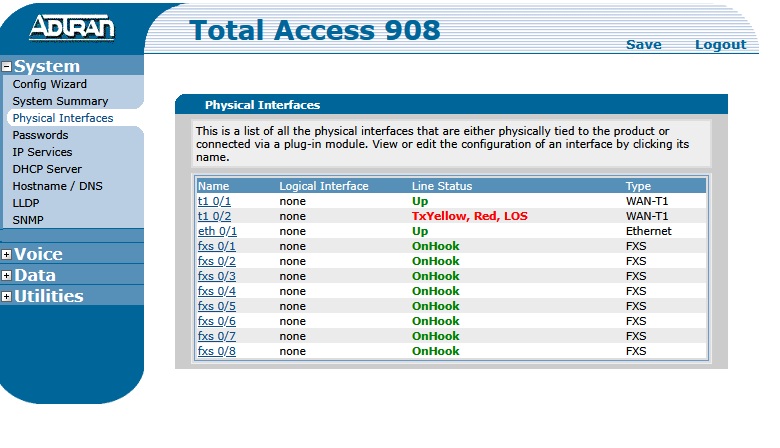
The Adtran as TWO T1 type ports:
T1_0/1: labeled “NET/T1”
T1_0/2: labeled “DSX-1/T1”
Typically Port 1 would go to a provider T1 connection, and
Port 2 would go to your PBX T1 card.
I have been absolutely unable to get a T1 carrier connection/indication
using the DSX-1 port no matter what I do.
Shows disconnected/no carrier on both ends (PBX+Adtran) no matter what I try.
The Adtran shows a carrier and connection on the DSX-1 port if I plug in
a T1 loopback test cable.
I always get a carrier/connect indication if I connect the PBX to the Port1 T1 connection
on the Adtran.
I’m confused why I can’t get a connection on the DSX-1 port.
And have tried many things including:
T1 straight cable
T1 cross cable
Putting PBX PRI card in “MASTER” mode versus “NORMAL”
etc etc.
Always shows a carrier if I connect to port1 (NOT port 2) DSX-1
But I can never get a “connection” on port 2 DSX1.
Loopback cable shows that all ports involved “work” and show carrier.
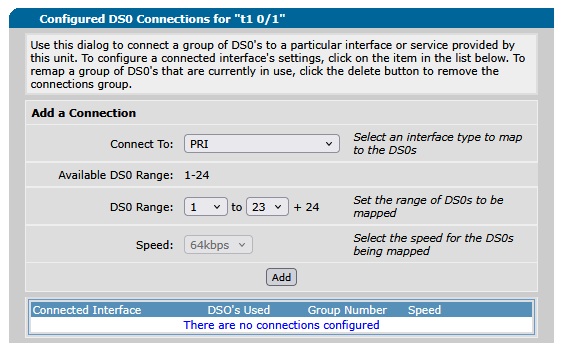
This goes a bit deeper as I cannot assign PRI services to port 1 and just “try” that.
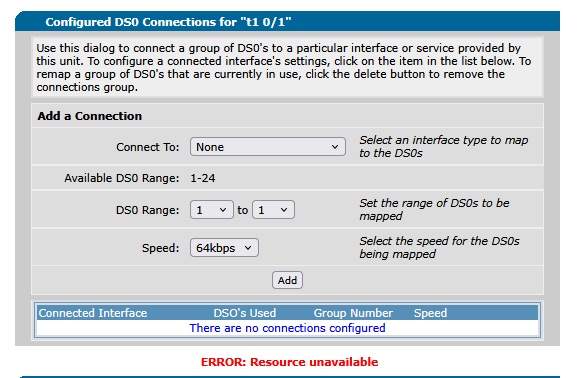
It says “resource not available” using web interface If I try to add PRI services to T1 port 1.
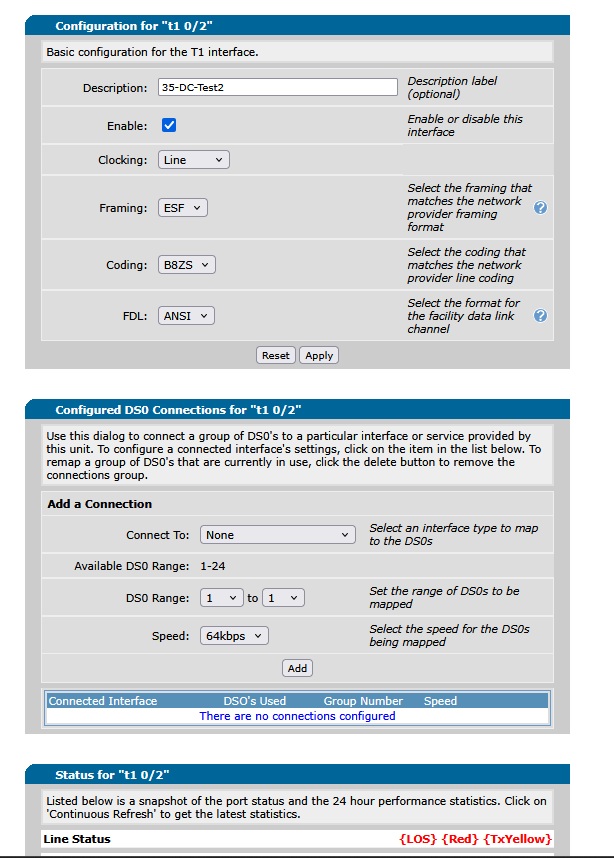
But it let’s be add this to port 2 no problem.
But I can’t get a T1 connection to work on port 2.
Any thoughts/suggestions.
I am doing this just for fun & learning while no customer is needing this to work.
I thought I would give this a try and see if I might be able to figure out SIP to T1/PRI.
With some of this old stuff I have on hand.
It seems that Adtran has removed all information/firmware/docs for this “old” 2007 vintage equipment.
And searching the web is nearly 100% useless finding anything on these although they were very popular at one point and very widely used.
And many of these are still out there in use.
I am using the web interface for what I have tried above, but am perfectly comfortable using the CLI as well.
**
ADTRAN, Inc. OS version 14.04.00.E
Checksum: 7D594745, built on Wed Apr 11 15:19:13 2007
Upgrade key: ********************
Boot ROM version 14.04.00
Checksum: 8519, built on: Wed Apr 11 15:24:19 2007
Copyright (c) 1999-2007, ADTRAN, Inc.
Platform: Total Access 908, part number 4210908L1, CLEI code is SIM5C00BRA
Serial number LBADTN07**—————
Flash: 16777216 bytes DRAM: 67108863 bytes
HAHA I didn’t think anyone would jump at this one quickly..
I can’t find ANY archived firmware for these 2007ish Adtran Total Access units.
And I can’t for the life of me figure out why I can’t get a T-carrier on the DX1 port.
Strangest thing ever.
I think if I could actually get the T1 carrier to work on that Interface I could do ISDN/PRI with SIP
and emulate a T1 PRI provider to the PBX.
And that would be fun.
Shucks…
Version 14 is one of the later firmwares so you should be good there.
What is your goal with this? I have and Adtran 924e V2 that I have that takes sip from my local FreePBX and turns it into PRI for a Mitel system I have as well as some analog FXS ports I use for a few analog phones. Are you looking to do something similar to this?
Hi Dan! Exactly that.
The end goal is to present a T1 PRI to a FreePBX with a Sangoma T1 Pri card.
My first mini-coal was to just see the T1 carrier/link on the PBX T1 card.
I was able to get this to link but only works on the “NET T1 0/1” interface.
No matter what I do I cannot get the T1 carrier link to come up on the “NET T1 0/2” Interface.
I have no idea why that port will not come up & show a link.
The port itself comes up and shows a link if I put a loopback plug on it. (connecting TX pair to RX pair)
It does not come up (show T1 link active) if I connect a T1 cross connect cable or straight through cable to the two ports on the Adtran itself T1 0/1 <—> to T1 0/2.
On the Adtran in the web interface you can assign what services to put on either T1.
It lets you “attach/assign” PRI/ISDN to the 0/2 (DSX-1) port without errors.
But will not let you do likewise on the 0/1 (NET) port, and reports “ERROR resource unavailable”
I do not get this error on the 0/2 port (it lets me add the service) and stays.
But I cannot get the T1 link to come up on port 0/2 no matter what I try except the loopback test plug.
Port settings are exactly the same on both ports.
Also here’s a copy of the running config. (passwords and serial number obvuscated)
TA908#show run
Building configuration...
!
!
! ADTRAN, Inc. OS version 14.04.00.E
! Boot ROM version 14.04.00
! Platform: Total Access 908, part number 4210908L1
! Serial number LBADTN07********
!
!
hostname "TA908"
enable password *******
!
clock timezone -5-Eastern-Time
!
ip subnet-zero
ip classless
ip domain-proxy
ip domain-name "home.michiganbroadband.com"
ip routing
!
no auto-config
!
event-history on
no logging forwarding
no logging email
logging email priority-level info
!
no service password-encryption
!
username "admin" password **********
!
banner motd #

        Important

Web username/password is configured to admin/password.
Enable and Telnet passwords are configured to "password".
Please change them immediately.

The ethernet 0/1 interface is enabled with an address of 10.10.10.1
Telnet/SSH access is also enabled.
#
!
!
no ip firewall alg msn
no ip firewall alg h323
!
!
!
!
!
!
!
!
!
!
!
!
interface eth 0/1
  ip address dhcp
  media-gateway ip primary
  no shutdown
!
!
!
!
interface t1 0/1
  description 35-DC-Test-1
  no shutdown
!
interface t1 0/2
  description 35-DC-Test2
  no shutdown
!
!
interface fxs 0/1
  no shutdown
!
interface fxs 0/2
  no shutdown
!
interface fxs 0/3
  no shutdown
!
interface fxs 0/4
  no shutdown
!
interface fxs 0/5
  no shutdown
!
interface fxs 0/6
  no shutdown
!
interface fxs 0/7
  no shutdown
!
interface fxs 0/8
  no shutdown
!
!
!
!
!
!
!
!
no ip tftp server
no ip tftp server overwrite
ip http server
ip http session-timeout 4200
ip http secure-server
no ip snmp agent
no ip ftp server
no ip scp server
ip sntp server
!
!
!
!
!
!
!
voice feature-mode network
voice forward-mode network
!
!
!
!
voice dial-plan 1 local NXX-XXXX
voice dial-plan 2 long-distance 1-NXX-NXX-XXXX
!
!
!
!
!
voice codec-list Clarity-2
  codec g711ulaw
!
!
voice trunk T01 type sip
  description "Clarity01"
  sip-server primary ***************
  registrar primary 10.73.73.7
  codec-group Clarity-2
!
!
voice grouped-trunk TG1
  no description
  trunk T01
  accept NXX-XXXX cost 0
  accept 1-NXX-NXX-XXXX cost 0
  accept 1-800-NXX-XXXX cost 0
  accept 1-888-NXX-XXXX cost 0
  accept 1-877-NXX-XXXX cost 0
  accept 1-866-NXX-XXXX cost 0
  accept 1-855-NXX-XXXX cost 0
  accept 011-$ cost 0
  accept 411 cost 0
  accept 611 cost 0
  accept 911 cost 0
  accept $ cost 0
  reject 976-XXXX
  reject 1-900-NXX-XXXX
  reject 1-976-NXX-XXXX
!
!
!
!
voice user 3137292615
  connect fxs 0/1
  first-name "*****"
  last-name "*****"
  password "**********"
  description "Steve's very old number"
  no special-ring-cadences
  phone model polycom 50x
!
!
voice user 3137292616
  connect sip
  first-name "Test"
  last-name "Err"
  password "********"
!
!
!
!
!
ip sip
!
!
!
ip rtp udp 16000
!
!
line con 0
  login
!
line telnet 0 4
  login
  password ********
  no shutdown
line ssh 0 4
  login local-userlist
  no shutdown
!
sntp server 10.73.73.1
!
end
TA908#
Thank you for responding and asking me.
Do you any further thoughts on why I cannot get a carrier link on the second T1 port?
I have not been able to make any sense of this.
The physical port settings are exactly the same and I think they should work.
T1 carrier works fine on the first port, but refuses to let me attach any “services” to the first port.
Second port lets me attach needed services but refuses to show a carrier link.
I have tried everything I can think of logically. (turning on one port at a time etc.)
Also any clues on where to find any old AdTran firmware archives?
Not that newer firmware would help, but I seem to have absolutely no options to be able to try this either.
It’s sinful that Adtran completely removed any traces of this stuff.
And it’s a bummer that I cannot find any resources.
The unit is from 2007 and I KNOW there are many of these still out there in working service.
There are also a LOT of the older TA 600’s as well as these 900 series still out there in active service.
And phone systems tied to them.
So the 924e has 4 t1 ports but only ports 3 and 4 have PRI capabilities. Ports 1 and 2 are t1 only. I’m not sure if the 908e has something similar.
I also have 2 different trunks programmed on mine, though it may be unnecessary. 1 trunk for sip from the FreePBX to the Adtran, one trunk from the Adtran to the PRI on my Mitel.
Those are the only things I can think of, but when I got the Adtran several years ago, it was a lot of trial and error trying to get everything working properly.
Since you don’t have T1 from the carrier your only data path for sip is eth0/1
I also think that web interface is only good for observation and changes to config should only be made through CLI or tftp. I doubt modern web browser will work well with 20 years old device
Here is AI generated config for you
! ============================================================
! ADTRAN 908 - FULL CONFIGURATION
! SIP Provider : VoIP.ms (chicago.voip.ms)
! WAN/MGMT : eth 0/1 (DHCP from router)
! PRI : T1 0/2 → Sangoma A101DE (TE side)
! FXS : 0/1 → Analog phone (main number 1234567890)
! Generated : 2026-03-18
! ============================================================
! ------------------------------------------------------------
! SECTION 1 - GLOBAL SYSTEM SETTINGS
! ------------------------------------------------------------
hostname Adtran908
!
no ip telnet server
ip ssh server
no ip http server
ip http secure-server
!
service timestamps log datetime localtime
logging buffered 512
!
banner login ^
WARNING: Unauthorized access is prohibited.
All sessions are monitored and logged.
Disconnect immediately if you are not authorized.
^
!
! ------------------------------------------------------------
! SECTION 2 - CREDENTIALS
! ------------------------------------------------------------
username admin privilege 15 password
!
! ------------------------------------------------------------
! SECTION 3 - WAN + MANAGEMENT INTERFACE
! ------------------------------------------------------------
interface eth 0/1
description WAN-AND-MGMT
ip address dhcp
media-gateway ip primary
ip access-group COMBINED-ACL in
max-reserved-bandwidth 95
qos-policy out VoicePriority
no shutdown
!
! ------------------------------------------------------------
! SECTION 4 - DEFAULT ROUTE
! ------------------------------------------------------------
ip route 0.0.0.0 0.0.0.0 dhcp
!
! ------------------------------------------------------------
! SECTION 5 - COMBINED ACL (SIP + Management on eth 0/1)
! ------------------------------------------------------------
ip access-list extended COMBINED-ACL
remark :: ALLOW SSH FROM MGMT HOST ONLY ::
permit tcp host any eq 22
remark :: ALLOW HTTPS FROM MGMT HOST ONLY ::
permit tcp host any eq 443
remark :: PERMIT SIP FROM VOIP.MS CHICAGO ONLY ::
permit udp host any eq 5060
remark :: PERMIT RTP FROM VOIP.MS ::
permit udp host any range 10000 20000
remark :: DENY ALL OTHER SIP - TOLL FRAUD PROTECTION ::
deny udp any any eq 5060 log
remark :: DENY MGMT FROM ALL OTHER HOSTS ::
deny tcp any any eq 22 log
deny tcp any any eq 443 log
deny tcp any any eq 80 log
remark :: PERMIT ALL OTHER TRAFFIC ::
permit ip any any
!
! ------------------------------------------------------------
! SECTION 6 - QOS (Voice priority over data)
! ------------------------------------------------------------
ip access-list extended VoipRTP
permit udp host any range 10000 20000
!
ip access-list extended VoipSignaling
permit udp host any eq 5060
!
qos map VoicePriority 10
match list VoipSignaling
bandwidth percent 5
!
qos map VoicePriority 15
match list VoipRTP
priority percent 90
!
! ------------------------------------------------------------
! SECTION 7 - T1 INTERFACE (Physical layer to Sangoma)
! ------------------------------------------------------------
interface t1 0/2
description PRI-TO-SANGOMA-A101DE
framing esf
linecode b8zs
clock source line
tdm-group 1 timeslots 1-24 speed 64
no shutdown
!
! ------------------------------------------------------------
! SECTION 8 - PRI INTERFACE (D-Channel signaling)
! ------------------------------------------------------------
interface pri 1
description PRI-SIGNALING
isdn name-delivery setup
connect t1 0/2 tdm-group 1
digits-transferred 10
role network
b-channel-restarts disable
no shutdown
!
! ------------------------------------------------------------
! SECTION 9 - ISDN GROUP
! ------------------------------------------------------------
isdn-group 1
connect pri 1
timing-source t1 0/2
!
! ------------------------------------------------------------
! SECTION 10 - FXS INTERFACE (Analog phone)
! ------------------------------------------------------------
interface fxs 0/1
description ANALOG-MAIN-LINE
no shutdown
!
! ------------------------------------------------------------
! SECTION 11 - CODEC GROUP
! ------------------------------------------------------------
voice codec-group TRUNK-CODECS
codec g711ulaw
no codec g711alaw
no codec g729
no codec g722
!
! ------------------------------------------------------------
! SECTION 12 - SIP VOICE TRUNK (VoIP.ms upstream)
! ------------------------------------------------------------
voice trunk T01 type sip
description VOIPMS-SIP-TRUNK
sip-server primary chicago.voip.ms
registrar primary chicago.voip.ms
outbound-proxy primary chicago.voip.ms
authentication username “555555” password “”
register 1234567890
caller-id-override number-outbound 1234567890
rtp delay-mode adaptive
codec-group TRUNK-CODECS
!
! ------------------------------------------------------------
! SECTION 13 - PRI VOICE TRUNK (Sangoma downstream)
! ------------------------------------------------------------
voice trunk T02 type isdn
description PRI-TO-SANGOMA
resource-selection linear ascending
caller-id-override number-inbound 1234567890 if-no-cpn
connect isdn-group 1
rtp delay-mode adaptive
codec-group TRUNK-CODECS
!
! ------------------------------------------------------------
! SECTION 14 - FXS VOICE TRUNK (Analog phone)
! ------------------------------------------------------------
voice trunk T03 type analog
description FXS-ANALOG-PHONE
connect fxs 0/1
caller-id-override number-inbound 1234567890 if-no-cpn
codec-group TRUNK-CODECS
!
! ------------------------------------------------------------
! SECTION 15 - GROUPED TRUNKS
! ------------------------------------------------------------
! Inbound: VoIP.ms → rings PRI (Sangoma) AND FXS (analog) simultaneously
voice grouped-trunk INBOUND
trunk T02
trunk T03
accept $ cost 0
!
! Outbound: Sangoma or FXS → VoIP.ms
voice grouped-trunk OUTBOUND
trunk T01
accept $ cost 0
!
! ------------------------------------------------------------
! SECTION 16 - VOICE ROUTING
! ------------------------------------------------------------
voice route inbound
match dnis “1234567890” trunk-group INBOUND
match dnis “$” trunk-group INBOUND
!
voice route outbound
match dnis “9$” substitute “$”
trunk-group OUTBOUND
match dnis “$” trunk-group OUTBOUND
!
! ------------------------------------------------------------
! SECTION 17 - SYSTEM TIMING
! ------------------------------------------------------------
timing-source t1 0/2
!
! ============================================================
! AFTER PASTING THIS CONFIG RUN:
! write memory
! ============================================================
I would open an account with VoIPms for testing purposes. They let you to whitelist IPs you’ll be connecting from, which is important security feature with this old device
Adtran 908 Config Placeholders
Placeholder
What to Put Here
STRONG-PASSWORD
Admin password for the 908
LAN-IP
908 LAN IP e.g. 192.168.1.1
SUBNET-MASK
e.g. 255.255.255.0
MGMT-HOST-IP
IP of your PC/laptop you manage from
CHICAGO-VOIPMS-IP
Run: nslookup chicago.voip.ms and use the IP it returns
VOIPMS-SIP-PASSWORD
Your VoIP.ms SIP subaccount password (set in VoIP.ms portal under your subaccount, not your main login password)
Thank you for showing your config example here.
It may cone in handy once I get to the stage where I an play with SIP.
Right now I simply have been unable to get a T1 carrier to link on port 2.
My device has two ports.
Port 1 appears to be T1 only (which is fine) and works as expected.
Like yours you can’t attach PRI services to it.
Port 2 allows PRI and other services, but I have been unable to get a T1 carrier link to show up on it. so I am really stuck at this point.
And it makes no sense that the a T1 carrier link itself will not come up on port 2 no matter what I have tried, except for a loopback cable to itself.
I also get no T1 carrier on port 2 if I hook it directly to port1 with a crossover or straight cable as a test.
Well you make a good point here, and I need to further investigate from this.
Per my shared here config it looks unconfigured.
But BOTH look configured in the web interface and I had been working from that.
Also it looks like port 1 is not configured either from the running config, but this port works and gets a T1 carrier link.
!
interface t1 0/1
  description 35-DC-Test-1
  no shutdown
!
interface t1 0/2
  description 35-DC-Test2
  no shutdown
!
Interesting… I tried configuring a few items on the interface manually,
And it took settings, but do not show those settings in the running config.
(except tdm-group 1) which got added.
TA908(config)#interface t1 0/2
TA908(config-t1 0/2)#
alias - A text name assigned by an SNMP NMS
coding - Select the coding for this T1
description - A text description of the current interface
do - Execute a root command
exit - Exit from configure mode
fdl - Specify the fdl standard on this T1
framing - Select the framing for this T1
lbo - Set line build out on this T1(eq. to line-length)
loopback - Activate a T1 loopback
no - Negate a command or set its defaults
remote-alarm - Enables tx of a remote alarm
remote-loopback - Enables acceptance of remote loopback requests
shutdown - Shutdown this interface
snmp - Enable a T1 snmp trap
tdm-group - Configure a group of DS0s on this T1
test-pattern - Enable test patterns
I used to really like Adtran as a hardware provider. To me at least, they were rock solid and came with lifetime support included back in the day. I remember the old Atlas 550’s we had for connecting branch site locations. Back then we had private T1’s between the locations, and the Atlas was breaking it out where I had a fractional PRI, with the rest of the circuit used for data. Funny back then how much less than 1.55 Mbps for data was acceptable.
The TA series was also good. Very flexible. We still have one in production for breaking out SIP for analog devices like fax machines. Please keep us posted on your progress getting your test environment working. Good stuff!
I’m still working at this, but had to take a break from it.
Will be trying again in a week or so + I wanted to keep this post from closing.
Seems that this should work, but I am stuck on the T1 no link problem on interface2.
And you can only assign services to interface 2 without getting an error.
Interface #1 link works but does not let you assign any services to it.
All with the webUI I’ll have to dig into the CLI and config files and see if I can get anything to work
If I can get that far, then I can start messing with trying to get SIP working on it and be able to experiment with SIP to PRI and back.
ALso I have not been able to find any kind of firmware archives for any of this stuff.
A firmware update is probably also in order for this unit.
There’s something of a user forum, I made a post months ago, but this seems to be unwatched
and there are no active conversations there.
At my workplace, we had TA924’s used implenenting some SIP to analog lines for faxes. As recently as 2021. Don’t have them in service any longer, but I had saved off the configs. Pulling one up, not sure if the firmware version is newer. Saved a copy of that too, which appears to have been downloaded back in 2018. If you want me to share a link to the FW file let me know. I forgot the TA’s in place now for breaking out analog lines are Yeastar not Adtran.
Sounds like an interesting retro challenge. Years back I had working CTI between a Dialogic CT server (I think?) and an old Merlin Legend. Recreated that to remember how I got all that stuff to work in the first place. lol.
!
!
! ADTRAN, Inc. OS version A4.11.00.E
! Boot ROM version 14.04.00
! Platform: Total Access 924 (1st Gen), part number 4210924L1
! Serial number LBADTN0732AF659